

 Lavkush
 Shopify is an online platform that lets anyone build a complete online store without writing code or arranging their own hosting. You sign up, add your products, choose how the store looks, connect a way to accept payments, and Shopify handles the technical side — the website, security, checkout and order emails — behind the scenes. Think of it as renting a fully fitted shop in a busy market instead of building the shop, the road and the power supply yourself.
If you have bought anything online in the last few years, there is a good chance the store was quietly running on Shopify, even if you never saw the name. It powers millions of businesses, from a student selling printed T-shirts from a bedroom to brands you have definitely heard of. This guide explains, in plain words, what Shopify actually is, how a sale travels through it, what it costs in simple terms, and who it is — and is not — right for.
What Shopify Actually Is
Shopify is what people call a hosted e-commerce platform. "E-commerce" simply means selling things online. "Hosted" is the important word: Shopify runs your store on its own computers, keeps the software updated, and makes sure the site stays fast and secure. You never install anything, never update anything, and never get a scary email about a server at 3 a.m. — Shopify's team handles all of that as part of your subscription.
What you get for that subscription is a full shop in a box: a storefront (the pages your customers see), a product catalogue, a shopping cart, a secure checkout, payment processing, order management, discount codes, basic reports, and an admin dashboard where you run everything from your laptop or phone. The official Shopify homepage sums the offer up as an all-in-one commerce platform, and for once the marketing phrase is accurate — the pieces genuinely arrive together.
How Shopify Works, Step by Step
Here is the journey of a real order, which is the easiest way to understand the machine. Step 1: you create an account, name your store, and pick a theme — a ready-made design you can adjust with colours, fonts and sections, no code needed. Step 2: you add products with photos, prices, descriptions and stock levels. Step 3: you connect payments, so money from cards and other methods can actually reach your bank account, and you set your shipping rates and taxes.
Step 4: a customer finds your store, adds a product to the cart and checks out on Shopify's secure checkout pages. Step 5: the payment is processed, and both you and the customer get confirmation emails automatically. Step 6: the order appears in your dashboard; you pack the item, mark it fulfilled, add a tracking number if you have one, and Shopify notifies the customer. Step 7: the money lands in your account on Shopify's payout schedule. That whole loop — storefront to doorstep paperwork — is what "how Shopify works" really means.
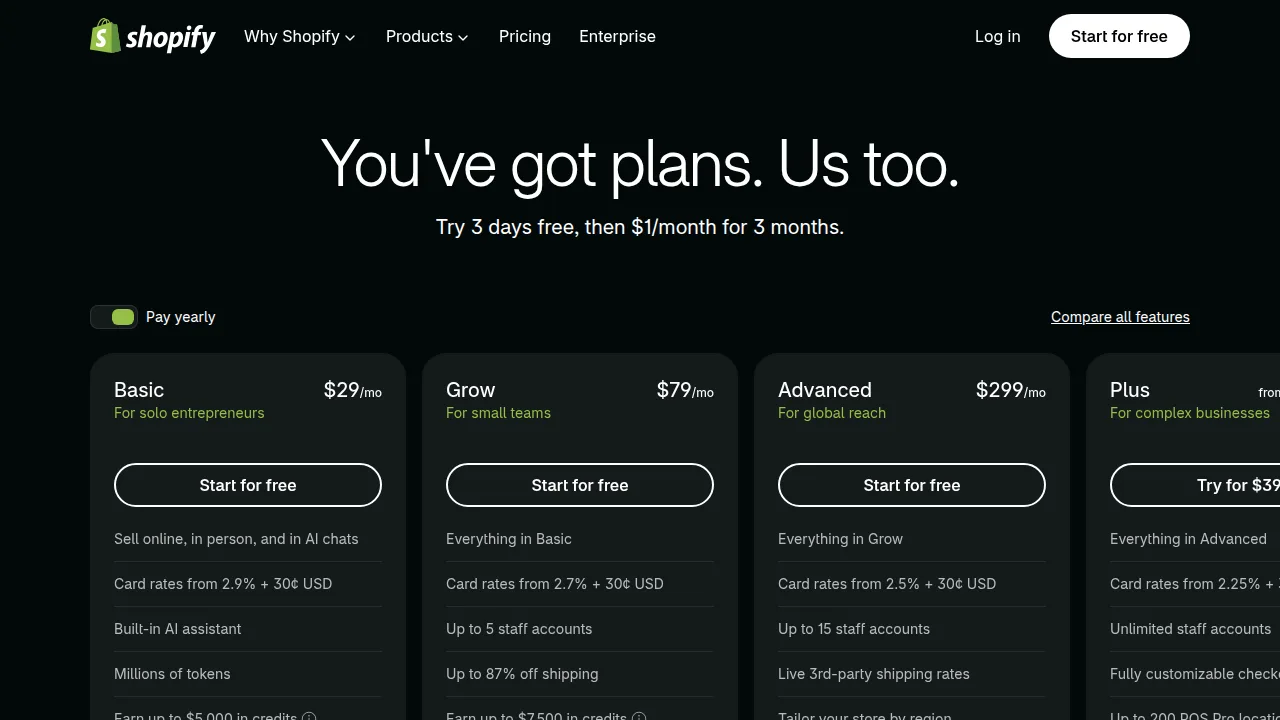
What Does Shopify Cost, in Simple Terms?
Shopify is a monthly subscription, and the exact figures change with offers and regions, so check the live numbers on the official Shopify pricing page before deciding. In simple terms, most beginners start on the Basic tier — usually around $29–39 a month depending on billing and region — which already includes your store, hosting, SSL security, the checkout and unlimited products. Higher tiers mainly lower the card transaction percentages and add staff accounts and better reports.
| Cost item | What it is | Good to know |
|---|---|---|
| Monthly subscription | Your plan fee for the platform | Basic is enough for most new stores |
| Transaction fees | A small percentage per sale | Lower on higher plans; using Shopify Payments avoids an extra platform fee in many regions |
| Domain name | Your store's address | Roughly $10–15 a year, or connect one you own |
| Apps and themes | Optional extras | Many free options exist; premium themes are a one-time cost |
The key beginner insight is that there is no big upfront bill. You can start small, make your first sales on the cheapest sensible plan, and let revenue — not hope — decide when to upgrade. Plenty of stores also begin during a trial, build everything, and only start paying once the shop is ready to open its doors.
Who Shopify Is For — and Who It Is Not For
Shopify is a great fit if you want to sell physical or digital products, you value your time over tinkering, and you like the idea that checkout security and updates are somebody else's job. It suits first-time sellers especially well, which is why it so often appears in guides about ways to earn money online — a small store is one of the few ideas on that list where the shop itself can be live in a weekend.
It is a weaker fit in a few honest cases. If you need a heavily customised website that happens to sell one or two things, a regular website platform with a shop added on may suit you better — our comparison of WordPress vs Shopify for eCommerce walks through that exact decision. If you want total control over the code and hosting and enjoy maintaining it, a self-hosted route gives you that freedom, along with the maintenance work. And if you are only selling occasionally through social media messages, a full store subscription may simply be more shop than you need — for now.
Features Beginners Actually Use Every Week
A few built-in tools deserve a mention because new sellers use them constantly. The theme editor lets you rearrange sections, change colours and fonts, and preview everything on phone and desktop before publishing. Discount codes take a minute to create and power most first promotions — a launch offer, a festival sale, a thank-you code inside the parcel. Reports show which products people view, where visitors come from, and what they abandon in the cart, which quietly teaches you more about selling than any course. And the app store adds extras only when you need them: reviews, email marketing, digital downloads, print-on-demand connections and more. The sensible approach is to start with the built-ins, sell first, and add an app only when a real problem asks for one — a store with thirty apps installed "just in case" is a bicycle with a jet engine taped to it: impressive, unnecessary, and harder to ride.
Frequently Asked Questions
Do I need coding skills to use Shopify?
No. Themes, pages, products and settings are all managed with visual tools. Coding only becomes relevant if you want deep customisation later, and even then it is optional.
How does Shopify make money?
Through monthly subscriptions and a small percentage of each sale's payment processing. That is why the platform fee and card fees both appear in the pricing table.
Can I sell digital products on Shopify?
Yes. Apps from Shopify's app store handle digital delivery, sending customers a download link after checkout for files such as e-books, templates or course material.
Does Shopify provide the products to sell?
No. Shopify provides the store, not the stock. What you sell — your own products, handmade items, print-on-demand or digital files — is entirely up to you.
Can I use my own domain name?
Yes. You can buy a domain through Shopify or connect one you already own, so your store lives at your own address instead of a myshopify.com subdomain.
Conclusion
Shopify is a hosted, all-in-one way to run an online store: you bring the products and the ideas, and Shopify brings the storefront, checkout, payments, security and updates for a monthly fee. A customer buys, Shopify processes and records everything, and you fulfil the order — that simple loop is the whole platform. If selling online is on your plans for this year, it remains the easiest front door into e-commerce for a beginner.


Leave a Comment