

 Lavkush
 A student management system in PHP and MySQL is a web app that a school or college uses to store and manage student records — admission details, course and section, guardian details, photos and status — from one admin panel. This free project gives you a complete one, built in core PHP with no framework: secure login, full student records, advanced filters, CSV import and export, a printable student profile, and a Dynamic Fields module that lets the admin add new fields to the registration form without touching any code.
This guide walks through every feature with screenshots and shows you how to run the project on your own computer in about two minutes.
Watch the full demo
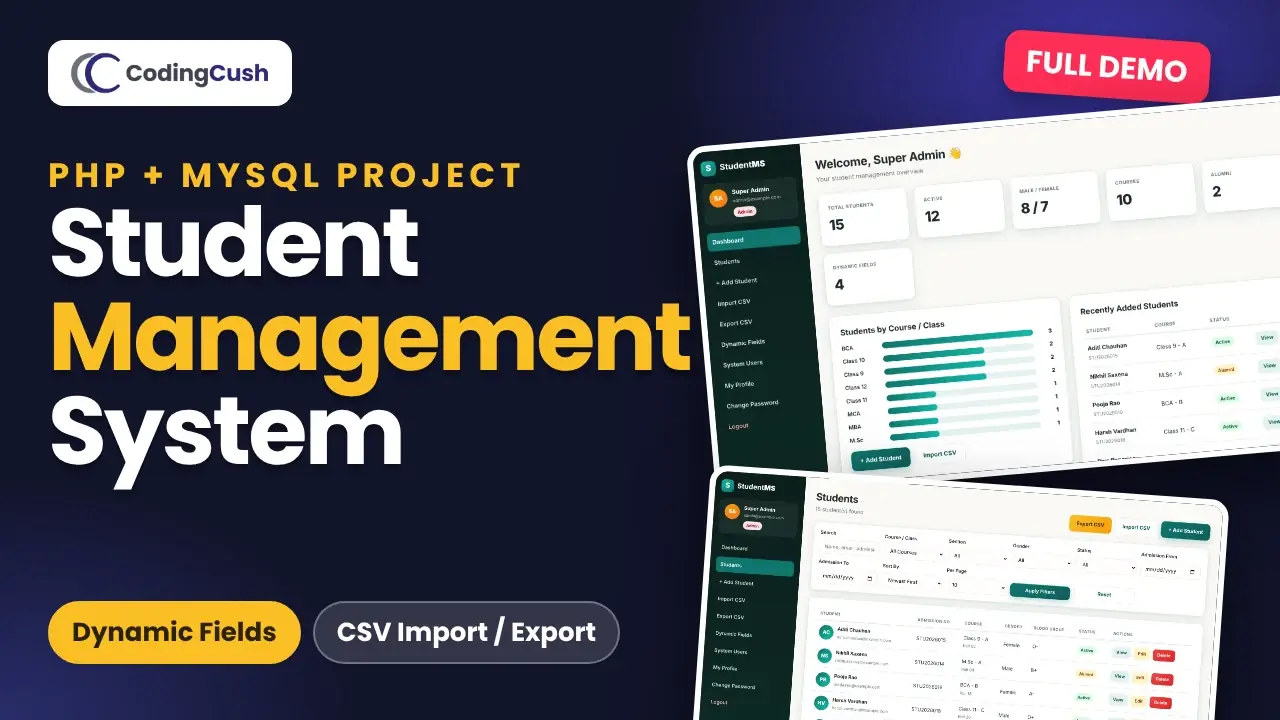
Prefer video? This 11-minute walkthrough shows every feature in action, from secure login and advanced filters to adding a Dynamic Field and importing students from CSV. Click the thumbnail or watch it on YouTube.
Project at a glance
| Item | Details |
|---|---|
| Language | Core PHP 8 (no framework, no Composer) |
| Database | MySQL or MariaDB, accessed with PDO prepared statements |
| User roles | Admin and Staff |
| Database tables | 4 (users, students, custom_fields, student_field_values) |
| Star feature | Dynamic Fields — add form fields from the browser |
| Security | Hashed passwords, CSRF tokens, session regeneration, prepared statements, XSS-safe output |
| Setup time | About 2 minutes on XAMPP |
| Price | Free source code |
Key features
- Secure login with Admin and Staff roles. Public registration creates Staff accounts only, so nobody can sign themselves up as admin.
- Dashboard with total, active and alumni counts, the male/female split, a students-by-course chart and recently added students.
- Student records — add, edit, view and delete (delete is admin only), with photo upload and duplicate email checks.
- Auto admission numbers like
STU20261234when you leave the field blank. - Advanced filters — keyword search plus course, section, gender, status, admission date range, sorting and pagination.
- Dynamic Fields — text, number, email, date, select, textarea, radio and checkbox fields that appear everywhere automatically.
- CSV import with a report that shows how many rows were inserted, how many were skipped, and why.
- CSV export that contains exactly the students you filtered, including the dynamic-field columns.
- Printable student profile with photo, age badge and every field grouped into clean sections.
The dashboard
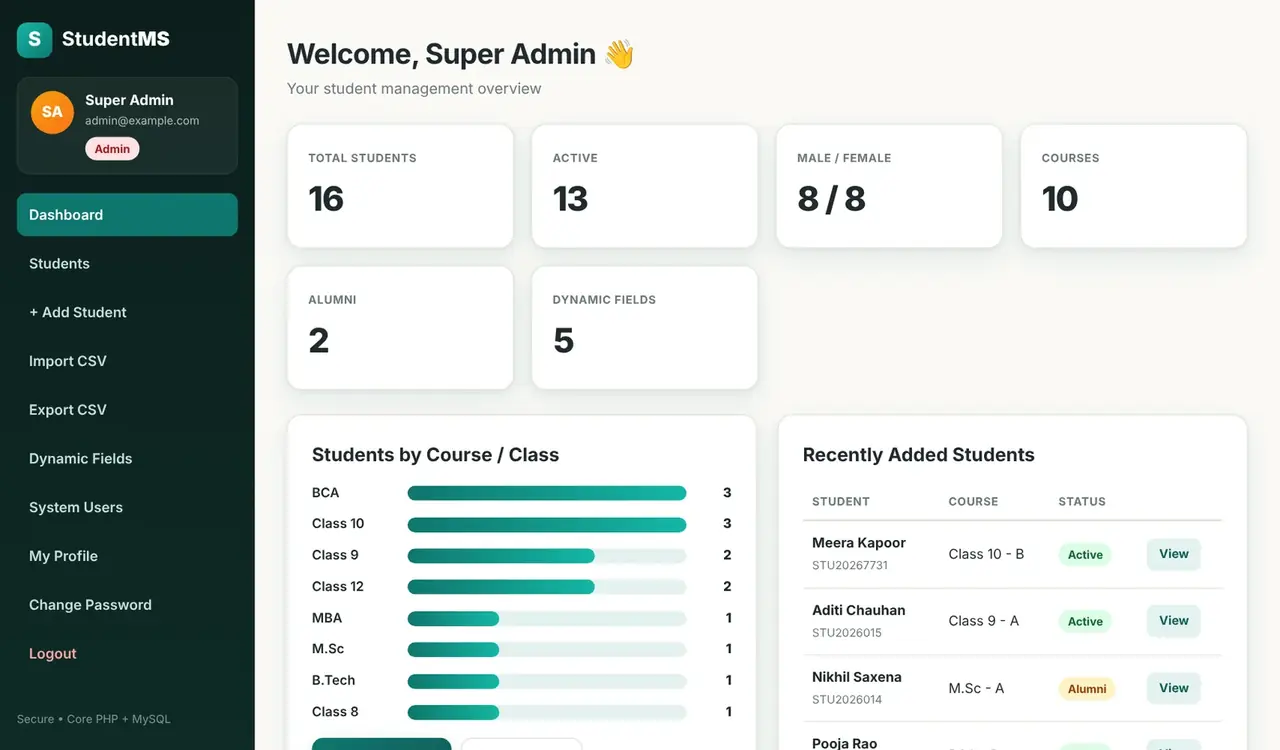
After you log in, the dashboard shows the numbers that matter at a glance: total students, active students, the male/female split, how many courses you run, alumni and how many dynamic fields are active. Below that, a simple bar chart shows students by course or class, and a table lists the most recently added students with a quick View button.
Students list and advanced filters
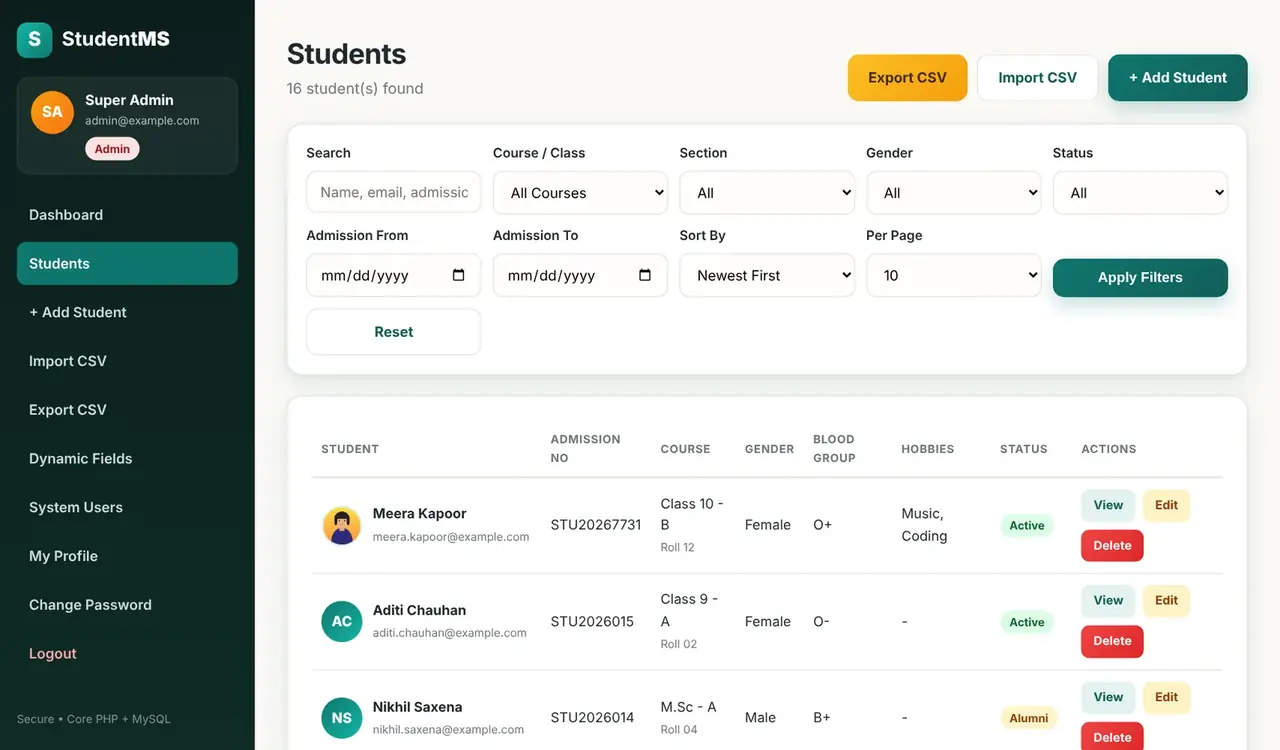
The Students page lists every student with their admission number, course, gender and status. One filter bar gives you eight ways to find people: search by name, email, admission number, phone or city, then narrow the list by course, section, gender, status and admission date range. You can sort A–Z, newest first or by course, and choose 10, 25 or 50 rows per page.
Columns such as Blood Group and Hobbies in this screenshot are dynamic fields. They show up in the list because the admin ticked “Show in list” when creating them.
Dynamic Fields: change the form without code
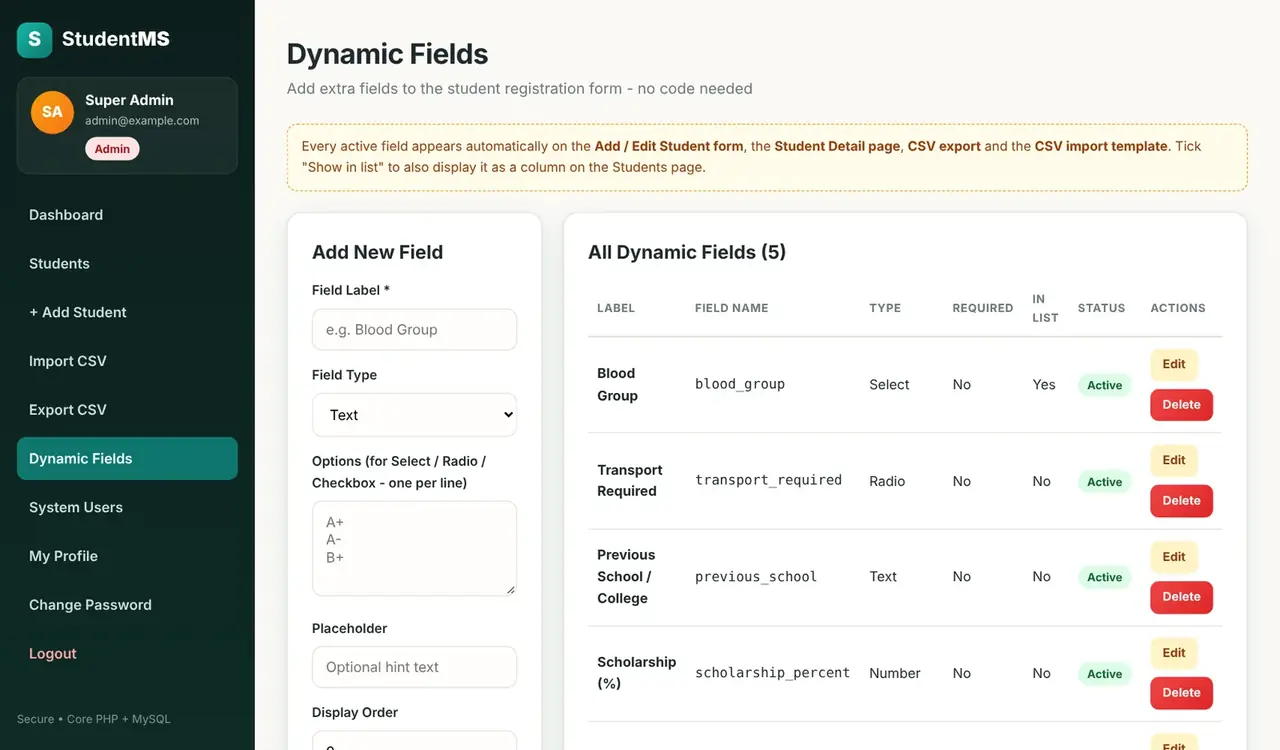
This is the feature that makes the project stand out. Every school wants to collect slightly different information. Instead of editing the database and the PHP files, the admin opens Dynamic Fields, types a label, picks a field type and clicks Add Field.
Where does a new field appear?
As soon as you save it, the field appears on:
- The Add Student and Edit Student forms
- The student profile page
- The students list, if “Show in list” is ticked
- The CSV export and the CSV import template
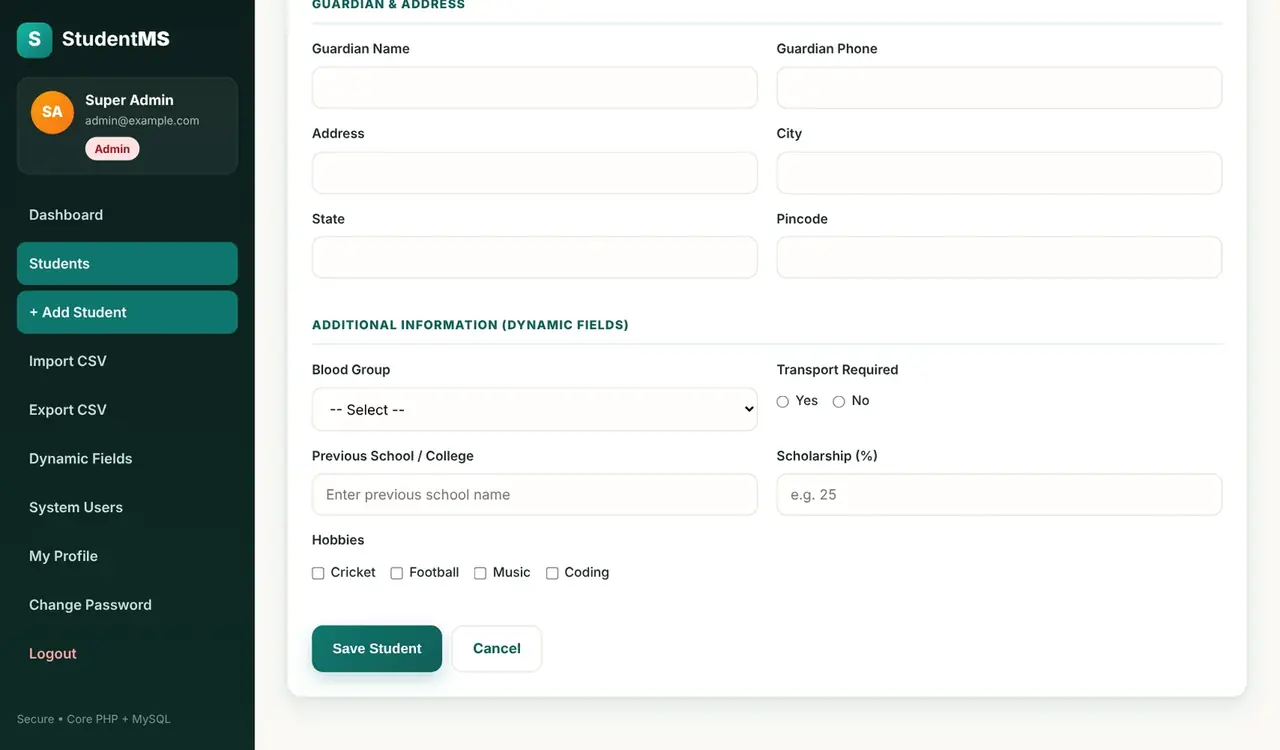
Here is the registration form after adding a Hobbies checkbox field. It sits right under the built-in Blood Group, Transport, Previous School and Scholarship fields.
How do dynamic fields work in the database?
Each field you create is one row in the custom_fields table. Each student's answer is one row in student_field_values, linked by student_id and field_id. Adding a field just inserts a row, so you never need to run ALTER TABLE. When you delete a field, its saved values are removed automatically by ON DELETE CASCADE.
Add a student
The registration form is split into Personal, Academic, Guardian & Address and Dynamic Fields sections. Validation runs on the server, so a missing first name, an invalid email or an unselected course shows a clear message under the field, and everything you already typed stays filled in.
- Photo upload accepts JPG, PNG or WEBP up to 2 MB. Files get random names, and the uploads folder blocks PHP execution with
.htaccess. - Admission number is generated automatically when you leave it blank.
- Core data and dynamic values are saved together in one database transaction.
Student profile page
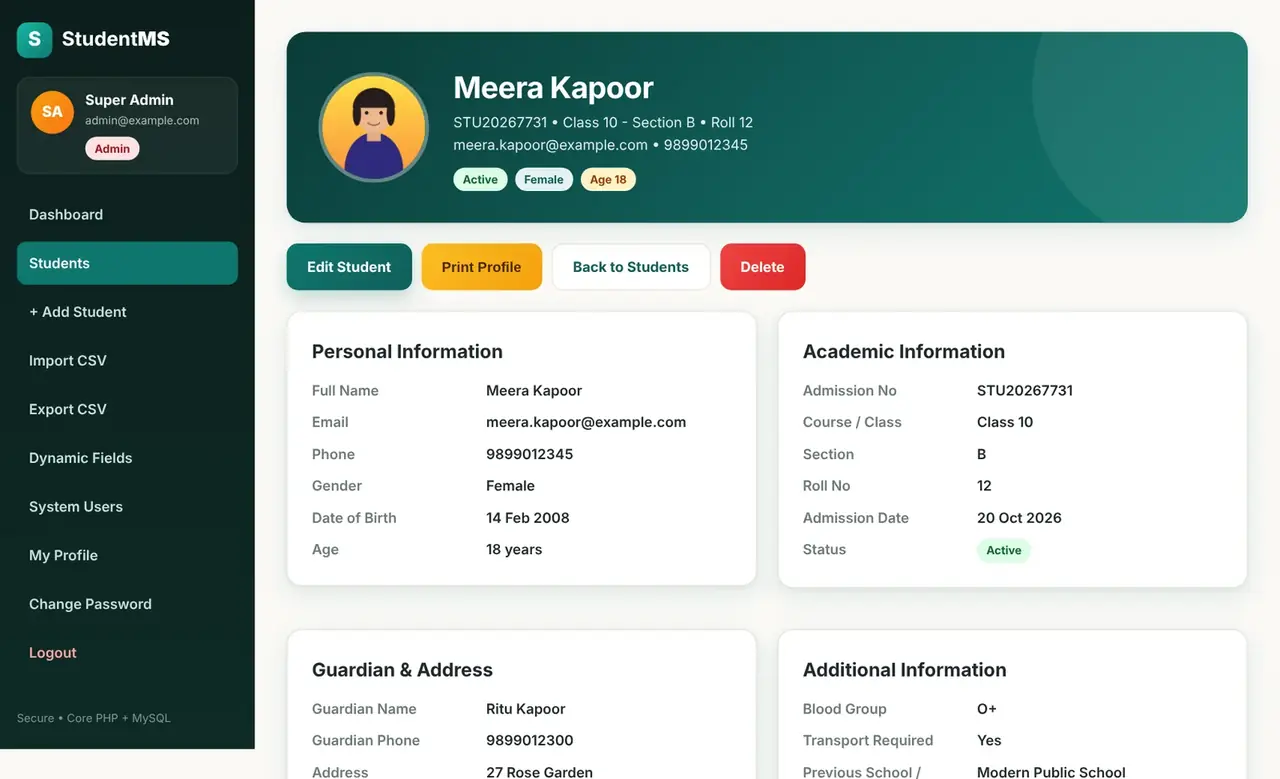
Click View on any student to open their profile. A gradient header shows the photo, admission number, course, section, contact details and status, gender and age badges. The age is calculated from the date of birth. Below it, the details are grouped into Personal, Academic, Guardian & Address and Additional Information (the dynamic fields), with created and last-updated timestamps. Print Profile gives a clean one-page printout.
CSV import and export
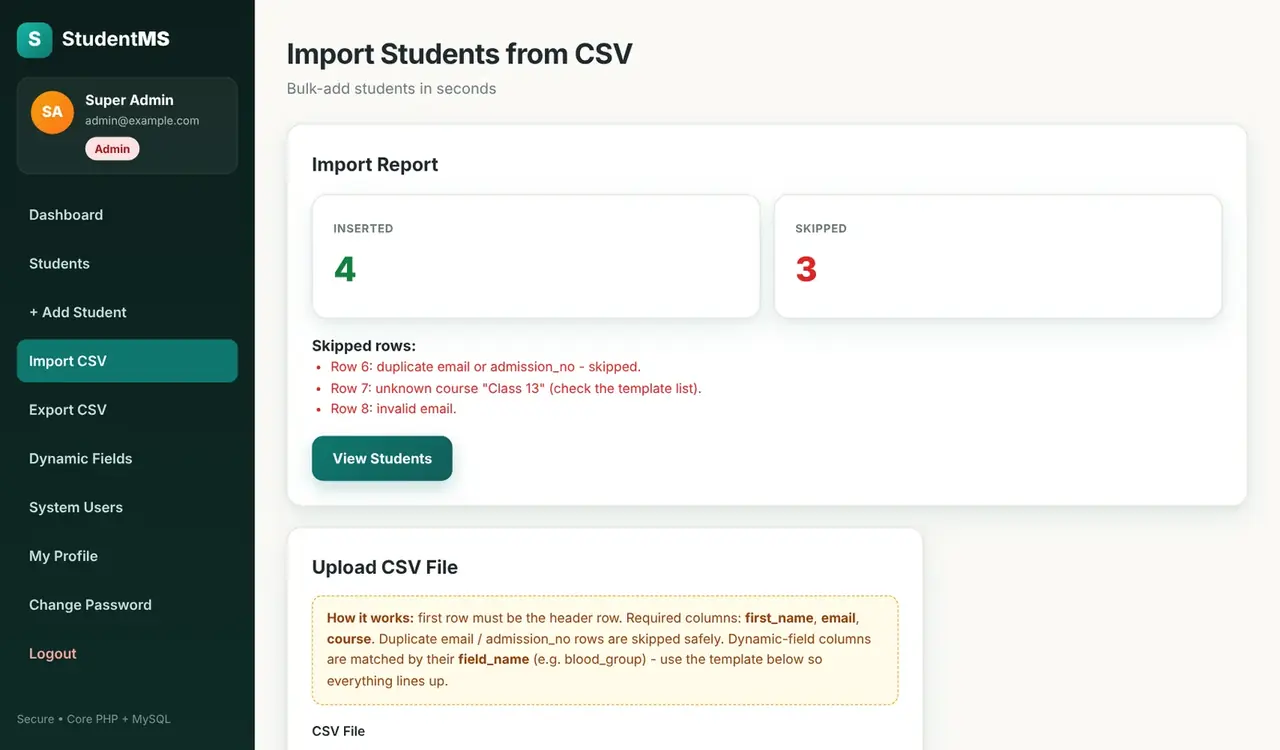
To add many students at once, open Import CSV. The first row must be the header row, and first_name, email and course are required. Download the CSV template first — it already contains a column for every active dynamic field.
After the upload you get an import report. In this example, four rows were inserted and three were skipped, and each skipped row says exactly why: a duplicate email, an unknown course and an invalid email. Bad rows are skipped safely instead of breaking the import.
Export CSV on the Students page uses the same filter code as the list, so the file contains exactly the students you are looking at, with the dynamic-field columns included. It opens straight in Excel or Google Sheets.
Admin vs Staff
Admins see two extra menus: Dynamic Fields and System Users, and only admins can delete students. Staff can add, edit, view, import and export students. Hiding a menu is never the only protection: every admin page calls require_admin() before any other code runs, so a staff member who types an admin URL directly gets 403 Forbidden.
Project structure
advanced-student-management-system/
├── config/            database.php, app.php (course & section lists)
├── includes/          functions.php, student-form.php, student-save.php, student-filters.php
├── admin/             fields.php (Dynamic Fields), users.php
├── assets/            css/style.css, js/app.js
├── uploads/students/  student photos (PHP execution blocked)
├── students.php, student-add.php, student-edit.php, student-view.php, student-delete.php
├── import.php, export.php, download-template.php, sample-students.csv
├── login.php, register.php, dashboard.php, profile.php, change-password.php
└── database.sql       database, tables, demo users and sample data
How to install the Student Management System
Step 1: Download and extract the project
Download the source code from the download box at the end of this post and extract it. You get a folder called advanced-student-management-system.
Step 2: Copy it to htdocs
Put the folder inside htdocs if you use XAMPP, www for WAMP, or public_html on shared hosting.
Step 3: Import the database
Start Apache and MySQL, open http://localhost/phpmyadmin, click Import, choose database.sql and click Go. The file creates the student_management_system database by itself, with all tables, demo users, sample students and four sample dynamic fields.
Step 4: Check the database settings
If your MySQL user is not root with an empty password, open config/database.php and update the details:
define('DB_HOST', 'localhost');
define('DB_NAME', 'student_management_system');
define('DB_USER', 'root');
define('DB_PASS', '');
Step 5: Open it and log in
Visit http://localhost/advanced-student-management-system/ and log in with one of the demo accounts:
| Role | Password | |
|---|---|---|
| Admin | admin@example.com | Admin@123 |
| Staff | staff@example.com | Staff@123 |
Change both passwords after your first login. To use your own course list, edit the COURSES array in config/app.php.
Common installation problems
- “Database connection failed” — the database was not imported, or the details in
config/database.phpare wrong. - Photos don't upload — make sure the
uploads/studentsfolder is writable by the web server. - CSV rows are skipped as “unknown course” — the course name must match one in
config/app.phpexactly, for exampleClass 10orBCA.
Frequently Asked Questions
Is this student management system free?
Yes. The complete source code is free to download, learn from and use in your own projects.
Does it need a framework like Laravel?
No. It is written in core PHP with PDO, so every file is easy to read and explain. It only needs PHP 8 and MySQL or MariaDB.
Can I use it as a final year project?
Yes. It covers authentication, roles, CRUD, file uploads, validation, CSV import and export and a dynamic form builder, which makes it a strong BCA, MCA, BSc IT or BTech project. Make sure you understand the code and can explain it in your viva.
How do I add a new field to the student form?
Log in as admin, open Dynamic Fields, enter a label, choose the field type (add the options one per line for select, radio or checkbox) and click Add Field. It appears on the form, the profile, the CSV export and the import template straight away.
Can I run it on shared hosting like Hostinger?
Yes. It has no build step — upload the folder, import database.sql in phpMyAdmin and update config/database.php.
What are the default login details?
Admin: admin@example.com / Admin@123. Staff: staff@example.com / Staff@123.
Download the source code
Download the complete Student Management System from the download box below, follow the five installation steps, and you will have it running in a couple of minutes. If you get stuck, leave a comment with the error message and I will help you fix it.
Looking for more projects? Try the biometric attendance management system in PHP and MySQL, the online examination system in PHP and MySQL, or learn the basics with the free PHP & MySQL course.



Leave a Comment