

 Lavkush
 HTTP sends data between your browser and a website as plain, readable text, while HTTPS sends the same data inside an encrypted tunnel, so nobody in between can read or quietly change it. That single letter — S, which stands for Secure — is the difference between shouting your passwords across a crowded room and having a private conversation. Same website, same pages, completely different level of safety.
You have seen both versions. Some addresses start with http://, others with https://, and modern browsers mostly hide the whole thing behind a small padlock icon. Let us see what HTTP does, what HTTPS adds, and why almost every serious website now treats HTTPS as non-negotiable.
What HTTP Is and How It Works
HTTP stands for HyperText Transfer Protocol. It is the set of rules your browser and a web server use to talk to each other. When you visit a page, your browser sends an HTTP request — a polite note saying, "Please send me this page and its images" — and the server replies with an HTTP response containing exactly those files. Request, response, done. Simple, fast and beautifully boring, it has powered the web since the early 1990s.
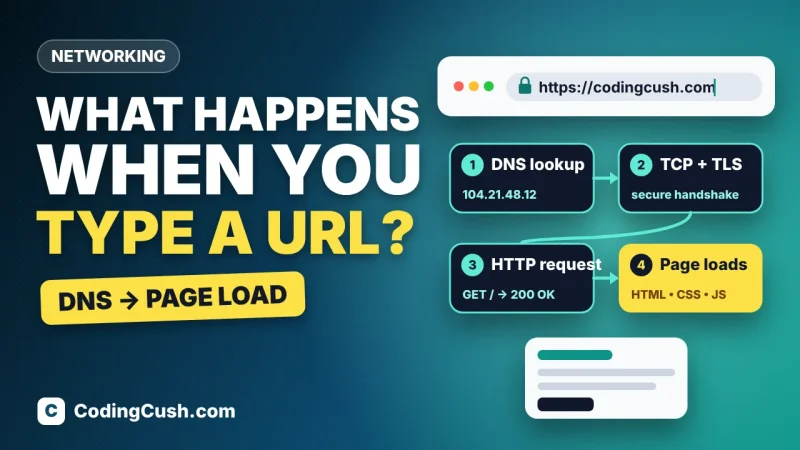
To see that journey in slow motion, our step-by-step walkthrough of what happens when you type a URL follows a single visit from address bar to finished page. HTTP is the conversation in the middle of it.
The problem is privacy. Plain HTTP was designed in a friendlier, smaller internet, where the main worry was whether pages loaded at all. Everything travels as readable plain text. If you type a password, a card number or a private message into an HTTP site, that data crosses routers, Wi-Fi networks and providers in a form anyone along the path could read. Fine for university pages about penguins; far less fine for banking and shopping.
What HTTPS Adds: TLS and Encryption
HTTPS is not a separate invention — it is HTTP travelling inside a secure layer called TLS (Transport Layer Security). Before any page data moves, browser and server perform a quick negotiation called the TLS handshake. They agree on encryption keys, verify each other's identity, and only then does the normal HTTP conversation begin — except now every message is scrambled into unreadable gibberish for anyone else listening in.
Encryption gives HTTPS three guarantees plain HTTP cannot offer. Privacy: eavesdroppers see scrambled data, not your passwords. Integrity: nobody can secretly alter the page on its way to you — no injected adverts, no swapped downloads. Authenticity: the server really is the website it claims to be, not a convincing impostor. The MDN Web Docs overview of HTTP covers the protocol in more depth, and it is an excellent next read once the basics here feel comfortable.
Certificates and the Padlock Icon
Encryption alone is not enough — your browser also needs proof of who owns the keys. That proof is the SSL/TLS certificate: a small digital document installed on the server that ties the domain name to a verified owner. Certificates are issued by trusted organisations called Certificate Authorities, which check that whoever requests one actually controls the domain. Browsers trust a built-in list of these authorities, which is why the system works without you approving every website manually.
When everything checks out, the browser shows the famous padlock icon. Clicking it shows which domain it covers, who issued it and when it expires. If the certificate is missing, expired or issued for a different domain, the browser complains loudly with a full-page warning — and for once, a computer warning genuinely deserves your respect. Never type passwords into a site your browser is warning you about. The padlock does not guarantee a site is honest, either; a scam site can hold a valid certificate. It guarantees the connection is private and the domain is who it claims to be. Small distinction, big difference.
Port 80 vs Port 443
Every connection arrives at a numbered "door" called a port, and HTTP and HTTPS use different doors. Plain HTTP uses port 80; HTTPS uses port 443. You rarely type these numbers yourself — browsers add the right one automatically based on the scheme in the address:
http://example.com/page   → arrives at port 80, unencrypted
https://example.com/page  → arrives at port 443, encrypted with TLS
Knowing the ports still matters in real work. Firewalls must allow port 443 before HTTPS can function, and many a developer has lost twenty minutes wondering why a freshly secured site refuses to load — only to find port 443 politely closed. Check the door before blaming the lock.
HTTP vs HTTPS: Side by Side
| Feature | HTTP | HTTPS |
|---|---|---|
| Full name | HyperText Transfer Protocol | HTTP over TLS (Secure) |
| Encryption | None — plain text | Yes — TLS encryption |
| Default port | 80 | 443 |
| Certificate needed | No | Yes, from a Certificate Authority |
| Browser display | "Not secure" warning | Padlock icon |
| Safe for logins and payments | No | Yes |
| SEO effect | None | Small positive ranking signal |
What Happens Without HTTPS
On plain HTTP, the risks are practical, not theoretical. Someone sharing your café Wi-Fi can read the pages you view and the forms you submit. Attackers can also modify traffic as it passes: injecting adverts, replacing a download with a malicious twin, or redirecting a login form to a copy that harvests credentials. This family of tricks is called a man-in-the-middle attack, and plain HTTP politely leaves the middle wide open.
Modern browsers have stopped being subtle about it. Chrome and Firefox label HTTP pages "Not secure", and visitors have learned to read that label as "leave now". So an unsecured site does not just risk data — it loses trust, sign-ups and sales before the homepage has finished loading. As Cloudflare's guide to why websites use HTTPS explains, encryption also protects your reputation: tampered content still looks like it came from you.
Why Google and SEO Push HTTPS So Hard
Google announced HTTPS as a ranking signal back in 2014, and its weight has only grown since. Secure sites get a small ranking boost, keep their referral data in analytics, and avoid the browser warnings that push visitors away. In practice, HTTPS is now closer to table stakes than a bonus feature: two otherwise equal pages will not stay equal for long if one greets visitors with a security warning.
That makes HTTPS part of technical SEO, alongside speed, crawlability and clean metadata. If you are learning to measure that side of a website, our complete guide to SEO metrics, backlinks, keywords and rankings shows which numbers actually matter — and a secure site is the foundation they all stand on.
How a Website Gets HTTPS
Switching a site to HTTPS follows a well-worn path. First, get a certificate — many hosts include free ones from Let's Encrypt and install them in a couple of clicks. Second, install it on the server and make sure port 443 is open. Third, redirect every HTTP address to its HTTPS version, so old links land on the secure page automatically:
http://example.com/old-page → https://example.com/old-pageFinally, update internal links and fix any "mixed content" — images or scripts still loading over HTTP, which browsers block or flag. Most free certificates renew automatically, but checking beats apologising. The whole job on a typical small site takes under an hour, and the padlock at the end of it is oddly satisfying.
Frequently Asked Questions
Is HTTPS slower than HTTP?
Barely, and usually not noticeably. The TLS handshake adds a tiny setup step, but modern servers and TLS 1.3 keep it negligible — and HTTP/2, which generally requires HTTPS, often makes secure sites feel faster.
Does every website need HTTPS, even a simple blog?
Yes. Even without logins or payments, HTTPS stops tampering, avoids "Not secure" labels, protects contact forms and keeps your rankings healthy. There is no good reason left to skip it.
Can a site with a padlock still be a scam?
Yes. The padlock means the connection is encrypted and the domain verified — not that the owner is honest. Always check the domain is spelled correctly before trusting a site.
What is the difference between SSL and TLS?
TLS is the modern protocol; SSL was its older predecessor and is no longer used. People still say "SSL certificate" out of habit, but the encryption protecting you today is TLS.
Conclusion
HTTP and HTTPS deliver the same web, but only one delivers it privately. HTTP speaks in plain text on port 80 for anyone to overhear; HTTPS wraps that conversation in TLS encryption on port 443, backed by a certificate your browser can verify. The padlock is not decoration — it is privacy, integrity and identity in one small icon. If your site still runs on plain HTTP, switching is one of the cheapest, quickest upgrades you will ever make.


Leave a Comment