

 Lavkush
 TCP and UDP are the two main ways computers send data over a network. TCP (Transmission Control Protocol) checks that every piece of data arrives, in the right order, and resends anything that gets lost. UDP (User Datagram Protocol) sends data as fast as it can, with no checking and no resending. In short: use TCP when correctness matters more than speed, like web pages and email, and use UDP when speed matters more than perfection, like video calls and online games. That one idea explains almost every TCP vs UDP question, including the interview version.
Think of TCP as a registered courier who needs a signature for every parcel, and UDP as dropping leaflets through letterboxes — fast and cheerful, but nobody promises every leaflet arrived. Neither is "better". They are tools for different jobs, and the internet quietly uses both every minute.
What Is TCP?
TCP is a connection-based protocol. Before any real data moves, the two computers perform a short greeting called a three-way handshake: one side says "can we talk?", the other says "yes, can you hear me?", and the first replies "yes, let us start". Only then does data flow. The glossary on MDN describes TCP on MDN as a protocol that guarantees reliable, ordered delivery — and those two words, reliable and ordered, are the whole personality of TCP.
Reliable means the receiving computer sends back a small acknowledgement for the data it received. If an acknowledgement does not come back in time, the sender simply sends that piece again. Ordered means every piece is numbered, so if piece 3 arrives before piece 2, TCP waits and reassembles them in the correct order before handing them to your app. Your browser never sees the mess; it just receives one clean, complete stream.
This careful behaviour has a cost: extra messages, extra waiting, and a slightly slower start. For a web page, that cost is worth it — a page with missing or jumbled bytes is a broken page.
What Is UDP?
UDP skips almost all of that ceremony. There is no handshake, no acknowledgement, no numbering for reordering, and no resending. A computer wraps its data in a small packet called a datagram, writes the destination address on it, and sends it. Done. MDN's short UDP glossary entry on MDN calls it a lightweight protocol with no guarantee of delivery — which sounds like a flaw until you see where it shines.
Imagine a live video call. If one tiny slice of sound goes missing, would you rather hear a half-second glitch, or have the whole call freeze while the missing slice is fetched again — by which time the conversation has moved on? Every caller picks the glitch. Late data is useless data in live media, so UDP's "send it and move on" style is exactly right.
TCP vs UDP: The Side-by-Side Difference
| Feature | TCP | UDP |
|---|---|---|
| Connection | Yes — handshake before data | No — just send |
| Delivery guarantee | Yes — lost data is resent | No — lost packets are gone |
| Order guarantee | Yes — data arrives in order | No — packets may arrive out of order |
| Speed | Slower, more overhead | Faster, very little overhead |
| Header size | 20 bytes or more | Only 8 bytes |
| Typical uses | Web (HTTP/HTTPS), email, file transfer, SSH | Video calls, live streaming, online games, DNS, VoIP |
Notice how the uses follow the guarantees. Anything where one missing byte corrupts the result — a downloaded file, a bank page, an email — rides on TCP. Anything live, where a late packet is worse than a lost one, rides on UDP. If you understand that single trade-off, you understand both protocols.
One friendly twist: some modern tools mix the two ideas. Online games often send movement updates over UDP but send chat and purchases over TCP. And HTTP/3, the newest version of the web protocol, runs on top of UDP-based QUIC, which rebuilds TCP-style reliability in a smarter way. The trade-off never disappears; engineers just choose where to handle it.
When Should You Use Each One?
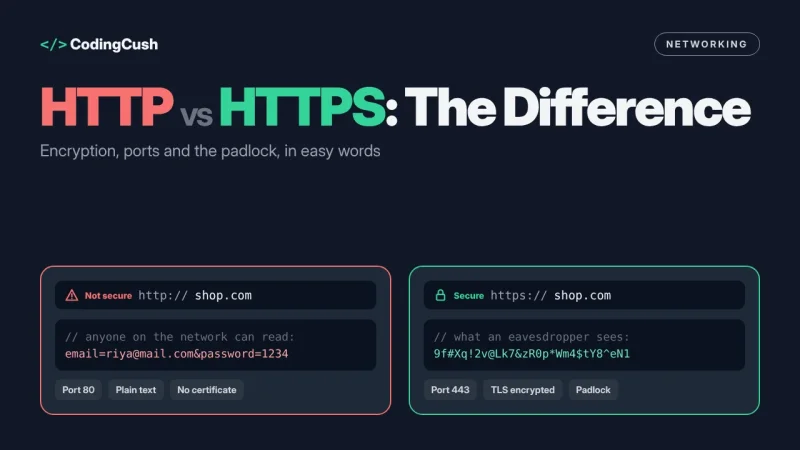
Use TCP when the data must be complete and correct. Web browsing is the classic case, and it connects neatly to our guide on HTTP vs HTTPS and why the padlock matters — both HTTP versions 1.1 and 2 travel over TCP. Email, file downloads, database connections and remote logins (SSH) are all TCP for the same reason: nobody wants 97% of a file.
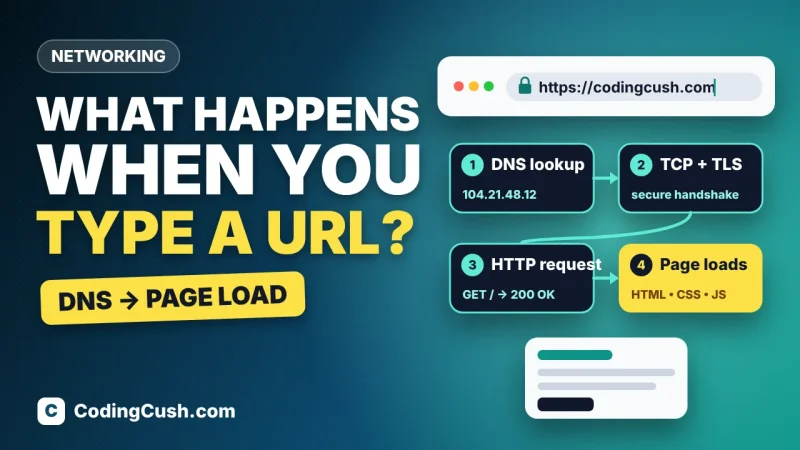
Use UDP when freshness beats completeness. Video and voice calls, live sports streams, multiplayer games and DNS lookups all prefer UDP. DNS is a neat example: asking "what is the address of this website?" is one tiny question and one tiny answer, so setting up a whole TCP connection first would be like booking a meeting room to ask someone the time. If the answer never comes back, the app simply asks again. That journey is part of what happens when you type a URL in the browser, from DNS to the finished page.
# A 10-second decision guide (pin this above your desk)

Is the data useless if a piece is missing or late-arriving?
  YES, missing hurts  -> TCP  (files, pages, payments, email)
  YES, late hurts     -> UDP  (calls, streams, games)

Still unsure? Start with TCP.
Reliability is the safer default for most beginner projects.
A Quick Look Inside: Why TCP Is Heavier
Every packet carries a small label called a header, holding details like the source and destination ports and, for TCP, sequence numbers and acknowledgement numbers. A UDP header is just 8 bytes: ports, length and a checksum, nothing more — there is simply less to say when you make no promises. A TCP header starts at 20 bytes and can grow, because it must carry the bookkeeping that makes reliability possible. That difference sounds tiny, and for one packet it is. But a video call sends hundreds of packets every second, and a game sends state updates many times per second. At that scale, shaving bytes and skipping round trips is the difference between "smooth" and "why is everyone teleporting?". Overhead is not a footnote; at scale, overhead is the story.
There is one more everyday example hiding in your browser: when a page loads over HTTPS, the TCP handshake happens first, then the TLS security handshake, and only then the actual page request. Two greetings before any content — secure and reliable, but not free. Remembering that chain makes a lot of "why is the first load slow?" mysteries much less mysterious.
Common Beginner Confusions, Cleared Up
"UDP is unreliable, so it must be bad." No — it is honest. UDP leaves reliability decisions to your app, which is powerful when the app knows that a fresh packet beats a resent old one. "TCP is always slower, so games should avoid networks?" TCP is slower to start and steadier after; games use both. "Is one of them the internet itself?" Neither — both sit on top of IP, the system that addresses and routes packets. TCP and UDP are two different delivery services running on the same roads.
Frequently Asked Questions
What is the main difference between TCP and UDP?
TCP guarantees that data arrives complete and in order, resending anything lost. UDP guarantees nothing — it sends packets as fast as possible and never resends, which makes it quicker but less reliable.
Which is faster, TCP or UDP?
UDP is faster in practice because it has no handshake, no acknowledgements and a tiny 8-byte header. TCP spends extra time on checks that UDP simply skips.
Why do video calls and games use UDP?
Because live data expires. A resent packet would arrive too late to be useful, so it is better to drop it, accept a tiny glitch, and keep the call or game moving in real time.
Does WhatsApp or YouTube use TCP or UDP?
Both, depending on the job. Live calls lean on UDP-style delivery, while messages, uploads and regular video playback use reliable delivery (TCP, or QUIC over UDP with its own reliability built in), so files and messages never arrive half-missing.
Conclusion
TCP is the careful courier: handshake, numbering, acknowledgements, resending — perfect for pages, files and payments. UDP is the speedy leaflet drop: no promises, minimal delay — perfect for calls, streams and games. When an interviewer or an exam asks "TCP vs UDP?", answer with the trade-off first — reliability versus speed — then give one example of each. That order makes the answer sound like understanding, not memorising, because it is.


Leave a Comment