

 Lavkush
A Python KeyError means your code asked a dictionary for a key that does not exist in that dictionary. Python cannot guess what you wanted, so it stops the program and shows the missing key by name. It is one of the most common errors beginners meet, and the good news is that it is also one of the easiest to understand and fix once you know why it happens.
What a KeyError Looks Like
Here is the smallest example that causes the error. We create a dictionary for a student, then ask for a key that was never added.
student = {"name": "Priya", "age": 21}

print(student["city"])
Python replies with a short message like this:
Traceback (most recent call last):
  File "main.py", line 3, in <module>
    print(student["city"])
KeyError: 'city'
Read that last line carefully. Python is telling you the exact key it could not find, in this case city. The traceback also shows the file name and line number, so you know where to look. The official Python documentation defines it clearly in the Python exceptions reference, which says it is raised when a mapping key is not found.
A dictionary works like a labelled box. Each value sits behind a label, which is the key. If you ask for a label that was never put on any box, there is nothing to hand back, so Python raises KeyError instead of inventing an answer.
Why a KeyError Happens
Almost every KeyError comes from one of three simple causes. Once you learn to spot them, you will fix most cases in under a minute.
The first cause is the obvious one. The key is simply missing. Perhaps you forgot to add it, another part of your code removed it, or the dictionary was loaded from a file without that field. This happens a lot with settings and user profiles, where some records have extra fields and others do not.
The second cause is a small typo or mismatch. Python keys are case sensitive, so "Name" and "name" are different keys. A trailing space does the same damage, so "city " is not "city". The integer key 1 and the string key "1" also look similar but count as different keys.
The third cause is real world data from outside your program. When you read JSON from an API, one response might include a phone number while the next leaves it out because the user never added it. Your code asks for that key on every record and falls over on the one where it is missing. Your code assumed every record would have the same shape, and real data rarely behaves that politely.
Fix One: Check with the in Operator
The simplest safe habit is to check whether a key exists before you use it. The word in does exactly that and reads almost like plain English.
student = {"name": "Priya", "age": 21}

if "city" in student:
    print(student["city"])
else:
    print("City is not available yet.")
This pattern works well when a missing key needs different logic, such as showing a form or logging a warning. If you only need a fallback value, the next fix is usually shorter.
Fix Two: Use .get() with a Default Value
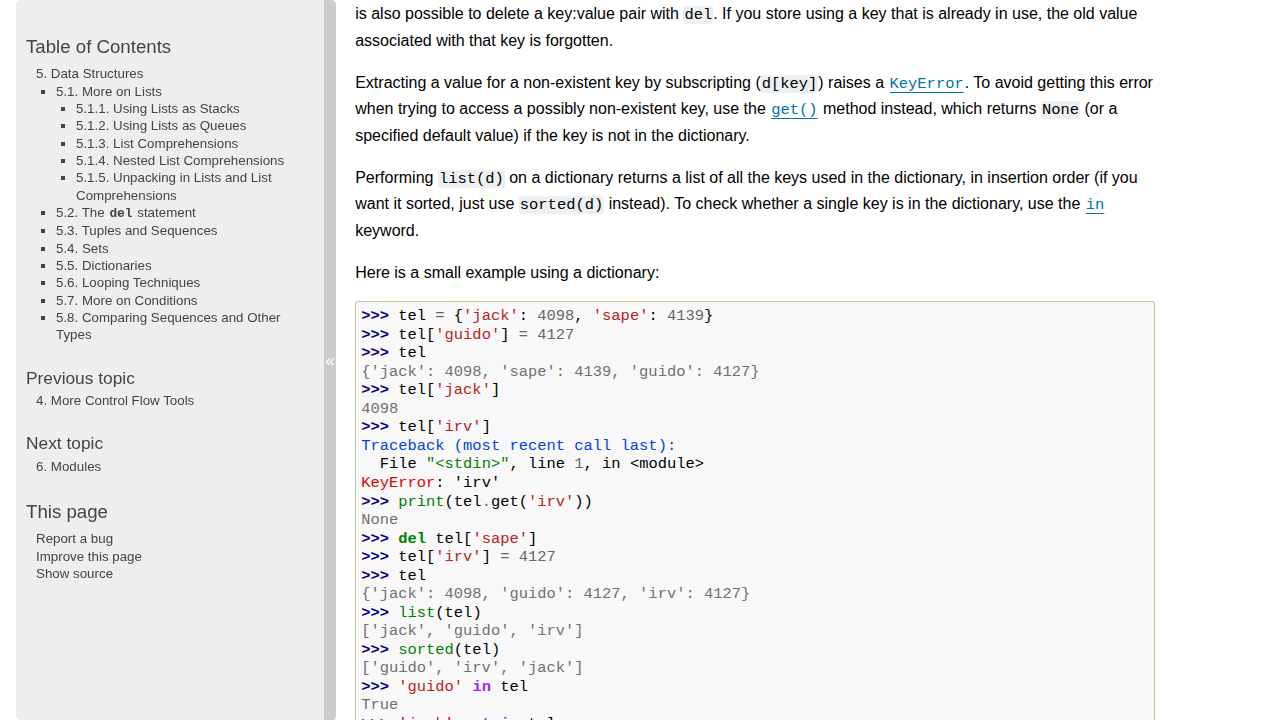
Most of the time, this is the fix you want. The get method returns the value if the key exists, and returns a default value you choose if it does not, without raising an error.
student = {"name": "Priya", "age": 21}

city = student.get("city", "Not provided")
print(city)  # Not provided
If you call get without a second argument, it returns None for a missing key. An explicit default such as an empty string or a friendly message usually makes later code simpler. The official Python tutorial on data structures covers dictionaries in detail. For a wider tour of methods like keys, values and items, see our guide to Python dictionary methods explained.
One warning is worth remembering. Using get everywhere can hide a real bug if a key should always exist. Use get for optional data, and let required data fail loudly.
Fix Three: setdefault and defaultdict
Sometimes you want a missing key to be created the first time you use it. The setdefault method does this for a normal dictionary. It returns the existing value if the key is there, and if not, it inserts your default and returns that instead.
cart = {}
cart.setdefault("items", []).append("Notebook")
print(cart)  # {'items': ['Notebook']}
When you are grouping values repeatedly, such as counting words or collecting students by course, defaultdict from the collections module is even cleaner. It creates missing entries automatically.
from collections import defaultdict

groups = defaultdict(list)
groups["Python"].append("Priya")
groups["Python"].append("Rahul")
print(dict(groups))
Choose defaultdict when the pattern repeats many times in a loop. For a one off lookup, get or setdefault keeps the code lighter.
Choosing the Right Fix at a Glance
| Method | What it does | Best for |
|---|---|---|
| in check | Tests if the key exists before you use it | When missing data needs different logic |
| .get() with default | Returns a fallback value instead of raising an error | Optional fields and display values |
| setdefault | Creates the key with a default if it is missing | Building up a dictionary step by step |
| defaultdict | Creates missing entries automatically | Grouping and counting in loops |
| try and except | Catches the error and handles it in one place | Required keys and larger blocks of code |
There is no single best answer. The right choice depends on whether the key is optional and whether a missing key should warn you that something else has gone wrong.
Fix Four: Handle It with try and except
When a key truly must exist, try and except lets you react in a controlled way, with a clear message instead of a raw traceback. Our guide to Python error handling with try, except and finally explains this pattern in full.
student = {"name": "Priya", "age": 21}

try:
    print(student["city"])
except KeyError as error:
    print(f"Missing information: {error}")
    print("Please complete the profile first.")
Keep the try block as small as you can, ideally around the lookup itself. A giant try block can catch a KeyError from an unexpected place and send you hunting in the wrong direction.
Quick Debugging Tips When You Are Stuck
If you still cannot see why a key is missing, print what the dictionary contains just before the failing line. Printing list(student.keys()) often reveals the problem at once, such as a capital letter or a stray space.
Check nested data with care. With API data, a value might live one level deeper, such as data["user"]["city"] instead of data["city"]. Print one level at a time rather than guessing. Finally, test with the awkward record, not just the perfect one. Keep a small sample where optional fields are missing, and run your code against it before you call the bug fixed.
Frequently Asked Questions
What is the difference between KeyError and IndexError?
A KeyError happens when a dictionary key is missing. An IndexError happens when you ask a list for a position that does not exist, such as item ten in a list of three. They are cousins, but they belong to different data types.
Does .get() change the dictionary?
No. The get method only reads. It returns a default for a missing key but does not add that key to the dictionary. If you need the key to be stored for later, use setdefault instead.
Should I always use .get() to avoid KeyError?
No. Use it for optional data. If a key is required for your program to be correct, checking for it or handling KeyError makes the bug visible early, which is far better than hiding it with a silent default.
Why does the error show the key in quotes?
Python prints the missing key exactly as it was requested, including quotes for a string key. Comparing that printed key carefully with your dictionary keys is often the fastest way to spot a typo or a case mismatch.
Conclusion
A KeyError is Python being honest with you. The key you asked for is not there, and Python would rather tell you plainly than invent an answer. Check with in when the logic branches, use get for optional values, reach for setdefault or defaultdict when you are building data, and use try and except when a missing key needs a proper response. Print the keys, test the awkward records, and this once annoying error will become a quick, routine fix.




Leave a Comment