

 Lavkush
Python list methods are built in functions you call on a list to add, remove, find, sort or copy items without writing long code yourself. The most useful ones are append, extend and insert for adding items, remove, pop and clear for removing items, index and count for searching, sort and reverse for ordering, and copy for making a safe duplicate. In this guide, you will learn each method with a short, working example you can try right away.
What Are Python List Methods?
A list in Python is an ordered collection that can hold numbers, strings, or even other lists. Lists can change after you create them, which is why they are called mutable. List methods are the tools Python gives you to work with that changing data. You call a method with a dot after the list name, like this: my_list.append(10).
Most list methods change the original list in place and return None. If you write new_list = my_list.sort(), your new variable will hold None, not a sorted list. The sorting worked, but it happened on the original list itself.
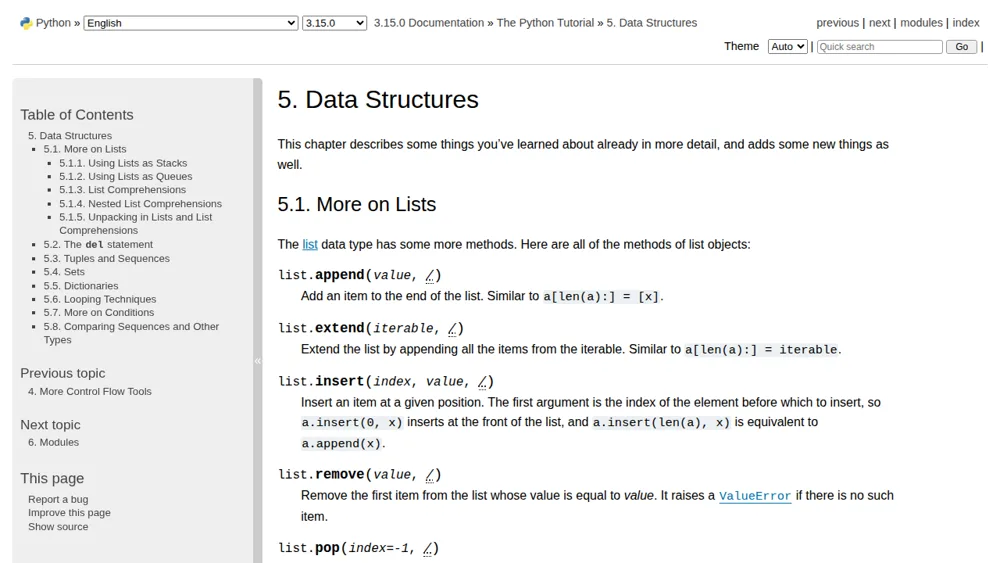
The official Python Tutorial on data structures lists these methods completely, and it is worth reading after this guide.
Adding Items: append, extend and insert
Use append() to add one item at the end of a list. Use extend() to add all items from another list, one by one. Use insert() when you need an item at a specific position, because it takes an index and a value.
fruits = ["apple", "banana"]
fruits.append("cherry")
print(fruits)  # ['apple', 'banana', 'cherry']

fruits.extend(["mango", "orange"])
print(fruits)  # ['apple', 'banana', 'cherry', 'mango', 'orange']

fruits.insert(1, "grapes")
print(fruits)  # ['apple', 'grapes', 'banana', 'cherry', 'mango', 'orange']
Notice the difference between append and extend. If you pass a list to append, that whole list becomes a single nested item. If you pass a list to extend, each item joins the main list separately. Think of append as one guest joining a party, and extend as a whole group joining.
Removing Items: remove, pop and clear
The remove() method deletes the first matching value you give it. The pop() method removes an item by its index and returns that item, so you can use it somewhere else. The clear() method empties the whole list while keeping the list itself alive and ready for new items.
numbers = [10, 20, 30, 20, 40]
numbers.remove(20)
print(numbers)  # [10, 30, 20, 40]

last = numbers.pop()
print(last)     # 40
print(numbers)  # [10, 30, 20]

numbers.clear()
print(numbers)  # []
Be careful with remove. If the value is not in the list, Python raises a ValueError and your program stops. Check with the in keyword first, like if 20 in numbers: before calling remove. Popping from an empty list also raises an IndexError, so check first.
Note that pop(0) removes the first item instead of the last.
Finding Items: index and count
When you need to know where something is, use index(). It returns the position of the first matching item, starting from zero. When you need to know how many times a value appears, use count(). It returns how many times the value appears, or zero if it is not there.
colours = ["red", "blue", "green", "blue", "red"]
print(colours.index("green"))  # 2
print(colours.count("blue"))   # 2
print(colours.count("yellow")) # 0
Like remove, index raises a ValueError if the item is missing, so check first or handle the error. Count is the polite one of the pair, it never complains, it just tells you zero and moves on. These methods pair nicely with loops, and if loops still feel new, our guide on Python loops, for vs while loop, explains them with the same simple style.
Sorting and Reversing: sort and reverse
The sort() method orders a list from smallest to largest, or from A to Z for strings. Add reverse=True inside the brackets if you want the opposite order. The reverse() method is different: it does not sort anything, it simply flips the current order, so first becomes last and last becomes first.
scores = [45, 12, 88, 30]
scores.sort()
print(scores)  # [12, 30, 45, 88]

scores.sort(reverse=True)
print(scores)  # [88, 45, 30, 12]

names = ["Zara", "Amit", "John"]
names.reverse()
print(names)  # ['John', 'Amit', 'Zara']
Sorting mixed types, like numbers and strings in the same list, will raise a TypeError, because Python cannot decide which one is bigger. Sorting strings is case sensitive too, so capital letters come before small letters. You can fix that by passing key=str.lower to sort. The full rules are covered in the Python documentation on built in types, in the section on sequence types.
If you need a sorted copy without changing the original, use the built in sorted() function instead.
Copying a List: copy
The copy() method creates a new list with the same items. This solves a very common bug. When you write list_b = list_a, you do not make a copy at all. Both names point to the same list, so changing one changes the other, and your program starts behaving like it has a mind of its own. It does not, you are just editing the same list twice.
original = [1, 2, 3]
backup = original.copy()
backup.append(4)
print(original)  # [1, 2, 3]
print(backup)    # [1, 2, 3, 4]
Copy makes a shallow copy. The new list is separate, but if your list contains other lists inside it, those inner lists are still shared. For most beginner projects, a shallow copy is exactly what you need. Once you are comfortable here, the natural next step is Python list comprehension explained, which shows a shorter way to build new lists from old ones.
Quick Comparison Table
The table below sums up all eleven methods from this guide. Keep it nearby while you practise, and soon you will stop needing it at all.
| Method | What it does | Returns |
|---|---|---|
| append(x) | Adds one item at the end | None |
| extend(list) | Adds each item from another list | None |
| insert(i, x) | Adds an item at a given index | None |
| remove(x) | Removes the first matching value | None |
| pop(i) | Removes an item by index | The removed item |
| clear() | Removes every item | None |
| index(x) | Finds the first position of a value | The index number |
| count(x) | Counts how often a value appears | The count number |
| sort() | Sorts the list in place | None |
| reverse() | Reverses the current order | None |
| copy() | Makes a shallow copy | A new list |
Only pop, index, count and copy give you a value back. The rest change the list and return None.
Common Mistakes to Avoid
First, do not save the result of a method that returns None, like result = my_list.append(5), because result will hold None, not the list. Second, do not change a list while looping over it, because items shift and some get skipped. Loop over a copy if you plan to remove items. Third, check a value exists before using remove or index.
Frequently Asked Questions
What is the difference between append and extend in Python?
Append adds one whole item at the end of a list, even if that item is itself a list. Extend adds each item from another list one by one, so the new items become part of the main list directly.
Does sort return a new list in Python?
No, sort changes the original list in place and returns None. If you need a new sorted list while keeping the original unchanged, use the built in sorted() function instead.
How do I remove an item from a list by its value?
Use remove() with the value, like my_list.remove(20). It deletes the first matching item. If the value is not in the list, Python raises a ValueError, so check with the in keyword first.
What does pop do in a Python list?
Pop removes an item by its index and returns that item. With no index, it removes and returns the last item, which makes it useful when you need both the value and a shorter list.
Conclusion
You now know the eleven list methods that cover almost everything a beginner does with lists: adding with append, extend and insert, removing with remove, pop and clear, searching with index and count, ordering with sort and reverse, and staying safe with copy. Pick three, write small examples of your own, and add the rest during the week. Small daily practice beats one long reading session. Happy coding.


Leave a Comment