

 Lavkush
GraphQL is a query language for APIs. Instead of the server deciding what data you get, your app asks for exactly the fields it needs, in one request, and the server sends back JSON in the same shape as your request. GraphQL was created at Facebook, its specification was open sourced in 2015, and today many teams use it as an alternative to REST. This guide explains the problem it solves, your first query, schemas, mutations and variables.
The Problem: Over-Fetching and Under-Fetching in REST
With a typical REST API, each address returns a fixed bundle of data. A student profile screen may only need a name and a course title, yet the endpoint still sends the email, address, phone number, signup date and ten other fields. That waste is called over-fetching. Your app downloaded a suitcase when it only needed a shirt.
The opposite problem is under-fetching. The profile endpoint gives you the student, but not the lessons inside the course. So your app makes a second request for lessons, maybe a third for progress, and the screen loads in slow steps. If APIs are still new to you, start with our guide to what an API is, explained simply with everyday examples, then come back.
GraphQL tackles both problems the same way: the client writes one request that lists exactly what it wants, including nested data, and the server answers with just that. No extra fields, and usually no chain of follow up requests.
Your First GraphQL Query
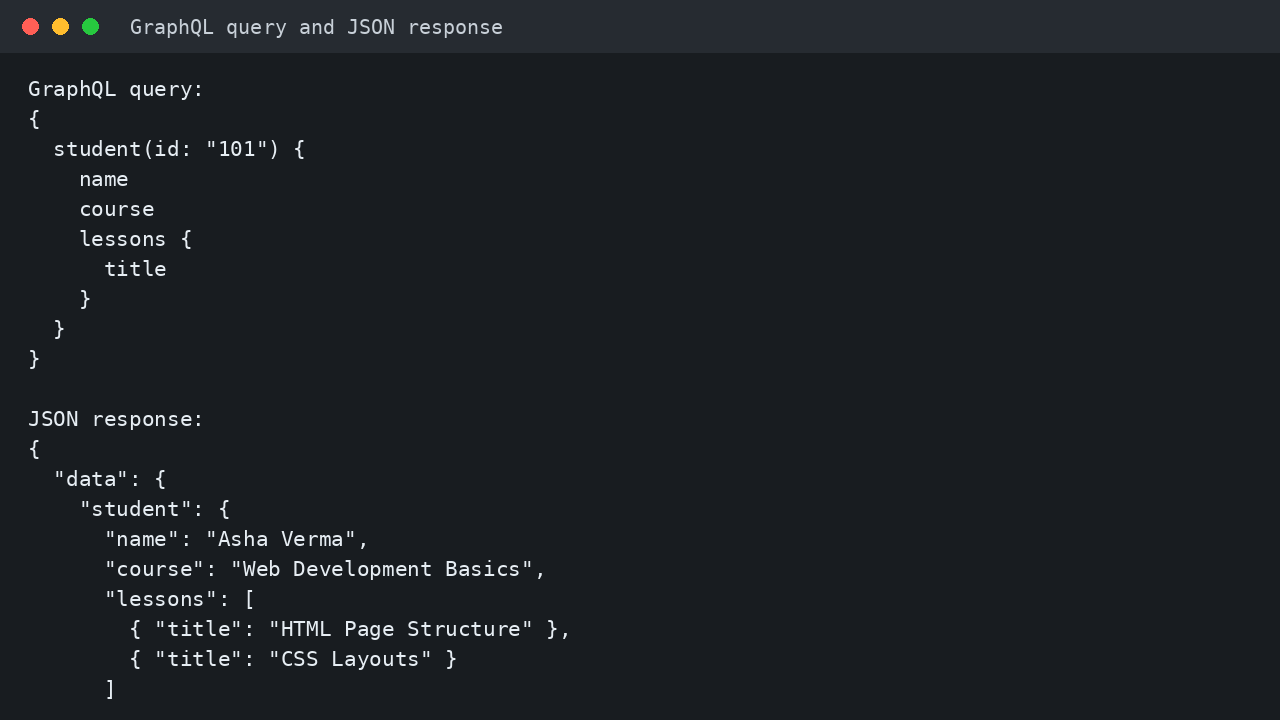
Here is a complete, small query. It asks for one student, by id, and picks three things: the name, the course, and the titles of the lessons in that course.
{
  student(id: "101") {
    name
    course
    lessons {
      title
    }
  }
}
Read it like a shopping list. The outer field, student, takes an argument, id: "101", so the server knows which student you mean. Inside the curly braces you list the fields you want. Because lessons is a list of objects, it gets its own braces and field, title. Nothing else is requested, so nothing else comes back.
Here is the exact JSON response for that query:
{
  "data": {
    "student": {
      "name": "Asha Verma",
      "course": "Web Development Basics",
      "lessons": [
        { "title": "HTML Page Structure" },
        { "title": "CSS Layouts" }
      ]
    }
  }
}
Notice two things. First, everything sits under a top level data key. Second, the response has the same shape as the query: same field names, nested the same way. That predictability is the heart of GraphQL. The official GraphQL guide to queries puts it simply: you always get back what you expect, because the server knows exactly which fields the client asked for.
Types and the Schema, in Plain Words
Every GraphQL server describes its data in a schema. Think of the schema as a menu written in a strict format: it lists the types of objects available, the fields on each type, and what kind of value each field holds. Here is a tiny schema for our example:
type Student {
  id: ID!
  name: String!
  course: String
  lessons: [Lesson!]!
}

type Lesson {
  title: String!
}

type Query {
  student(id: ID!): Student
}
String means text, ID means a unique identifier, and square brackets mean a list. The exclamation mark means the field must always have a value, so name: String! promises a name is never missing, while course: String may be empty. The special Query type is the front door: it lists the questions clients may ask. Because the schema is typed, the server can check a query before running it and reject a misspelled field with a clear error.
Query vs Mutation: Reading and Changing Data
A query reads data and changes nothing, like looking at a notice board. A mutation changes data, like pinning a new notice on it. Updating a student course looks like this:
mutation {
  updateStudentCourse(id: "101", course: "Advanced CSS") {
    id
    course
  }
}
The word mutation comes first, then the change and its arguments. Inside the braces you list the fields you want returned after the change, so the server confirms the new course and your app needs no second request to check. Queries and mutations follow the same field and argument rules, which keeps the language small.
Variables: Keep Dynamic Values Separate
Hard coding an id in the query string is fine for a demo, but real apps get ids from a click, a search box or a page address. Gluing user values into query text is messy and risky. GraphQL solves this with variables: placeholders declared at the top, with real values sent separately as JSON.
query GetStudent($studentId: ID!) {
  student(id: $studentId) {
    name
    course
  }
}
The variables sent with that query are simply { "studentId": "101" }. The dollar sign marks a variable, and ID! says a value is required. Now the same saved query works for every student: the app changes only the small variables object, never the query text. The official GraphQL learning hub walks through variables, schemas and mutations step by step.
GraphQL vs REST: A Quick Comparison
| Point | GraphQL | REST |
|---|---|---|
| Endpoints | Usually one endpoint for all requests | Many endpoints, one per resource |
| Data returned | Exactly the fields the client asked for | A fixed bundle chosen by the server |
| Related data | Nested fields in a single request | Often several requests in a row |
| Shape of response | Mirrors the shape of the query | Fixed by each endpoint design |
| Type safety | Strong schema, queries checked before running | Depends on documentation and discipline |
| Learning curve | New language and tooling to learn | Uses familiar HTTP methods and URLs |
If you want the REST side in practice, our tutorial on how to build a simple REST API in PHP, step by step shows the endpoint style in real code.
When to Use GraphQL, and When REST Is Enough
Choose GraphQL when different screens need different slices of the same data, when a page pulls related objects together, or when mobile apps must keep downloads small. It also shines when a product changes fast, because new fields can be added without breaking older clients that never ask for them.
Choose REST when your API is small, data shapes are stable, and simple caching through plain URLs matters more than flexible queries. Plenty of successful projects never need GraphQL. It is a tool for a specific pain, not a badge of modern code. Whichever style you pick, browsers enforce the same cross origin rules, so our explainer on what CORS is and how to fix CORS errors is worth reading before your first frontend call fails.
Common Mistakes and Troubleshooting
Asking for everything anyway. Listing every field because you can defeats the main benefit. Ask only for what the screen actually shows.
Forgetting the data key. The response wraps results in data. Reading response.student instead of response.data.student is a classic first bug.
Ignoring the errors key. If something fails, the server can return an errors list next to partial data. Always log it during development instead of staring at an empty screen.
Mixing up query and mutation. A change sent as a query will be rejected or will confuse your tooling. Reads are queries, writes are mutations, every time.
Building queries with string glue. Never paste user input straight into the query text. Use variables, as shown above, so values stay separate and safe.
Assuming a field exists. A misspelled field fails validation against the schema. Copy field names from the schema or the API explorer, not from memory.
Frequently Asked Questions
Is GraphQL a database or a programming language?
Neither. It is a query language and a specification for APIs. Your server can be written in many languages and can read from any database or other API behind the schema.
Does GraphQL replace REST completely?
No. Many companies run both, using GraphQL for flexible app data and REST for simple services, file uploads or public endpoints. Pick per problem, not per fashion.
Is GraphQL hard for beginners?
The basics are gentle: one query, one response shape, one schema. Most beginners write a working query within an hour, then learn mutations, variables and fragments gradually.
How does the server know what data to return?
The schema defines the fields, and small functions on the server fetch each field from its real source. The server runs only the fields your query named.
Conclusion
GraphQL flips the usual API habit: the client, not the server, decides the shape of the answer. One request lists the exact fields needed, nested data included, and the JSON response mirrors that request under a data key. A typed schema keeps everyone honest, queries read, mutations write, and variables keep dynamic values tidy. Start with small queries like the student example, and the idea will click quickly.
Leave a Comment