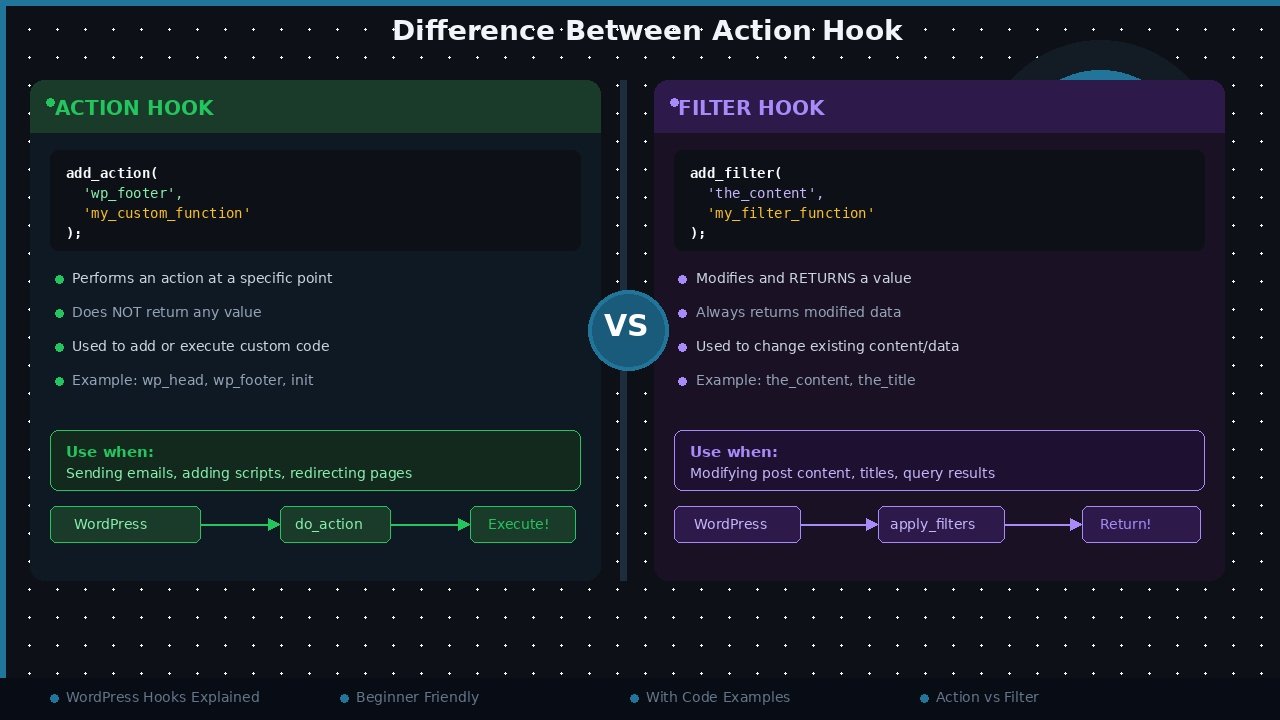
The difference between an action hook and a filter hook in WordPress is simple: an action hook lets you run your own code at a specific moment while WordPress is working, while a filter hook lets you receive a piece of data, change it, and return it. Actions do something. Filters change something. Once you understand that one line, most WordPress development starts to make sense.
What Are WordPress Hooks?
WordPress is built so that developers can extend it without editing its core files. It does this with hooks — named points inside WordPress, themes, and plugins where your own functions can be attached. When WordPress reaches that point while loading a page, it runs every function attached to the hook.
Hooks come in exactly two types: actions and filters. They look similar in code, and both are registered in almost the same way, but they have completely different jobs. Mixing them up is one of the most common beginner mistakes in WordPress development. The official WordPress documentation on hooks explains the full system whenever you need to look up a hook name.
What Is an Action Hook?
An action hook is triggered at a specific event or moment. Examples of moments are: WordPress finishes loading, a post is saved, a user logs in, or the page head section is printed. When that moment arrives, WordPress runs your function. Your function can print output, send an email, save something in the database, or do almost anything — but it does not return a value that WordPress uses.
You attach a function to an action with add_action():
// Run a custom function when WordPress prints the page head
add_action('wp_head', 'my_custom_head_code');
function my_custom_head_code() {
echo '<!-- Custom code added by my function -->';
}
Some action hooks you will meet often are:
init— fires after WordPress has finished loadingwp_head— fires inside the head section of the themewp_footer— fires just before the closing body tagsave_post— fires when a post or page is savedwp_login— fires when a user logs in
The official action hooks reference lists each action and the exact moment it fires.
Filters like the_title are also how many SEO tweaks are made under the hood. If you want to see the other approach, our tutorial on using PHP to add title and meta tags for SEO shows how titles and metadata are handled in code.
What Is a Filter Hook?
A filter hook works with data. WordPress passes a value into your function, your function changes it, and then it must return the changed value. WordPress then continues working with your returned value instead of the original one. Filters are used for things like post titles, post content, excerpt length, and many settings.
You attach a function to a filter with add_filter():
// Add a prefix to every post title
add_filter('the_title', 'my_custom_title');
function my_custom_title($title) {
return 'Guide: ' . $title;
}
Notice the important detail: the function accepts $title as a parameter and returns a new value. If you forget the return statement in a filter, WordPress receives nothing, and the title (or content) can disappear completely. That is the single most common filter bug beginners face.
Common filter hooks include:
the_title— filters the post titlethe_content— filters the full post contentexcerpt_length— filters how long automatic excerpts arebody_class— filters the CSS classes on the body tag

Action Hook vs Filter Hook: Side-by-Side Comparison
| Point | Action Hook | Filter Hook |
|---|---|---|
| Main purpose | Execute code at a specific moment | Modify data and return it |
| Function used | add_action() | add_filter() |
| Receives a value? | Not required | Yes, as the first parameter |
| Must return a value? | No | Yes, always |
| Typical use | Print output, send email, register menus | Change title, content, excerpt length |
| Example hooks | wp_head, save_post, wp_login | the_title, the_content, excerpt_length |
Priority: Controlling the Order
Many functions can be attached to the same hook. WordPress runs them in priority order — lower numbers run first, and the default priority is 10. You pass the priority as the third parameter:
// Run this function early, before most other functions
add_action('init', 'my_early_function', 5);
// Run this filter late, after other filters have finished
add_filter('the_content', 'my_late_filter', 20);
Priority works exactly the same for actions and filters, because under the hood WordPress actually stores both in the same system. In fact, add_action() is just a friendly wrapper — actions are filters that ignore the return value. Knowing this makes the whole hooks system much less confusing.
A Real-World Example Using Both
Imagine you run a small tutorial blog and you want two things: a notice printed above every post, and the reading experience cleaned up a little. The notice is a job for an action, and the cleanup is a job for filters:
// ACTION: print a notice before the post content area loads
add_action('wp_head', 'my_site_notice_style');
function my_site_notice_style() {
echo '<style>.my-notice{background:#fff3cd;padding:10px;}</style>';
}
// FILTER 1: shorten automatic excerpts to 20 words
add_filter('excerpt_length', 'my_excerpt_length');
function my_excerpt_length($length) {
return 20;
}
// FILTER 2: add a class to the body tag on single posts
add_filter('body_class', 'my_body_class');
function my_body_class($classes) {
if (is_single()) {
$classes[] = 'tutorial-post';
}
return $classes;
}
Look at the pattern in this example. The action function takes no input and returns nothing — it simply outputs CSS at the moment the head section is printed. Both filter functions receive a value ($length and $classes), change it, and return it. This is the pattern you will use in almost every WordPress customization: actions for moments, filters for values. Nearly every plugin you install is built from hundreds of these same two building blocks, which is why hooks are worth learning properly before anything else in WordPress development.
How to Choose the Right Hook
Ask yourself one question: do I need to change a value that WordPress gives me? If yes, you need a filter. If you only need something to happen at a certain moment — a notice printed, a log entry written, a script loaded — you need an action.
Hooks are also how professional WordPress sites stay upgrade-safe. Instead of editing plugin or theme files (which get overwritten on update), you put your code in a child theme or a small custom plugin. If you have not made one yet, follow our step-by-step guide to create a WordPress child theme before adding custom hook code to a live site.
Frequently Asked Questions
What is the main difference between action and filter hooks in WordPress?
An action hook runs your code at a specific moment and does not return anything. A filter hook receives a value, lets you modify it, and must return the modified value back to WordPress.
Can I use add_action() instead of add_filter()?
They are stored in the same system, so it can technically work, but you should always use the correct function. Using add_filter() makes your intention clear and guarantees the returned value is used properly.
What happens if I forget to return a value in a filter?
WordPress receives null instead of the data, so the title, content, or setting being filtered can become empty or break. Always return a value from every filter function.
What is hook priority in WordPress?
Priority decides the order in which functions attached to the same hook run. Lower numbers run first, and the default priority is 10. You set it as the third parameter of add_action() or add_filter().
Where should I add my hook code?
Add it in a child theme's functions.php file or in a small custom plugin. Never edit WordPress core files or a parent theme, because updates will erase your changes.
Conclusion
Action hooks and filter hooks are the foundation of WordPress development. Actions let something happen at the right moment; filters let you change data as it flows through WordPress. Remember the simple rule — actions do, filters change — learn the common hooks like wp_head, the_content, and the_title, and you can safely customize almost any WordPress site without touching core files.
Leave a Comment