

 Lavkush
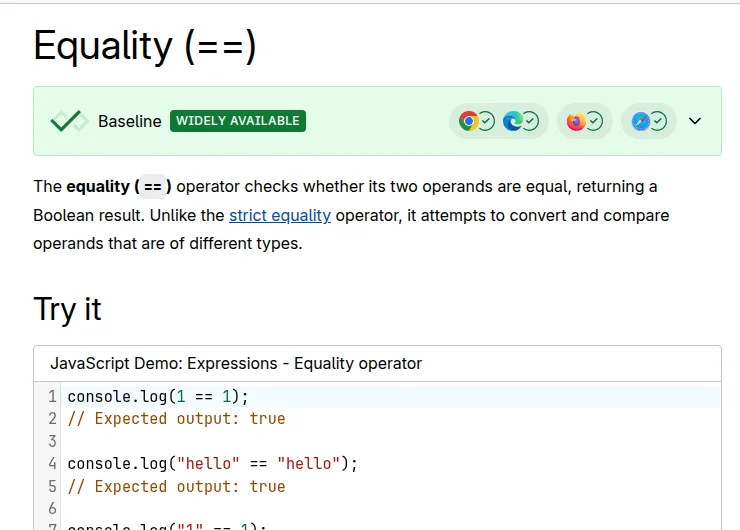
 The difference between == and === in JavaScript is simple: ==, called loose equality, converts the two values to the same type before comparing them, while ===, called strict equality, compares both the value and the type exactly as they are, with no conversion at all. That is why 5 == "5" returns true but 5 === "5" returns false. In most real code, you should use === by default, because it gives predictable results and helps you catch bugs early instead of discovering them at midnight.
What Does == Mean in JavaScript?
The == operator checks if two values are equal after converting them to a common type. Programmers call this conversion type coercion, and JavaScript does it quietly in the background. You ask a seemingly innocent question, and JavaScript answers a slightly different one after reshaping your values to match.
For example, a number and a string that look the same are treated as equal, even though they are different types. The same friendly flexibility applies to booleans, where true becomes 1 and false becomes 0 before the comparison happens.
5 == "5";        // true - the string "5" is converted to the number 5
0 == false;      // true - false is converted to 0
1 == true;       // true - true is converted to 1
"" == false;     // true - both sides become 0
"hello" == "hello"; // true - same type, same value, no surprise here
At first, this feels helpful. Your form gives you an age as a string, and == politely pretends it was a number all along. The trouble is that this politeness hides mistakes: a value that should never have passed your check slips through quietly.
If you enjoy long specification tables, the MDN guide to the equality operator lists exactly how each type is converted. For everyday work, remember one thing: with ==, JavaScript changes the values before it judges them.
What Does === Mean in JavaScript?
The === operator is stricter and, honestly, much better behaved. It first checks whether the two values have the same type. If the types are different, the answer is immediately false, and no conversion ever takes place. Only when the types match does it compare the actual values.
5 === "5";       // false - number vs string, different types
5 === 5;         // true - same type, same value
0 === false;     // false - number vs boolean
"hello" === "hello"; // true
true === true;   // true
This behaviour is predictable, and predictable code is happy code. When you read a line with ===, you know exactly what question is being asked. There is no hidden conversion step and no secret rulebook.
The MDN guide to strict equality puts it neatly: strict equality always considers operands of different types to be different. That one sentence is the whole philosophy. If you want a deeper practice path after this topic, our Learn JavaScript hub collects the beginner topics in a sensible order.
Side-by-Side Comparison: == vs ===
The fastest way to feel the difference is to run the same pairs through both operators. Notice how often == says yes where === firmly says no — those extra yeses are where real bugs hide.
| Comparison | With == | With === | Why? |
|---|---|---|---|
5 == "5" |
true | false | String is converted to a number only by == |
0 == false |
true | false | false becomes 0 only under loose equality |
"" == 0 |
true | false | Empty string becomes 0 with == |
null == undefined |
true | false | Special loose rule treats them as equal |
10 == 10 |
true | true | Same type and same value, both agree |
"cat" == "cat" |
true | true | Identical strings pass both checks |
When the types already match, both operators behave the same. The difference appears only when the types differ — precisely when you want your code to stop and think instead of guessing.
The Tricky Cases That Fool Everyone
Every learner eventually meets comparisons that look wrong but technically follow the loose rules. Meeting them now is far cheaper than meeting them in production on a Friday evening.
null and undefined
With loose equality, null and undefined are equal to each other and to nothing else. So null == undefined is true, but null == 0 is false. This special case is the main reason some developers still use == on purpose: if (value == null) checks for both in a single test.
NaN never equals anything
NaN (Not a Number) is famously antisocial: it is not equal to anything, not even itself. Both NaN == NaN and NaN === NaN return false. Test for it with Number.isNaN(value) instead.
Empty strings, zero, and false
An empty string, zero, and false all become loosely equal after conversion, so if (input == false) can pass for an empty field you wanted to reject. Strict equality keeps these three troublemakers separated.
Number.isNaN(NaN);     // true - the correct way
null == undefined;     // true - the one famous exception
null === undefined;    // false - different types
[] == "";              // true - yes, really, loose equality strikes again
[] == 0;               // true - arrays convert in surprising ways too
What About Objects and Arrays?
For objects and arrays, both operators compare identity, not contents. Two separate objects with identical properties are not equal, because they live in different places in memory. Only variables pointing at the same object pass.
const a = { name: "Lucas" };
const b = { name: "Lucas" };
const c = a;

a == b;   // false - different objects, same contents
a === b;  // false - strict equality agrees here
a === c;  // true - both variables point to the same object
This surprises beginners who expect a deep comparison, but JavaScript does not offer one built in. Compare the important properties one by one instead. The same identity idea appears when working with lists, as in our guide to JavaScript array methods explained.
Which One Should You Use?
Use === as your default, everywhere, and reach for == only in the one deliberate case of checking for null or undefined together. Most professional style guides, linters, and code reviewers follow exactly this rule, and tools like ESLint will warn you about loose equality with the popular eqeqeq rule.
If this topic clicked, continue with our comparison of var vs let vs const in JavaScript, which clears up another classic beginner confusion.
A practical workflow: know what type your data should be, convert it explicitly where it enters your code — for example with Number(input.value) for form fields — then compare strictly from that point on.
const age = Number("18");  // convert on purpose, in the open

if (age === 18) {
  console.log("Access allowed");
} else {
  console.log("Access denied");
}
// Clear, predictable, and no hidden conversion anywhere
There is also a matching pair for not equal: != is loose and !== is strict. Prefer !==. Your future self, debugging at an unreasonable hour, sends thanks.
Frequently Asked Questions
Is === faster than == in JavaScript?
In theory, yes, slightly, because strict equality skips the conversion step. In practice, the difference is far too small to notice in normal code. Choose === for correctness and clarity, not for speed.
Why does 5 == "5" return true?
Because loose equality converts the string "5" into the number 5 before comparing. Once both sides are numbers with the same value, the comparison returns true. Strict equality skips that conversion, so it returns false.
When is it okay to use ==?
The widely accepted exception is value == null, which checks for both null and undefined in one short test. Some teams still ban even this case for consistency. Either way, it should be a deliberate choice, never an accident.
What is type coercion?
Type coercion is JavaScript automatically changing a value from one type to another, such as turning a string into a number during a loose comparison. It also happens with operators like +, which is why "5" + 1 gives "51" instead of 6.
Does === work for comparing objects?
Only to check identity, meaning whether two variables point to the same object. It does not compare the contents inside two different objects. For contents, compare properties individually or use a library helper.
Conclusion
The whole topic fits in one sentence: == converts types then compares values, while === compares type and value together. Default to === and !==, convert data explicitly when it arrives, and save == for the single null check if your team allows it. An entire family of silent bugs then never moves into your code.


Leave a Comment