

 Lavkush
 Your binary search keeps returning -1 even though the value is clearly in the list — and the cause is almost always one of five classic mistakes: the list is not sorted, the low/high boundaries are off by one, the middle calculation or update is wrong, you are comparing the wrong thing, or the loop condition lets the search quit one step early. Binary search is only about ten lines of code, yet it is famously the easiest algorithm to write almost correctly. This guide shows a correct version first, then walks through each bug with the broken code, the symptom, and the fix — so you can spot your exact mistake in minutes.
There is a running joke that binary search has been implemented wrongly by nearly everyone at least once, including people who teach it. You are in excellent company. Let us fix yours.
A Correct Binary Search, for Reference
Keep this known-good Python version beside your code and compare line by line. Most bugs reveal themselves as one small difference from this shape.
def binary_search(arr, target):
    low = 0
    high = len(arr) - 1 # last valid index
    while low <= high: # note: <= not <
        mid = (low + high) // 2
        if arr[mid] == target:
            return mid
        elif arr[mid] < target:
            low = mid + 1 # target is in the right half
        else:
            high = mid - 1 # target is in the left half
    return -1 # not found
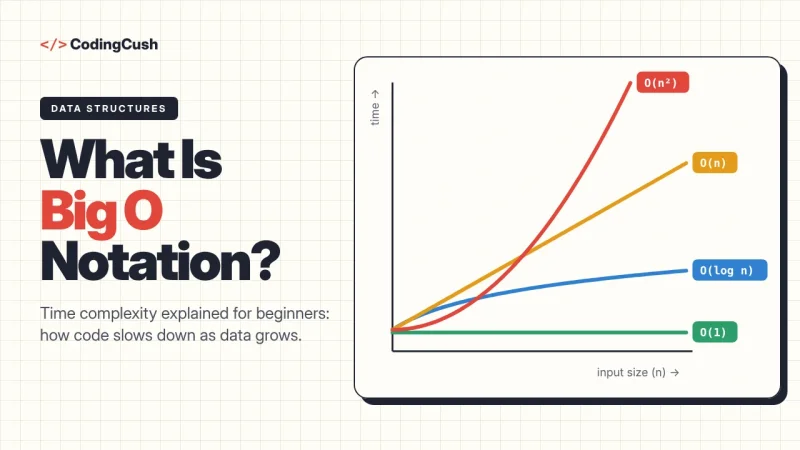
Three details carry the whole algorithm: the list must be sorted, the loop continues while low <= high, and each step moves a boundary PAST the middle (mid + 1 or mid - 1), never to the middle itself. Its speed is the famous O(log n) — if that label is new to you, our guide to what Big O notation means explains it with the same halving idea. Khan Academy also teaches the algorithm carefully in its free binary search lesson, including how to reason about the boundaries.
Mistake 1: Searching an Unsorted List
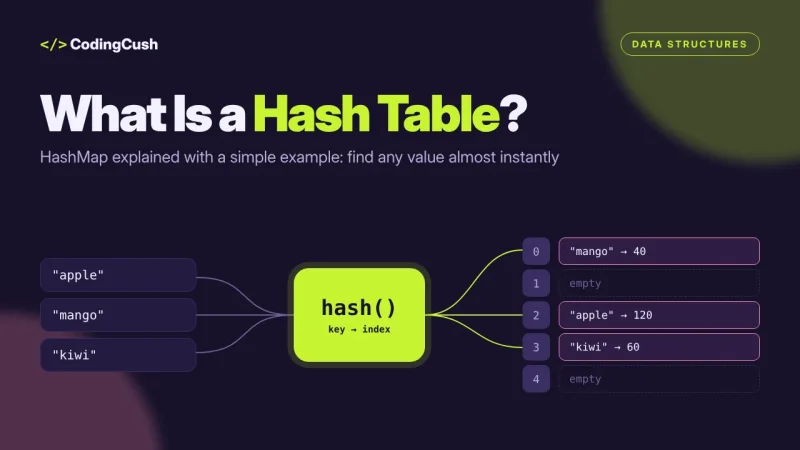
Binary search trusts one promise: the list is sorted. It checks the middle and throws away half the list based on that check. On an unsorted list, the half it throws away may contain your target — and the function honestly reports -1 for a value sitting right there. Symptom: -1 for some values that definitely exist, correct answers for others (the lucky ones). Fix: sort first, or use a plain linear search if sorting is not possible. If your data must stay searchable while it changes, that is exactly the problem a different structure solves — see how a hash table (hash map) gives near-instant lookups without any sorting at all.
Mistake 2: Off-by-One Boundaries
The most common bug family. Setting high = len(arr) instead of len(arr) - 1 makes the code read one past the last index — an error in some languages, silent nonsense in others. Using while low < high instead of low <= high quits when exactly one candidate remains unchecked, so the search misses values that sit at the final position. Symptom: the first or last element is never found, or the function fails only on tiny lists of one or two items. Fix: pick one convention — inclusive boundaries, high = len(arr) - 1, low <= high — and use it consistently everywhere. Test with a one-element list where the target IS that element; half of all boundary bugs die on that single test.
Mistake 3: Updating the Wrong Boundary (Infinite Loops and Early Exits)
Writing low = mid instead of low = mid + 1 means the search range may stop shrinking: when only one or two items remain, mid equals low, the same middle is checked forever, and your program hangs instead of returning. The mirror bug, high = mid instead of mid - 1, does the same on the other side. Symptom: the program never finishes on some inputs, or the loop runs but the printed mid value stops changing. Fix: always move past mid, because you have already checked arr[mid] — keeping it in the range is re-checking homework you already marked. The Wikipedia article on binary search has a whole section on these boundary variations and why mixing conventions causes exactly these bugs.
Mistake 4: Comparing the Wrong Thing
Three flavours of this one. Comparing indices with values: writing if mid == target instead of if arr[mid] == target — comparing a position with a value, which almost never matches. Comparing strings that look like numbers: "10" sorts before "2" as text, so a list sorted as strings breaks the sorted promise for numbers. And case-sensitivity: a list sorted with capital letters first will hide lowercase targets. Symptom: answers that are wrong in a pattern that feels random until you print the list and the comparisons. Fix: print arr[mid] and target together inside the loop for a few steps. Ninety percent of binary search debugging is just watching those two numbers behave.
Mistake 5: The Middle Overflow and Duplicate Values
In languages with fixed-size integers, (low + high) / 2 can overflow when both numbers are huge — a real bug that once lived in famous libraries for years. The safe form is low + (high - low) // 2. Python's big integers save you here, but Java, C and C++ do not. Separately: if the list contains duplicates, binary search returns A matching index, not necessarily the first or last one. Symptom: your test expected index 2 and got index 4, with the correct value at both. That is not a bug — it is the contract. If you need the first occurrence, add a step that walks left from the found index, or use your language's built-in lower-bound search.
A 5-Minute Debugging Checklist
When binary search returns -1 wrongly, check in this order: (1) Print the list — is it truly sorted, in the same order your comparisons assume? (2) Print low, high and mid each round — is the range shrinking every time? (3) Test the one-element list, then the first and last elements of a bigger list. (4) Confirm you compare arr[mid] with the target, and that both have the same type. (5) Confirm the boundaries move to mid + 1 and mid − 1, and the loop uses low <= high. Work down the list and you will find your bug — it is always on this list, wearing a small disguise.
Frequently Asked Questions
Why does binary search return -1 for a value that is in the list?
Almost always: the list is not sorted, the loop condition quits one step early (low < high instead of low <= high), or a boundary update skips the position where the value sits. Check those three first.
Why does my binary search loop run forever?
A boundary is not moving past the middle. low = mid or high = mid can leave the range unchanged when it gets small. Use mid + 1 and mid - 1 so the range always shrinks.
Can binary search work on an unsorted list if I am lucky?
No. It may accidentally find some values, but it throws away half the list based on order. Without the sorted promise, those decisions are coin flips. Sort first, or use linear search.
Which index does binary search return when there are duplicates?
Any one of the matching indices — usually whichever the middle checks land on first. If you need the first or last occurrence, search for that boundary deliberately with a modified version.
Is it better to use the built-in search instead?
For real projects, yes — Python's bisect module and JavaScript libraries are tested far more than hand-written versions. Write your own to learn and for interviews; use the built-in at work.
Conclusion
Binary search fails quietly and politely, returning -1 with total confidence — which makes its five classic bugs worth memorising: unsorted data, off-by-one boundaries, boundaries that do not move past mid, wrong comparisons, and duplicate or overflow surprises. Compare your code with the reference version, test the one-element list, and print the middle values. Your -1s will start meaning "genuinely not there" again.



Leave a Comment