

 Lavkush
To learn React as a beginner, follow this order: be comfortable with HTML, CSS and modern JavaScript first, then learn components and JSX, then props and state, then events and forms, then fetching data, and finally routing and a framework such as Next.js — building one small project at each step instead of only watching tutorials. Most beginners who follow this sequence can build real React apps within two to three months of steady practice.
Step 0: The Skills React Assumes You Already Have
React is a JavaScript library for building user interfaces, so it stands on three legs: HTML for structure, CSS for appearance, and JavaScript for behaviour. You do not need to be an expert in any of them, but three JavaScript ideas must feel friendly before React will make sense: arrow functions, array methods such as map and filter, and destructuring. These three appear in almost every React component ever written, and struggling with them inside React feels twice as hard as learning them in plain JavaScript first.
Give this foundation two honest weeks if it is new. Build one small static page, then make one tiny JavaScript app — a counter, a to-do list without a framework — so variables, functions and DOM updates are familiar territory. Skipping this step is the single most common reason beginners conclude that React is "too hard", when really the missing piece was never React at all. The official React Learn course itself opens by assuming this background, which tells you how universal the advice is.
Step 1: Components and JSX — Thinking in Pieces
React's central idea is the component: a small, reusable piece of interface written as a JavaScript function. A button, a card, a whole page — each is a component, and big interfaces are assembled from small ones the way a wall is assembled from bricks. Your first milestone is writing a component, displaying it inside another component, and passing it simple content.
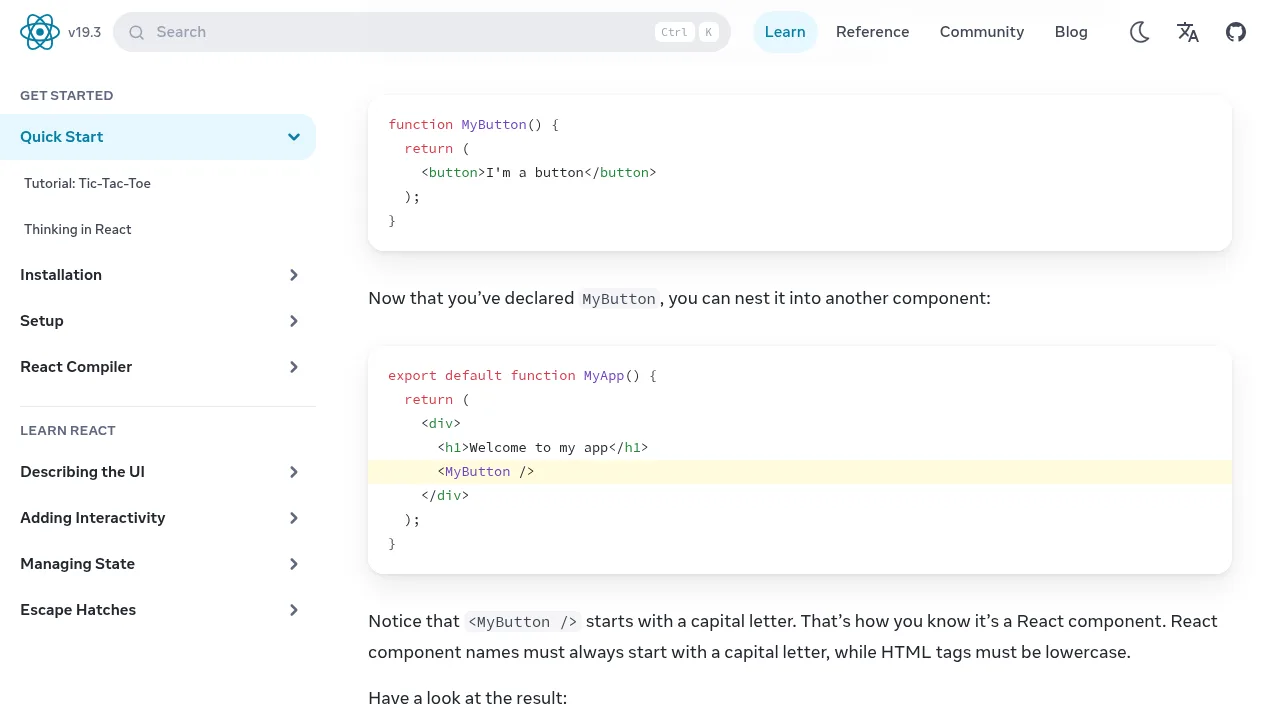
Inside components you will write JSX, the HTML-like syntax that lives inside JavaScript. If JSX still feels like a stranger, our explainer on what JSX is in React walks through it with small examples before you go further. The screenshot in this article, from the official React Learn quick start, shows the pattern in its purest form: a MyButton component defined once and then nested inside MyApp with a single tag. That nesting — components inside components — is the entire architecture of every React app you will ever open, from a practice counter to the dashboard of a company you have heard of.
Step 2: Props and State — Data That Flows and Data That Changes
With static components under your fingers, learn the two words that run every React app. Props are data a parent hands down to a child — the title and price given to a product card. State is data a component remembers and changes itself — the count in a counter, the text in a search box — using the useState hook. When state changes, React redraws the component automatically, which is the moment the library stops feeling like markup and starts feeling alive.
Our detailed guide to React components, props and state is the natural deep-dive for this step, with examples of each idea separately. Practise with a small project that needs both: a list of books or products rendered from an array, where each card receives props, and a favourite button on each card keeps its own state. If you can build that without copying, you understand the heart of React — honestly, a large fraction of professional React work is this exact step wearing better clothes.
Step 3: Events, Forms and Lists
Next, make your interfaces respond. Handling a click with onClick, reading an input with an onChange handler and controlled form fields, and rendering lists with map plus a stable key for each item: together these turn static screens into working tools. Build a small expense tracker or a notes app at this stage. It will be ugly. It will also teach you more about state than a week of videos, because every bug in a form is a state lesson arriving exactly on schedule.
While building, adopt the habit that separates calm developers from frustrated ones: when something does not update, ask "which state should have changed?" before changing any code. In React, the screen is a reflection of state, so a wrong screen almost always means wrong or stale state — a debugging compass that will serve you in every project on this roadmap and beyond it.
Step 4: Fetching Data and Talking to APIs
Real apps display data they do not own, so step four is loading data from an API with fetch inside the useEffect hook, showing a loading message while waiting, and handling the bad day when the request fails. Public practice APIs offer free data about weather, movies, products and countries, so you can build a respectable little app without writing any backend at all.
The React installation guide is worth a visit around this stage too, because it explains how real projects are set up with modern tooling, instead of the single-file practice pages most beginners start with. Set your practice project up the proper way once — folders, components in separate files, a sensible structure — and later steps, especially sharing your work with employers, become dramatically easier.
Step 5: Routing, Next.js and the Road Beyond
| Stage | Learn | Project to build |
|---|---|---|
| Foundation | HTML, CSS, modern JavaScript | A static page and a plain-JavaScript to-do list |
| Basics | Components, JSX | A personal profile page made of components |
| Core | Props, state, useState | A product list with favourite buttons |
| Interactive | Events, forms, lists and keys | An expense tracker or notes app |
| Real data | useEffect and fetch | A weather or movie search app |
| Beyond | Routing, then Next.js basics | A small multi-page blog or portfolio |
Once single-page apps feel comfortable, learn routing — how an app shows different pages without reloading — and then meet Next.js, the framework built on React that adds routing, server rendering and structure out of the box. Our comparison of React vs Next.js explains what the framework adds and why learning plain React first makes Next.js feel like a helpful upgrade instead of a second mountain. After that, the road branches by taste: styling libraries, testing, TypeScript, or deeper state tools — all optional side quests once the main path is walked.
The Habits That Make the Roadmap Work
A roadmap is only paper without habits. Build something at every step, however small, because projects expose the gaps that tutorials politely hide. Type code yourself instead of copying it, and when an error appears, read it before searching it — React's error messages are unusually honest by industry standards. Finally, keep every project, even the embarrassing early ones, in Git repositories: six months from now, that visible trail from counter app to data-fetching app is the most convincing portfolio a beginner can show.
Frequently Asked Questions
How long does it take to learn React?
With the JavaScript foundation in place and steady practice of an hour or two a day, most beginners build comfortable, real projects in two to three months. Reaching job-ready depth takes longer, but the first working apps come quickly.
Should I learn React or JavaScript first?
JavaScript first — at least arrow functions, array methods and destructuring. React is written in JavaScript, so every gap in the language becomes a gap in React, only harder to see.
Is React hard for beginners?
The core ideas — components, props, state — are genuinely simple. Beginners struggle mainly when the JavaScript foundation is missing, or when they try to learn React, routing and a framework all in the same week.
Do I need Next.js to get a React job?
Not at the start. Employers expect strong React fundamentals first; Next.js is a valuable second skill that builds directly on them, which is why it sits at the end of this roadmap.
Conclusion
Learn React in the order it builds on itself: JavaScript foundations, components and JSX, props and state, events and forms, fetching data, then routing and Next.js — with a small, finished project proving each step. Follow that sequence patiently and React stops being a wall of new words, and becomes what it really is: a simple idea, applied one component at a time.


Leave a Comment