

 Lavkush
A linked list is a chain of boxes called nodes, where each node holds one piece of data and a link to the next node. The first node is called the head, and the chain ends when a node links to nothing. Unlike an array, it does not store items side by side, so it can grow or shrink one node at a time without moving the rest. Below, you will build one in Python and learn when to pick it over an array. Every example was run with Python 3.12.3, so the outputs shown are real.
What Is a Linked List?
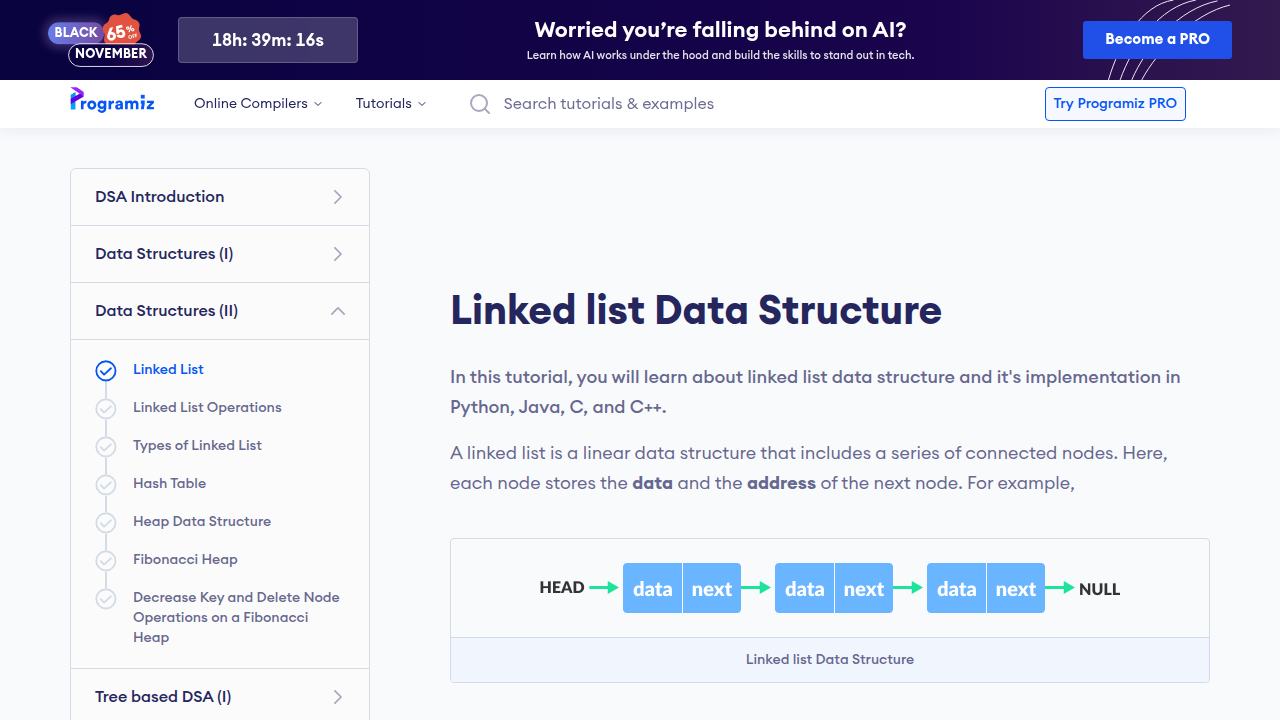
A linked list stores items in order, but not in one neat block. Each item lives in its own node, and each node points to the next one, like a treasure hunt where every clue tells you where the next clue is hidden. To read the list, start at the head and follow the links until you reach a node whose link is empty. That empty link, written as None in Python, marks the end of the list. The Programiz guide to the linked list data structure describes the same idea: a list of nodes, each storing data and a reference to the next node.
Think of a train: each carriage holds passengers and is joined to the one behind it, and you can add or remove one without rebuilding the whole train. If data structures are new to you, our guide to Python data structures explained in simple words is a good place to start.
How a Linked List Works: Nodes and Links
A node has two parts: the data, which can be a name, a number, or anything else, and the next pointer, which holds the address of the next node. The list itself only remembers one thing, the head, which is the first node. Lose the head, and you lose the whole list.
Here are three fruits as a linked list. The head node holds "apple" and points to the node holding "banana", which points to the node holding "mango", and the mango node points to nothing.
head
  |
  v
[apple | next] -> [banana | next] -> [mango | None]
Adding a node means walking to the last node and linking it to the new node. Removing one means changing the link before it so it skips the removed node. Our guide to the difference between a stack and a queue compares two more structures built on ordered items.
Building a Linked List in Python
Here is a small linked list in Python. The Node class stores the data and the link to the next node. The LinkedList class stores the head and adds three methods: append, print_list and search.
class Node:
    def __init__(self, data):
        self.data = data
        self.next = None


class LinkedList:
    def __init__(self):
        self.head = None

    def append(self, data):
        new_node = Node(data)
        if self.head is None:
            self.head = new_node
            return
        current = self.head
        while current.next is not None:
            current = current.next
        current.next = new_node

    def print_list(self):
        current = self.head
        while current is not None:
            print(current.data, end=" -> ")
            current = current.next
        print("None")

    def search(self, value):
        current = self.head
        while current is not None:
            if current.data == value:
                return True
            current = current.next
        return False
In append, a new node becomes the head when the list is empty. Otherwise the code walks to the last node, the one whose next is None, and links it to the new node. print_list prints each value followed by an arrow, then None. search returns True the moment it finds a match, or False after checking every node.
Running the Linked List: Append, Print and Search
Now let us use the classes above to build a list of fruits, search it, and add one more fruit.
# Build and print a list of fruits
fruits = LinkedList()
fruits.append("apple")
fruits.append("banana")
fruits.append("mango")
fruits.print_list()

# Search for a value that is there, and one that is not
print(fruits.search("banana"))
print(fruits.search("kiwi"))

# Append one more node and print again
fruits.append("orange")
fruits.print_list()

# A list of numbers, to show nodes can hold any data
numbers = LinkedList()
for n in [10, 20, 30]:
    numbers.append(n)
numbers.print_list()
print(numbers.search(20))
Output:
apple -> banana -> mango -> None
True
False
apple -> banana -> mango -> orange -> None
10 -> 20 -> 30 -> None
True
The first print shows the three fruits in order, ending with None. search("banana") returns True because banana is in the list, while search("kiwi") returns False. After appending "orange", the list prints four fruits, and nothing else had to move. The numbers list proves the same code works for any kind of data.
Linked List vs Array: Which One Should You Use?
Arrays and linked lists both store ordered items, but they trade speed in different places: an array gives instant access by position, while a linked list makes adding and removing items cheap.
| Feature | Linked list | Array |
|---|---|---|
| Memory layout | Nodes spread out, joined by links | Items in one block, side by side |
| Read by position | Slow: walk from the head | Fast: jump straight to it |
| Add or remove at the start | Fast: change one link | Slow: shift the other items |
| Add at the end | Walk to the end, then link it | Fast when there is spare room |
| Size | Grows one node at a time | Fixed size, or resized in chunks |
| Extra memory | One link per node | None per item |
Pick a linked list when you add and remove items often, especially at the start or in the middle. Pick an array when you need fast access by index. To put numbers on this trade off, our guide to Big O notation explained simply shows how to measure the speed of each operation.
When to Use a Linked List in Real Code
Linked lists show up more often than beginners expect. A music player queue is a natural fit: songs play in order, you can insert a song next, and removing one song should not disturb the rest. Browser history and undo and redo work the same way. The Wikipedia article on linked lists lists these uses and more. In Python you will rarely build one from scratch, because Python lists already cover most jobs. Still, they teach how data structures are built from simple parts.
Common Mistakes and Troubleshooting
Forgetting next = None in a new node. A new node must start with no link. The Node class above sets self.next = None, so never skip that line.
Losing the head. If you set self.head by mistake, the whole list becomes unreachable. Change the head only when you mean to.
An endless loop in append or print. If the last node links back to an earlier node, the list becomes a circle and print_list never stops. Never link a node to itself.
Walking past the end of the list. Reading current.next after current has become None crashes with AttributeError. Always test current is not None first, as the while loops above do.
Using a linked list for random access. Reading the hundredth item means walking through ninety nine nodes first. If your code keeps jumping to positions by number, use an array instead.
Frequently Asked Questions
What is a linked list in simple words?
A linked list is a chain of nodes, where each node holds one value and a link to the next node. Start at the first node, called the head, and follow the links to the end.
What is the difference between a linked list and an array?
An array stores items side by side in one block and gives fast access by position. A linked list stores items in separate nodes joined by links, so adding or removing items is cheap, but reaching an item means walking from the head.
What is a node in a linked list?
A node is one box in the chain, with two parts: the data it stores, and a link, called next, that points to the following node. The last node links to nothing.
Why use a linked list instead of a Python list?
For most Python work, a Python list is simpler and faster. A linked list is worth learning because it teaches how data structures work from the inside, and interview questions build on the same idea.
What is the time complexity of searching a linked list?
Searching takes O(n) time in the worst case, because you may need to check every node. Reading by position is O(n) too, while adding at the start is O(1).
Conclusion
A linked list is just a chain of nodes, each holding data and a link to the next one. That simple idea powers queues, browser history, undo stacks and more. You now know how nodes work, how to build a linked list in Python, and when an array is the better choice. Try it yourself: store five cities, then add a delete method that removes a node by value.


Leave a Comment