

 Lavkush
Insertion sort is a simple sorting algorithm that takes one value at a time from the unsorted part of a list and slides it left, shifting bigger values one step to the right, until it lands in its correct place among the values already sorted. In this guide you will dry run it step by step, write the complete Python version, count its comparisons and shifts, see why sorted input is its best case, and compare it with bubble sort, selection sort and Python's built in sorted(). All outputs are from real runs on Python 3.12.3.
How Insertion Sort Works, in Plain Words
Imagine holding playing cards and picking up new cards one by one. Each new card slides past the bigger cards until it sits in the right spot. You never shuffle the whole hand again. You insert one card, neatly, every time.
That is the whole algorithm. The list always has two parts: a sorted part growing at the front and an unsorted part shrinking behind it. The next unsorted value is called the key. You compare the key with the sorted values from right to left, shift each bigger value one place to the right, and drop the key into the gap.
Two details matter. The shifts make the room: nothing swaps back and forth, values simply slide over. And this version is stable, because only values strictly bigger than the key shift, so equal values never jump over each other.
A Dry Run on a Small List, Step by Step
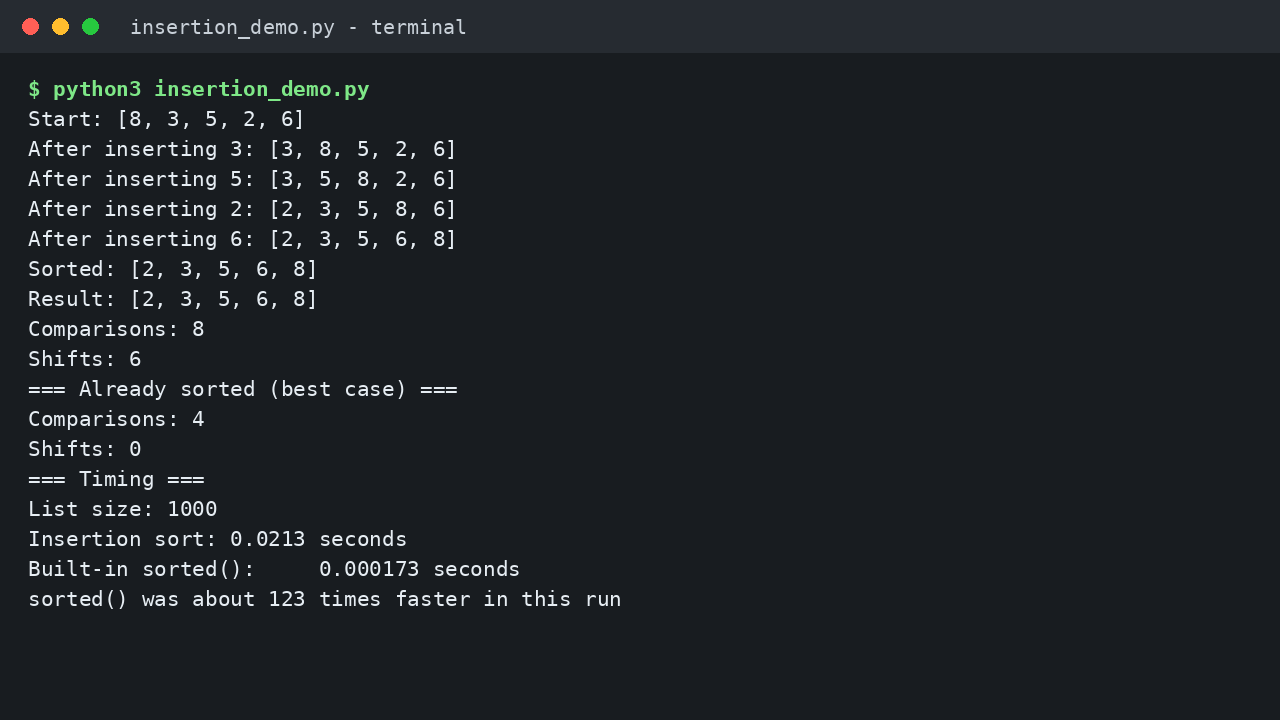
Let us sort [8, 3, 5, 2, 6] by hand. The first value, 8, starts as the sorted part on its own. Then each key is inserted into place:
Start: [8, 3, 5, 2, 6]
After inserting 3: [3, 8, 5, 2, 6]
After inserting 5: [3, 5, 8, 2, 6]
After inserting 2: [2, 3, 5, 8, 6]
After inserting 6: [2, 3, 5, 6, 8]
Sorted: [2, 3, 5, 6, 8]
Inserting 3 is easy: 8 shifts right and 3 takes the front spot. Inserting 5 shifts 8 but stops at 3. Inserting 2 does the most work: 8, 5 and 3 all shift before 2 reaches the front. Inserting 6 shifts only 8.
Notice the pattern. A key that is nearly in place costs almost nothing, while a small key arriving late slides past almost everyone.
Insertion Sort in Python, Step by Step
Here is the complete version. It copies the input first, so the caller's list never changes:
def insertion_sort(numbers):
    a = numbers[:]
    for i in range(1, len(a)):
        key = a[i]
        j = i - 1
        while j >= 0 and a[j] > key:
            a[j + 1] = a[j]
            j -= 1
        a[j + 1] = key
    return a

print(insertion_sort([8, 3, 5, 2, 6]))
Output:
[2, 3, 5, 6, 8]The outer loop picks the next key, starting at index 1, because a single value at index 0 is already sorted by itself. The inner while loop walks left from just before the key. Every bigger value copies itself one place to the right, which is the shift, and j steps back. The loop stops at the first value that is not bigger, and the key drops into the empty slot at j + 1.
Adding two counters to the same loop, one per comparison and one per shift, gave this real result on our test list:
Result: [2, 3, 5, 6, 8]
Comparisons: 8
Shifts: 6
Eight comparisons and six shifts for five values. The next section changes the input and watches those numbers move.
Why Already Sorted Input Is Its Best Case
Feed the counting version a list that is already sorted, [2, 3, 5, 6, 8], and the numbers collapse:
Result: [2, 3, 5, 6, 8]
Comparisons: 4
Shifts: 0
Each key compares once with its left neighbour, finds it smaller, and stays put. Four keys, four comparisons, zero shifts. That is a true best case: the work grows in a straight line with the list size, so sorted input runs in O(n).
This is where insertion sort pulls ahead of its cousins. Our selection sort explained with simple Python examples still pays full price on sorted input, because it must scan everything to find each smallest value. Insertion sort only checks until the key fits, so nearly sorted data is where it genuinely shines.
The worst case is the mirror image. On the reverse sorted list [8, 6, 5, 3, 2], every key travelled all the way to the front:
Result: [2, 3, 5, 6, 8]
Comparisons: 10
Shifts: 10
Ten is the maximum for five values: 1 plus 2 plus 3 plus 4. Double the list and that total roughly quadruples.
Time Complexity: Fast on Nearly Sorted, Slow on Reversed
In the worst and average cases, each key can be compared with every value before it, so the total work is about n squared divided by 2 comparisons: O(n^2). In the best case, sorted or nearly sorted input, it drops to O(n). Extra memory is O(1), because the sort happens inside the one copied list. If Big O itself feels fuzzy, our guide to Big O notation explained simply, with everyday examples builds the idea from scratch.
Insertion Sort vs Bubble Sort vs Selection Sort vs sorted()
In real Python code you would sort with sorted(), which returns a new sorted list in one line:
print(sorted([8, 3, 5, 2, 6]))[2, 3, 5, 6, 8]The official Python sorting guide explains that sorted() uses Timsort, which spots runs of ordered data and merges them, making it fast and stable. The sequence types documentation covers lists and the list sort() method. We timed both on 1,000 random numbers (seed 42):
List size: 1000
Insertion sort: 0.0213 seconds
Built-in sorted():     0.000173 seconds
sorted() was about 123 times faster in this run
Timings vary by machine, but the gap widens as lists grow, because O(n log n) pulls away from O(n^2) quickly. Compared with our bubble sort explained with simple Python examples, insertion sort usually does less work on random data: it shifts each value straight to its place instead of swapping neighbours step by step.
| Case or feature | Insertion sort | Bubble sort | Selection sort | Python sorted() (Timsort) |
|---|---|---|---|---|
| Best case | O(n), sorted input | O(n), optimised | O(n^2), always | O(n) on ordered data |
| Average case | O(n^2) | O(n^2) | O(n^2) | O(n log n) |
| Worst case | O(n^2), reversed | O(n^2) | O(n^2) | O(n log n) |
| Main movement | Shifts values right | Swaps neighbours | At most n minus 1 swaps | Moves runs |
| Extra memory | O(1) | O(1) | O(1) | O(n) worst case |
| Stable | Yes | Yes | No, classic form | Yes |
| Best use | Nearly sorted, tiny lists | Learning, tiny lists | Learning, few swaps | Real code, any size |
Common Mistakes and Troubleshooting
Not saving the key first. The first shift overwrites the position the key came from. If you did not copy it into key before the loop, the value is gone and a neighbour gets duplicated.
Forgetting to move j backwards. Without j -= 1 inside the loop, j never changes and the same value shifts forever. An infinite loop here almost always means the step back is missing.
Using >= instead of > in the while condition. Shifting values equal to the key pushes it in front of its equals, which breaks stability and adds useless shifts. Strictly bigger is the correct test.
Placing the key inside the while loop. The line a[j + 1] = key belongs after the loop, once the final gap is known. Inside, it writes the key into half finished positions.
Frequently Asked Questions
Why is it called insertion sort?
Because each pass takes the next value and inserts it into its correct place in the sorted part, like slipping a card into the right spot in your hand.
Is insertion sort stable?
Yes, in this version. Only values strictly bigger than the key shift right, so equal values keep their original order.
What is the best and worst case of insertion sort?
Best case is O(n) on sorted input: our test needed only 4 comparisons and 0 shifts. Worst case is O(n^2) on reverse sorted input: 10 comparisons and 10 shifts for five values.
Should I use insertion sort in real Python projects?
Almost never. Use sorted() or the list sort() method: faster, stable and tested. Insertion sort earns its place in learning, interviews and tiny, nearly sorted lists.
Conclusion
Insertion sort takes each value and slides it home. You saw [8, 3, 5, 2, 6] settle into order key by key, counted 8 comparisons and 6 shifts, watched a sorted list cost only 4 comparisons with no shifts, and measured sorted() about 123 times faster on 1,000 items. Learn it for the shifting pattern and its best case, then sort real lists the Python way.


Leave a Comment