

 Lavkush
Bubble sort is a simple sorting algorithm that compares neighbouring items again and again and swaps them whenever they are in the wrong order. After each full pass, the biggest unsorted value has bubbled up to its correct place at the end. In this guide you will dry run bubble sort on a small list, write the basic Python version, improve it with a swapped flag, count its comparisons and swaps, and see how it compares with Python's built in sorted(). Every output comes from running this article's code on Python 3.12.3.
How Bubble Sort Works, in Plain Words
Imagine students lined up by height, but shuffled. You walk along the line looking at each pair of neighbours. Whenever the taller student stands in front of the shorter one, they swap. By the end of the walk, the tallest student is at the back, having won every swap.
That walk is called a pass. On the next pass, the second tallest ends up just before the tallest. Pass by pass, the sorted part grows at the end. The algorithm stops when a pass finishes with no swaps, which means everything is in order.
Two details matter. Bubble sort only compares neighbours, never distant items. And equal values never swap, because we swap only when the left value is strictly greater. That makes it stable: equal items keep their original relative order.
A Dry Run on a Small List, Pass by Pass
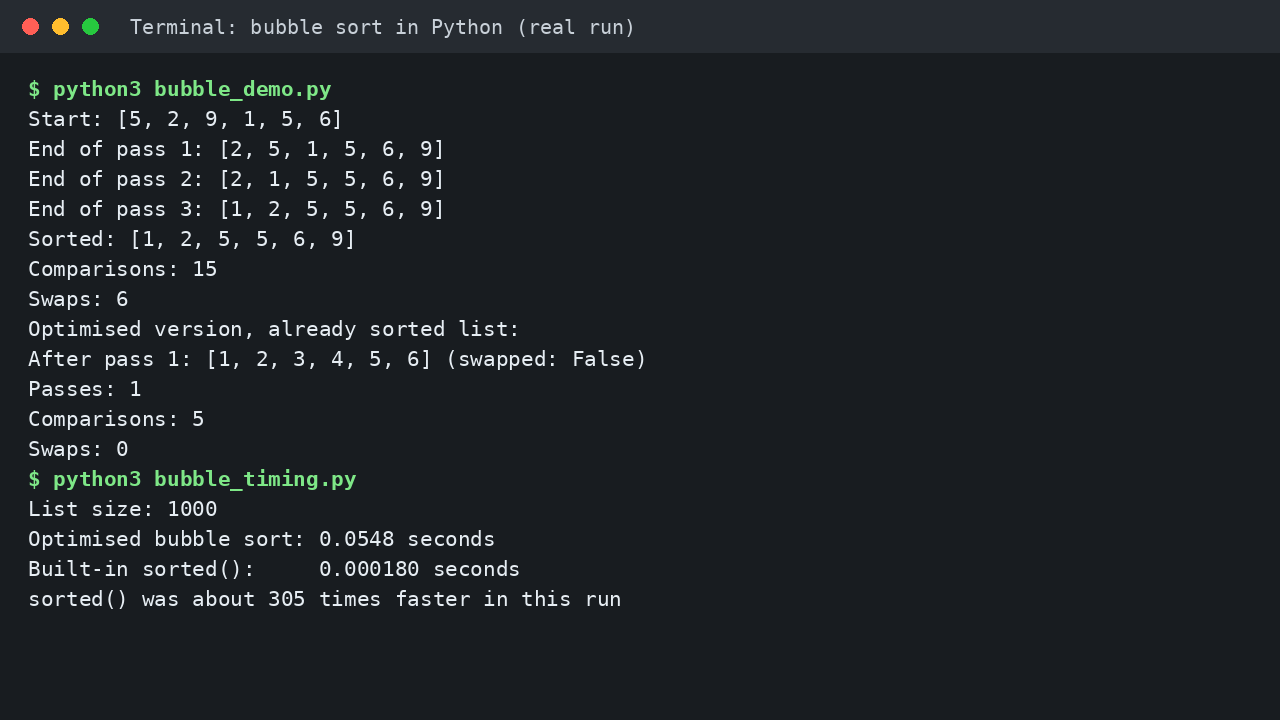
Let us sort [5, 2, 9, 1, 5, 6] by hand. In pass 1 we swap 5 and 2, keep 5 before 9, then swap 9 past 1, 5 and 6:
Start: [5, 2, 9, 1, 5, 6]
End of pass 1: [2, 5, 1, 5, 6, 9]
End of pass 2: [2, 1, 5, 5, 6, 9]
End of pass 3: [1, 2, 5, 5, 6, 9]
End of pass 4: [1, 2, 5, 5, 6, 9]
Sorted: [1, 2, 5, 5, 6, 9]
Pass 2 pushes the 1 forward. Pass 3 swaps 2 and 1, and the list is sorted. Pass 4 changes nothing, and that quiet pass proves we can stop. After each pass, one more position at the end is final, so the unsorted part shrinks by one item every time.
The Basic Bubble Sort in Python
Here is the plain version. It copies the input first, so the caller's list is never changed:
def bubble_sort(numbers):
    a = numbers[:]
    n = len(a)
    for i in range(n - 1):
        for j in range(n - 1 - i):
            if a[j] > a[j + 1]:
                a[j], a[j + 1] = a[j + 1], a[j]
    return a

print(bubble_sort([5, 2, 9, 1, 5, 6]))
Output:
[1, 2, 5, 5, 6, 9]The outer loop runs the passes. The inner loop walks the still unsorted part, which is why its range is n - 1 - i: after i passes, the last i items are sorted and need no more checks. The swap line exchanges two neighbours in one step, with no temporary variable. Python builds the right hand pair first, then unpacks it, so nothing is overwritten early.
Adding two counters to the same code gave this real result on our test list:
Result: [1, 2, 5, 5, 6, 9]
Comparisons: 15
Swaps: 6
Fifteen comparisons for six items is no coincidence. The passes compare 5, then 4, then 3, then 2, then 1 pairs, which sums to 15. Double the list and the comparisons roughly quadruple. That is the whole complexity story in one sentence.
The Optimised Version: Swapped Flag and Shrinking Range
The basic version keeps passing even when the list became sorted early. The fix is a flag named swapped: False at the start of each pass, True on any swap, and stop if a full pass ends with it still False. The shrinking range stays:
def bubble_sort_optimised(numbers):
    a = numbers[:]
    n = len(a)
    for i in range(n - 1):
        swapped = False
        for j in range(n - 1 - i):
            if a[j] > a[j + 1]:
                a[j], a[j + 1] = a[j + 1], a[j]
                swapped = True
        if not swapped:
            break
    return a
Running this version on the already sorted list [1, 2, 3, 4, 5, 6] gave:
After pass 1: [1, 2, 3, 4, 5, 6] (swapped: False)
No swaps, so the list is sorted. Stop early.
Passes: 1
Comparisons: 5
Swaps: 0
One pass, five comparisons, done. On our shuffled test list the same code needed 4 passes and 14 comparisons, one fewer than the basic version, because it skipped the pointless final pass. A small win here, but a huge win on nearly sorted input.
Time Complexity: Why Bubble Sort Is O(n^2)
For n items, bubble sort makes about n passes of up to n comparisons, so the work grows with n squared: O(n^2) on average and in the worst case. The best case belongs to the optimised version on sorted input, where one pass of n comparisons proves the job is done: O(n). Extra memory is O(1), because sorting happens in place. If Big O itself feels fuzzy, our guide to Big O notation explained simply, with everyday examples builds the idea from scratch.
Bubble Sort vs Python's sorted(): The Honest Comparison
In real Python code you would rarely ship bubble sort, because sorted() returns a new sorted list in one line:
print(sorted([5, 2, 9, 1, 5, 6]))[1, 2, 5, 5, 6, 9]The official Python sorting guide explains that sorted() uses Timsort, which spots runs of already ordered data and merges them, making it fast and stable. The built in functions documentation covers sorted() itself, including its key and reverse options. We timed both on the same 1,000 random numbers (seed 42):
List size: 1000
Optimised bubble sort: 0.0548 seconds
Built-in sorted():     0.000180 seconds
sorted() was about 305 times faster in this run
Exact timings vary by machine, but the gap widens as lists grow, because O(n log n) pulls away from O(n^2) quickly.
| Case or feature | Bubble sort | Python sorted() (Timsort) |
|---|---|---|
| Best case | O(n), optimised, on sorted input | O(n) on ordered data |
| Average case | O(n^2) | O(n log n) |
| Worst case | O(n^2) | O(n log n) |
| Extra memory | O(1), in place | O(n) worst case |
| Stable | Yes | Yes |
| Best use | Learning, tiny lists | Real code, any size |
When Bubble Sort Is and Is Not Useful
Bubble sort is useful for learning how sorting, loops and complexity fit together, for interviews about swaps, and for tiny, nearly sorted lists, where the optimised version finishes in a pass or two.
It is not useful for large data or production Python code. If your list has thousands of items and you wrote two nested loops, the honest fix is not a cleverer bubble sort. It is sorted(). The neighbour thinking still pays off elsewhere, for example when you compare a stack vs a queue and how each one orders its items.
Common Mistakes and Troubleshooting
Off by one in the inner range. Writing range(n - i) instead of range(n - 1 - i) lets j reach the last index, and a[j + 1] raises IndexError: list index out of range. The minus 1 exists because the loop looks one step ahead.
Resetting the swapped flag in the wrong place. If swapped = False sits inside the inner loop, the flag forgets earlier swaps and the sort can stop early. The reset belongs at the start of each pass.
Sorting the caller's list by accident. If the caller still needs the original order, copy first with numbers[:], or use sorted(), which returns a new list.
Frequently Asked Questions
Why is it called bubble sort?
Because the largest unsorted value rises to the end on every pass, the way a bubble rises through water.
Is bubble sort stable?
Yes, in the form shown here. We swap only when the left value is strictly greater, so equal items never change their relative order.
Should I use bubble sort in real Python projects?
Almost never. Use sorted() or the list sort() method: faster, tested and shorter. Bubble sort earns its place in learning and interviews.
What should I learn after bubble sort?
Selection sort and insertion sort come next, then merge sort. After that, recursion explained with simple Python examples unlocks the divide and conquer sorts, built on a function that calls itself.
Conclusion
Bubble sort does one humble thing well: it teaches you to watch an algorithm work. You saw [5, 2, 9, 1, 5, 6] settle into order, counted its 15 comparisons and 6 swaps, watched the optimised version quit after one pass on sorted input, and measured sorted() finishing about 305 times faster on 1,000 items. Learn it for the thinking, then sort real lists the Python way.


Leave a Comment