

 Lavkush
Recursion is when a function calls itself to solve a smaller version of the same problem, again and again, until it reaches a simple case it can answer directly. That simple case is the base case, and it stops the function from calling itself forever. In this article you will run four complete Python examples: a countdown, a factorial, the Fibonacci sequence, and the sum of a list. You will also learn how the call stack works, what the Python recursion limit is, and which beginner mistakes to avoid.
What Is Recursion, in Plain Words?
Imagine you are in a long queue and want to know your position. You ask the person in front, who asks the person in front of them, until the question reaches the first person, who can answer at once: "I am number one." The answer then travels back, each person adding one, until you know your position.
That is recursion. A big problem is passed on as a smaller problem until the answer is obvious, and the small answers are combined on the way back. To revise functions first, see the official tutorial section on defining functions and control flow in Python.
The Two Parts Every Recursive Function Needs
The base case is the smallest version of the problem, the one the function can answer directly without calling itself. In the queue story, it is the first person.
The recursive case is everything else. The function does a small piece of work, then calls itself with an input one step closer to the base case. Every call must move closer, or the function will never stop.
Example 1: A Simple Countdown
The countdown is the friendliest first example, because you can watch the calls in the output. The function prints a number, then calls itself with a number one smaller.
def countdown(n):
    if n <= 0:
        print("Blast off!")
    else:
        print(n)
        countdown(n - 1)

countdown(5)
The line if n <= 0 is the base case. The else block is the recursive case: it prints the number and calls countdown(n - 1), one step closer to zero. The output is:
5
4
3
2
1
Blast off!
Example 2: Factorial of a Number
The factorial of a number is that number multiplied by every whole number below it down to one, so 5! is 5 x 4 x 3 x 2 x 1, which equals 120. It also has a neat recursive definition: n! equals n multiplied by (n - 1)!.
def factorial(n):
    if n == 0 or n == 1:
        return 1
    return n * factorial(n - 1)

print(factorial(5))
print(factorial(0))
The base case says the factorial of 0 and of 1 are both 1. The recursive case returns n * factorial(n - 1), so factorial(5) becomes 5 x factorial(4), then 4 x factorial(3), until factorial(1) returns 1 and the multiplications happen on the way back. The output is:
120
1
Example 3: Fibonacci Numbers
In the Fibonacci sequence, each number is the sum of the two before it: 0, 1, 1, 2, 3, 5, 8, 13, and so on. This one needs two base cases.
def fibonacci(n):
    if n == 0:
        return 0
    if n == 1:
        return 1
    return fibonacci(n - 1) + fibonacci(n - 2)

print(fibonacci(6))
print([fibonacci(i) for i in range(8)])
The recursive case adds two smaller calls. The output is:
8
[0, 1, 1, 2, 3, 5, 8, 13]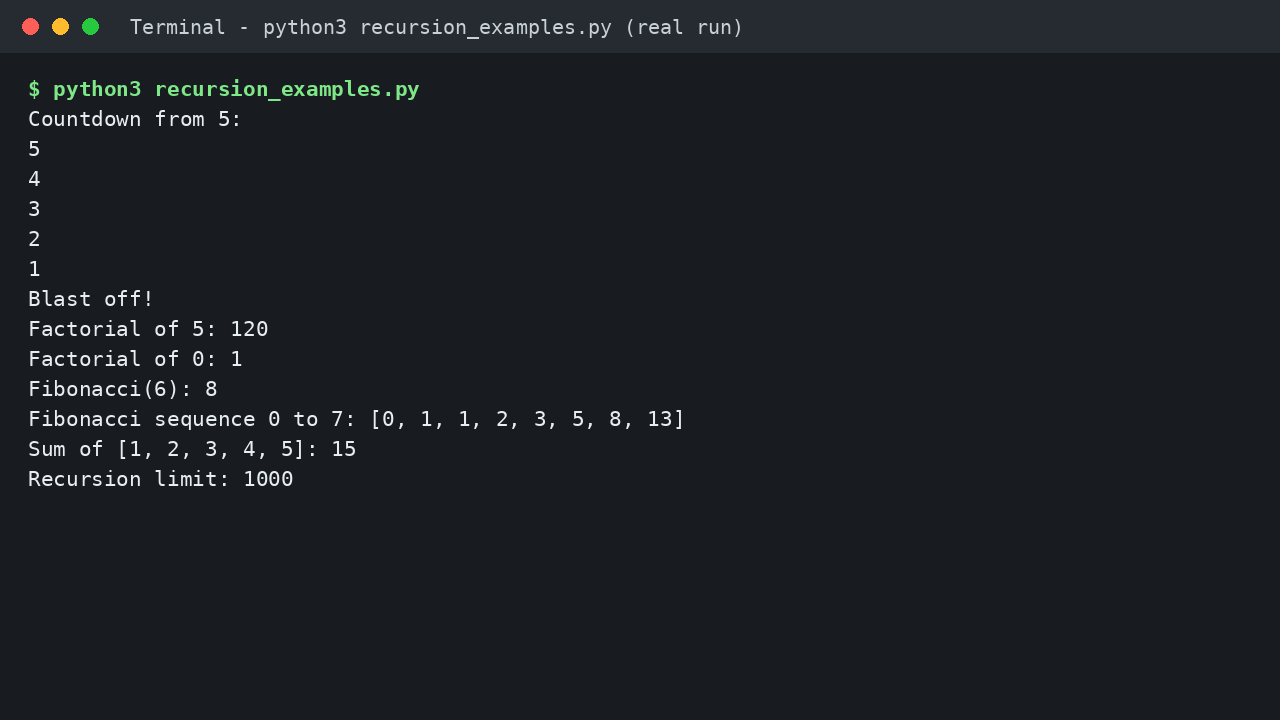
A friendly warning: this neat version is slow for larger numbers, because it repeats work. Finding fibonacci(6) calls fibonacci(5) and fibonacci(4), and fibonacci(5) calls fibonacci(4) again, so the same problems get solved many times and the calls grow very fast. Storing results in a dictionary, called memoisation, can fix this. Growth like this is easier to judge with our guide to Big O notation and how algorithm growth is measured and our walkthrough of time complexity in Python with everyday examples.
Example 4: Sum of a List
The sum of a list is the first item plus the sum of the rest, and the sum of an empty list is zero, which is the base case.
def sum_list(numbers):
    if not numbers:
        return 0
    return numbers[0] + sum_list(numbers[1:])

print(sum_list([1, 2, 3, 4, 5]))
Each call takes the first number out and asks a smaller call to handle the rest. The output is:
15In real projects you would use the built in sum() function, which is shorter and faster. The recursive version is still worth learning, because the same pattern appears in trees, nested folders, and interview questions.
What Is the Call Stack?
When a function calls itself, Python must remember where each unfinished call stopped and where to return its result. It stores this on the call stack, which you can picture as a pile of plates: each new call adds a plate, and a call can only finish when the calls above it have finished.
Take factorial(3). It waits for factorial(2), which waits for factorial(1), the base case, which returns 1. Then the stack unwinds: factorial(2) returns 2, and factorial(3) returns 6. This last in, first out behaviour is why the stack matters, and our comparison of the stack and queue data structures and their key differences explains it with more examples.
The Python Recursion Limit and RecursionError
Every unfinished call uses memory, so Python protects your program with a recursion limit. Call too deeply and Python raises a RecursionError instead of crashing. Check your limit like this:
import sys

print(sys.getrecursionlimit())
On the machine used to test this article, the output was:
1000Your number will most likely also be 1000, the usual default. The official documentation for the sys module in Python describes this limit in detail. You can raise it with sys.setrecursionlimit(), but treat that as an expert tool, not a fix: hitting the limit usually means a missing base case, so fix the logic first.
Recursion or a Loop: Which Should You Use?
Anything written with recursion can also be written with a loop. Use the version that is clearer and safer for your data size.
| Point to compare | Recursion | Loop |
|---|---|---|
| How it repeats | A function calls itself with a smaller input | A for or while block repeats steps |
| How it stops | When the base case is reached | When the loop condition becomes false |
| Memory use | Uses the call stack, so deep calls cost memory | Usually uses very little extra memory |
| Best for | Trees, nested data, divide and conquer problems | Simple counting, lists, long repetition |
| Main risk | RecursionError if the calls go too deep | An infinite loop if the condition never changes |
A simple rule: if the problem is nested or branching, try recursion. If it is a long, straight line of steps, use a loop.
Common Mistakes and Troubleshooting
Forgetting the base case. The function calls itself until Python raises a RecursionError. Fix: write the base case first, every time.
The input never gets smaller. Calling countdown(n) instead of countdown(n - 1) means the base case is never reached. Fix: check every call moves closer to it.
Forgetting to return the recursive call. Writing factorial(n - 1) on its own throws the answer away, and the function returns None. Fix: the recursive call is usually part of a return statement.
Expecting the naive Fibonacci code to be fast. It repeats work, so large inputs crawl. Fix: use a loop, or store results already worked out.
Raising the limit to hide a bug. A higher limit only delays the crash. Fix: print the argument for a small input and check the values move towards the base case.
Frequently Asked Questions
Is recursion hard to learn?
No, it only feels strange at first. Trace one small example on paper and the idea usually clicks within an hour.
What happens if a recursive function has no base case?
It keeps calling itself until Python raises a RecursionError, so always write the base case first.
Is recursion faster than a loop in Python?
Usually no. Loops are normally faster and use less memory. Recursion wins on clarity for nested problems, not speed.
When should I use recursion in real projects?
Use it when the data is nested, such as folders inside folders, comments with replies, or splitting a problem into halves.
Conclusion
Recursion is simply a function that calls itself on a smaller problem until it reaches a base case it can answer directly. You have seen it count down, build a factorial, grow the Fibonacci sequence, and add up a list. Pick one example, type it yourself, break it by removing the base case, then fix it. That small experiment teaches more than ten definitions. Happy coding, and yes, this conclusion was written by a human, not by a function calling itself.


Leave a Comment