

 Lavkush
A Python set is a collection that holds unique items in no particular order. Add the same value twice and the set keeps only one copy. If you need to remove duplicates from a list, test whether something is in a group, or find what two groups have in common, a set is usually the right tool. In this guide you will learn how to create sets, add and remove items, test membership, and use union, intersection and difference, with small examples run on Python 3.12.3. All outputs are real.
What Is a Set, in One Minute?
Think of a set as a bag that refuses to hold two copies of the same thing. Put in "apple", "orange", "apple" and "pear", and the bag holds three items, because the second "apple" is dropped. Order does not matter either: a set does not promise to keep items in the order you added them.
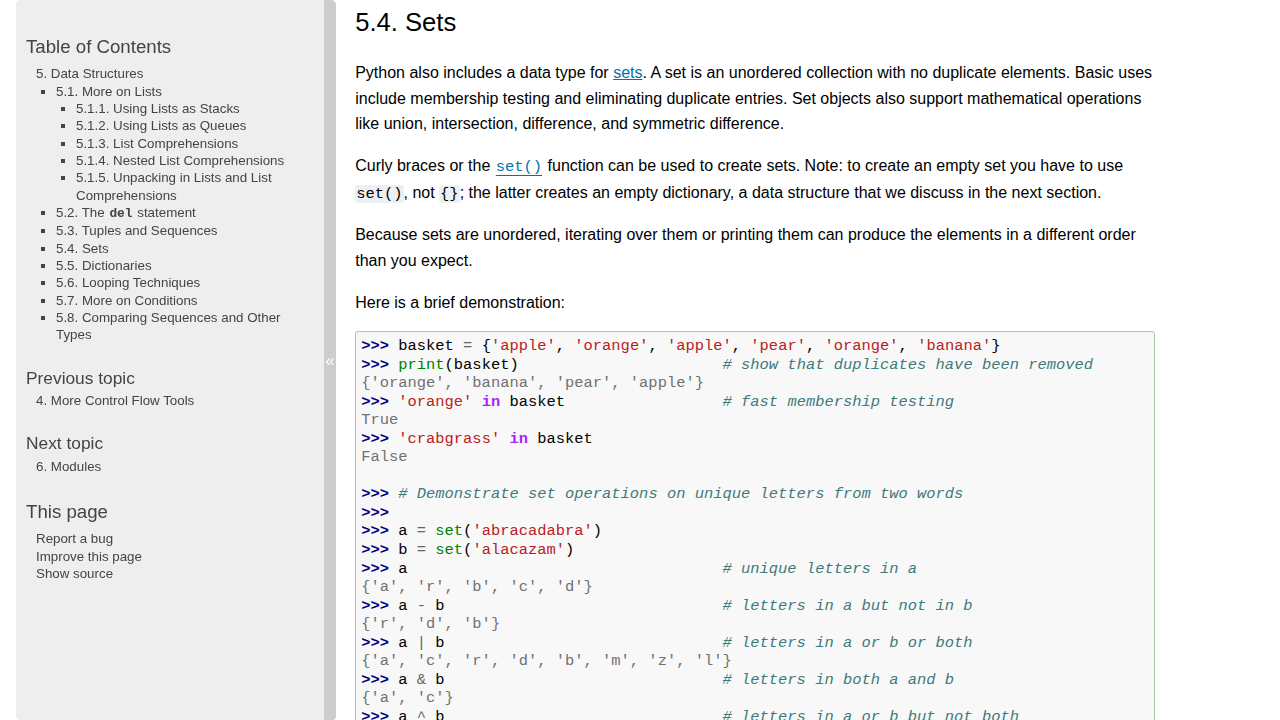
Here is the classic demo from the official Python tutorial. A basket of fruit is built with duplicates, and printing it shows the duplicates are gone:
basket = {'apple', 'orange', 'apple', 'pear', 'orange', 'banana'}
print(sorted(basket))
Output:
['apple', 'banana', 'orange', 'pear']I used sorted() here so the output comes out in a stable order. A raw set prints its items in an order Python chooses, which can change between runs, so never rely on a set keeping your order. If order matters, use a list. If uniqueness matters, use a set. Our guide to Python data structures explained places sets next to lists, tuples and dictionaries.
Creating Sets: Curly Braces and set()
There are two ways to make a set. Curly braces with values inside make a set with those values. The set() function builds a set from any collection, like a list or a string:
fruits = {'apple', 'banana', 'orange'}
letters = set('abracadabra')
print(sorted(letters))
Output:
['a', 'b', 'c', 'd', 'r']The string "abracadabra" has eleven letters, but the set keeps only the five unique ones. This trick is a quick way to see which distinct characters appear in some text. One trap catches every beginner: an empty pair of curly braces {} does NOT make an empty set. It makes an empty dictionary. To make an empty set, always write set(). The official Python tutorial on data structures warns about this in its first paragraph on sets.
Adding and Removing Items
Sets are mutable, so you can change them after creating them. add() puts one item in, discard() takes one out, and update() adds several at once:
basket = {'apple', 'banana', 'orange', 'pear'}
basket.add('mango')
basket.discard('pear')
basket.discard('pear')
print(sorted(basket))
Output:
['apple', 'banana', 'mango', 'orange']Notice that discarding "pear" twice caused no error. discard() quietly does nothing when the item is not there, which makes it the safe choice in real code. Its stricter cousin remove() raises a KeyError when the item is missing, so use remove() only when a missing item would mean a bug you want to hear about. Adding an item that is already present also does nothing: the set guards uniqueness for you.
Membership Testing: The Fast Check
The most common set operation is also the simplest: checking whether an item is in the set with in:
basket = {'apple', 'orange', 'apple', 'pear', 'orange', 'banana'}
print('orange' in basket)
print('crabgrass' in basket)
Output:
True
False
This check is fast because sets are built on hash tables, so Python jumps straight to the right spot instead of scanning every item. With a list, the same check scans from the start until it finds the item, which gets slow as the list grows. The rule of thumb is simple: if your code keeps asking "is this thing in the group?", put the group in a set. The official Python documentation for set types lists every method a set offers.
Set Operations: Union, Intersection and Difference
Sets support the maths you learned in school, and the operators read like the maths. Take two sets of letters:
a = set('abracadabra')
b = set('alacazam')
print('a - b:', sorted(a - b))
print('a | b:', sorted(a | b))
print('a & b:', sorted(a & b))
print('a ^ b:', sorted(a ^ b))
Output:
a - b: ['b', 'd', 'r']
a | b: ['a', 'b', 'c', 'd', 'l', 'm', 'r', 'z']
a & b: ['a', 'c']
a ^ b: ['b', 'd', 'l', 'm', 'r', 'z']
Here is what each line means. a - b is the difference: letters in a but not in b. a | b is the union: letters in either set. a & b is the intersection: letters in both. a ^ b is the symmetric difference: letters in exactly one of the two. These four operations answer real questions: which users signed up for course A but not course B, or which tags appear on both posts. If you work with dictionaries a lot, our guide to Python dictionary methods explained with simple examples shows the sibling collection that maps keys to values.
Removing Duplicates from a List
The single most useful set trick in everyday Python is removing duplicates from a list. Convert the list to a set, then back to a list:
nums = [3, 1, 3, 2, 1, 4]
print('unique list:', sorted(set(nums)))
Output:
unique list: [1, 2, 3, 4]One line, no loop, no manual checking. Two warnings come with it. First, the result has no guaranteed order, so sort it if order matters, as I did here. Second, if you need to keep the original order while removing duplicates, a set alone will not do it. Use dict.fromkeys(nums) instead, which keeps first-seen order because dictionaries remember insertion order. The set version is perfect when you only need the unique values, for example counting distinct visitors to a page. Our guide to Python string methods explained with simple examples shows another place where small cleanups like this save real time.
Sets vs Lists vs Dictionaries
Beginners often ask which collection to use. The short answer:
| Question | List | Set | Dictionary |
|---|---|---|---|
| Allows duplicates? | Yes | No | Keys unique |
| Keeps order? | Yes | No | Yes, insertion order |
| Access by | Index number | Membership test | Key |
| Best for | Order matters | Uniqueness, fast checks | Named data |
| Example use | Playlist, scores | Tags, seen users | User profile, settings |
Pick the collection that matches the question you keep asking. Need the third item? Use a list. Need to know if something is already there? Use a set. Need a value by name? Use a dictionary.
Common Mistakes and Troubleshooting
Using {} for an empty set. {} makes an empty dictionary, not a set. Always write set() for an empty set, or your code will fail later when you call .add() on a dictionary.
Expecting a set to keep order. Sets are unordered. If your code depends on the order items come out, use a list or sort the set with sorted().
Putting a list inside a set. Set items must be hashable, so a list cannot be a set member. Use a tuple instead, because tuples are immutable and hashable.
Using remove() when discard() is safer. remove() raises a KeyError when the item is missing. Unless a missing item means a bug, prefer discard().
Indexing a set like a list. my_set[0] raises a TypeError, because sets have no indexes. Convert to a list first if you need an item by position.
Frequently Asked Questions
What is a set in Python?
An unordered collection of unique items. Duplicates are dropped automatically, and you test membership with in.
How do I remove duplicates from a list in Python?
Convert it with set(), then back with list(): list(set(my_list)). Sort the result if you need a stable order.
What is the difference between a set and a list?
A list keeps order and allows duplicates, and you access items by index. A set drops duplicates, keeps no order, and is built for fast membership tests.
Can a set contain a list?
No. Set items must be hashable, and lists are not. Use a tuple instead, which is immutable and hashable.
What is a frozenset in Python?
An immutable set. You cannot add to it or remove from it, which makes it usable as a dictionary key or as a member of another set.
Conclusion
Sets are the quiet workhorse of Python collections. They keep your data unique, answer "is it in there?" faster than a list, and turn duplicate removal into a one-liner. The next time you catch yourself writing a loop to check for duplicates, reach for a set instead. Open your Python shell, run the examples from this guide, and try the letter operations on two words of your own.



Leave a Comment