

 Lavkush
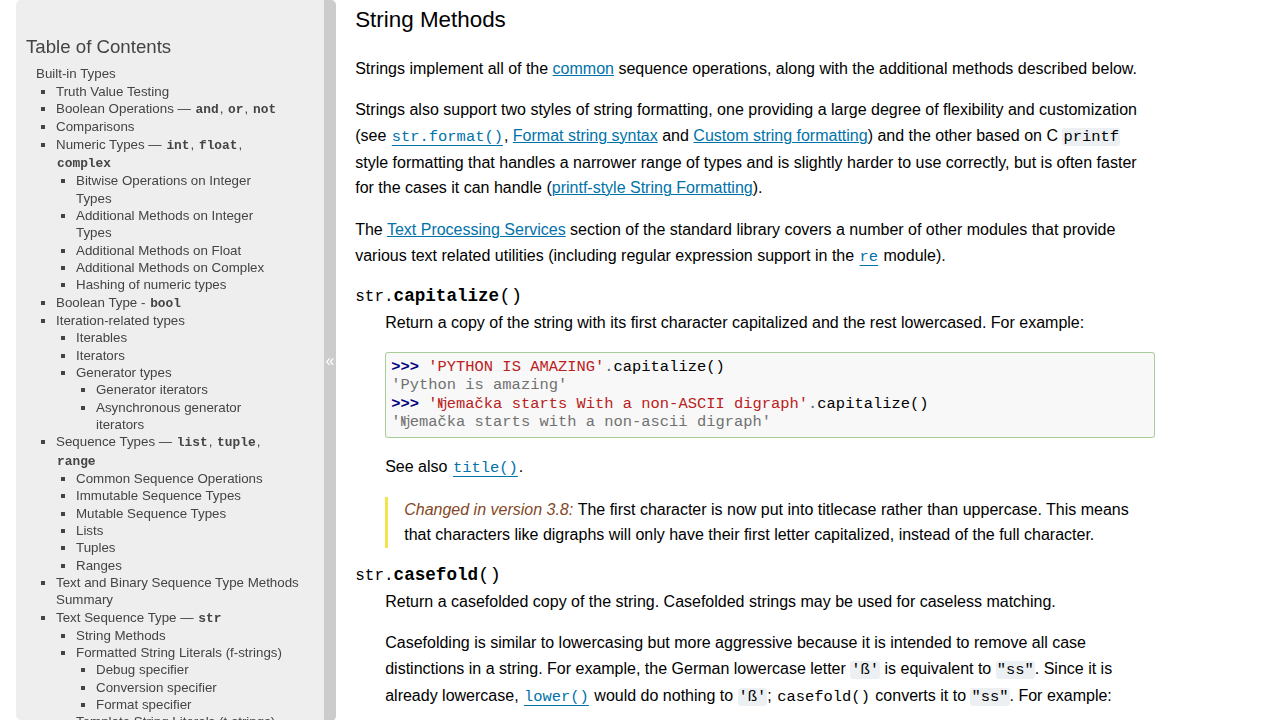
Python string methods are small built in tools that change, clean, search, split and check text. You call one with a dot right after the string, like "hello".upper(). There are dozens of them, but a beginner only needs about fifteen for most everyday jobs. In this guide you will learn those methods grouped by the job they do, with a small working example and real output for each one, and learn which method to pick when two of them look similar. Every example was run on Python 3.12.3, and string methods are stable across Python 3.
The One Rule First: Strings Never Change
Python strings are immutable: once created, a string cannot be changed. Every string method returns a brand new string and leaves the original untouched. Watch what happens:
greeting = "hello"
greeting.upper()
print(greeting)
greeting = greeting.upper()
print(greeting)
Output:
hello
HELLO
The first print shows hello because greeting.upper() built a new string and threw it away. The second shows HELLO because we stored the new string back into greeting. This is the most common beginner mistake with string methods: if you want to keep the result, assign it to a variable.
Changing Case: upper, lower, title and capitalize
Case methods change the capitalisation of a string. Reach for them when text arrives in messy case:
name = "lavkush kumar"
print(name.upper())
print(name.title())
print("HeLLo WoRLd".lower())
print("python is fun".capitalize())
Output:
LAVKUSH KUMAR
Lavkush Kumar
hello world
Python is fun
upper() turns every letter into capitals and lower() turns every letter into small letters. title() capitalises the first letter of every word. capitalize() only touches the first character and lowers the rest. The everyday use is comparison: lower both strings with lower() before you compare them, and "Yes", "YES" and "yes" will all match. The official Python tutorial section on strings covers the basics in the same friendly style.
Cleaning Up Text: strip, lstrip and rstrip
Text typed by real people arrives with extra spaces, and text read from files often carries a newline. The strip family trims characters from the edges:
raw = "   hello, world!   "
print(repr(raw.strip()))
print(repr(raw.lstrip()))
print(repr(raw.rstrip()))
print(repr("...hello...".strip(".")))
Output:
'hello, world!'
'hello, world!   '
'   hello, world!'
'hello'
strip() removes whitespace from both ends, lstrip() trims only the left end and rstrip() trims only the right end. repr() in the prints makes the invisible spaces visible. You can also pass characters to strip: "...hello...".strip(".") removes dots from both ends until it meets a different character. Use strip() every time you accept text from a user or read a line from a file, because a stray space is the classic reason two identical looking strings fail an equality check.
Searching Inside a String: find, index, startswith and endswith
find() tells you where a piece of text first appears, index() does the same job with a stricter attitude, and startswith() and endswith() check the edges:
text = "learn python, love python"
print(text.find("python"))
print(text.find("ruby"))
print(text.index("python"))
print(text.startswith("learn"))
print(text.endswith("python"))
print("python" in text)
Output:
6
-1
6
True
True
True
find("python") returns 6, the position where "python" starts, counting from 0. When the text is not there, find() returns -1 instead of crashing, so it is the safe choice when you are not sure the text exists. index() returns the same 6, but it raises a ValueError if the text is missing, so use it only when the text must be there. startswith() and endswith() return True or False, perfect for checks like "does this filename end with .py". The in operator is the simplest check: "python" in text is True when the word appears anywhere.
Splitting and Joining: split and join
split() and join() are opposites: split() cuts a string into a list of pieces, and join() glues a list of strings back into one string:
sentence = "python is fun to learn"
words = sentence.split()
print(words)
print(" ".join(words))
print("apple,banana,cherry".split(","))
print(", ".join(["red", "green", "blue"]))
Output:
['python', 'is', 'fun', 'to', 'learn']
python is fun to learn
['apple', 'banana', 'cherry']
red, green, blue
With no arguments, split() cuts on any run of whitespace. Pass a separator like "," and it cuts on commas instead. join() is called on the separator string, not on the list, so ", ".join(["red", "green", "blue"]) puts a comma and a space between each item. Once split() has given you a list, our guide to Python list methods explained with simple examples covers what you can do next, and our guide to Python dictionary methods explained with simple examples covers storing the same words as keys and values.
Replacing Text: replace
replace() swaps one piece of text for another, replacing every occurrence unless you limit it:
msg = "I love Java, Java is great"
print(msg.replace("Java", "Python"))
print(msg.replace("Java", "Python", 1))
Output:
I love Python, Python is great
I love Python, Java is great
The first call changes both occurrences of "Java", and the second passes 1 as the count, so only the first changes. Remember the immutability rule: replace() returns a new string, so assign the result to keep it.
Checking What a String Holds: isdigit, isalpha and Friends
The is... methods ask yes or no questions about a string, and they are the first check when validating input:
print("12345".isdigit())
print("hello".isalpha())
print("hello123".isalnum())
print("   ".isspace())
Output:
True
True
True
True
isdigit() is True only when every character is a digit, so check with it before converting user input with int(). isalpha() needs letters only, while isalnum() accepts letters and digits mixed, which suits usernames and codes. isspace() catches a string that is nothing but spaces. Strip the input first, then check it.
When Two Methods Look Alike: a Quick Comparison
A few pairs do nearly the same job, and picking the wrong one causes bugs. This table sorts them out:
| Pair | Use this one when | Watch out for |
|---|---|---|
| find() vs index() | find() when it might be missing, index() when it must be there | find() returns -1, index() raises ValueError |
| split() vs partition() | split() for many pieces, partition() to cut once | partition() always returns a 3-tuple |
| strip() vs replace() | strip() for edges only, replace() for text anywhere inside | strip() removes characters, not a substring |
| startswith() vs in | startswith() to check the beginning, in to check anywhere | in finds the text at any position |
One pair deserves a closer look. partition() splits a string into three parts at the first separator: the part before, the separator itself, and the part after. For an email address, "lavkush@example.com".partition("@") gives ('lavkush', '@', 'example.com'), and when the separator is missing it still returns three parts, so unpacking like user, sep, domain = email.partition("@") never crashes. That is safer than split("@")[1], which raises an IndexError when there is no @.
Common Mistakes and Troubleshooting
Calling a method and throwing the result away. name.upper() on its own line does nothing visible. Assign the result: name = name.upper().
Using index() and getting a ValueError. When the text is missing, index() raises ValueError and stops your program. Use find() and check for -1 instead.
Joining a list that holds numbers. ", ".join([1, 2, 3]) raises TypeError because join() only accepts strings. Convert first with ", ".join(map(str, [1, 2, 3])).
Thinking strip() removes a word. "hello world".strip("hello") does not remove the word "hello", it removes any of the characters h, e, l and o from the ends. Use replace() to remove a word.
Forgetting that comparisons are case sensitive. "Yes" == "yes" is False. Lower both sides with lower() before comparing.
Frequently Asked Questions
Do Python string methods change the original string?
No. Strings are immutable, so every method returns a new string. Save the result, like name = name.upper(), or the work is lost.
What is the difference between find() and index()?
Both return the position where a piece of text first appears. When it is not there, find() returns -1, while index() raises a ValueError. Use find() when the text might be missing.
How do I remove spaces from the start and end of a string?
Use strip(). It removes whitespace from both ends, while lstrip() trims only the left end and rstrip() only the right end.
Are string methods the same in every Python 3 version?
Yes, the core string methods have been stable for years and work the same in every Python 3 version. The string module documentation lists the extra helpers.
Conclusion
Python string methods are small tools with clear jobs: change the case with upper() and lower(), clean the edges with strip(), search with find() and startswith(), cut and glue with split() and join(), swap text with replace(), and check input with the is... methods. Remember the one rule: strings never change in place, so always save the result. Strings are one of Python's core data structures, and our guide to Python data structures explained simply shows how they fit alongside lists, dictionaries and the rest. Practise on a messy string of your own.


Leave a Comment