

 Lavkush
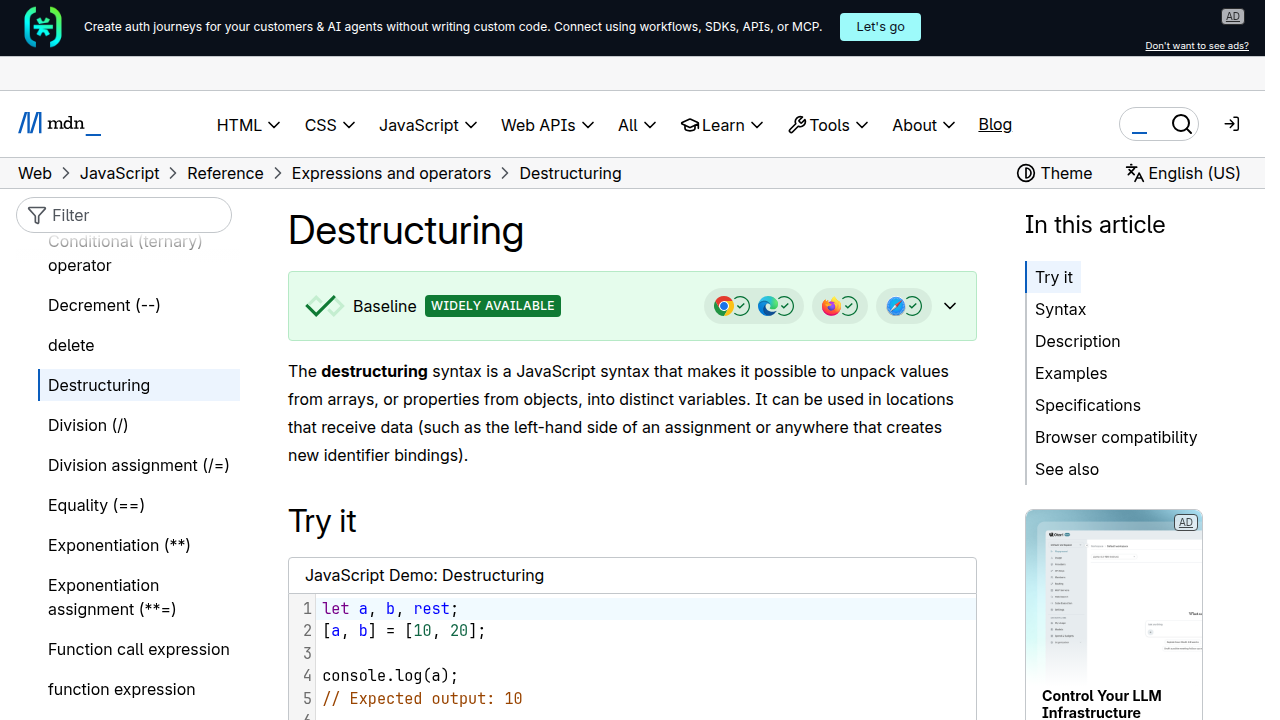
JavaScript destructuring is a short way to pull values out of an array or an object into variables. Instead of writing const first = colours[0] and const name = user.name on separate lines, you unpack everything in one line. In this guide you will learn array and object destructuring, defaults, renaming, the rest operator, and destructuring in function parameters, with examples you can run in Node.js or your browser console. All code was run on Node.js v24.22.1.
What Is Destructuring in One Minute?
Imagine a suitcase packed with clothes. Without destructuring, you take items out one by one. With destructuring, everything lands in labelled boxes in one move. That is all it does: it unpacks values from an array or an object into separate variables in one statement.
const colours = ["red", "green", "blue"];
const [first, second] = colours;
console.log(first, second);
Output:
red greenThe square brackets on the left mirror the array on the right. The MDN page on destructuring assignment defines it the same way: a syntax that unpacks values from arrays, or properties from objects, into distinct variables. Position decides everything: first gets index 0 and second gets index 1, while the third colour is ignored because no variable asked for it. If arrays and objects themselves still feel new, our guide to JavaScript arrays and objects explained simply covers the basics first.
Array Destructuring: Pick Values by Position
Array destructuring works by position, so your variables must match the order of the values. Skip a value by leaving an empty slot with just a comma:
const scores = [95, 88, 76, 64];
const [top, , third] = scores;
console.log(top, third);
Output:
95 76The empty slot between the commas skips 88, so third picks up 76. This is handy when a function returns an array and you only need some of the values. One warning: if you ask for more variables than the array has values, the extras become undefined, not an error. Defaults fix that, as you will see next. Destructuring also swaps two variables in one line, [a, b] = [b, a], because the right side is built before anything is assigned.
Defaults and the Rest Operator
When a value might be missing, give the variable a default. When you want everything left over, collect it with the rest operator, three dots:
const scores = [95];
const [top = 0, next = 0, ...rest] = scores;
console.log(top, next, rest);
Output:
95 0 []Here top gets 95, next falls back to its default 0, and rest collects whatever remains, which is nothing, so it is empty. Two details matter. A default only kicks in when the value is undefined; if the array actually contains null, the variable keeps null, because null is a real value, not a missing one. And the rest operator must always be last, because it gathers everything that is left. Our guide to JavaScript arrow functions explained with simple examples uses the same rest syntax in function parameters, so the pattern will feel familiar there too.
Object Destructuring: Pick Properties by Name
Objects work differently: you pick by property name, not by position. The variable name must match the property name, and the order does not matter:
const user = { name: "Meera", city: "Delhi" };
const { name, city } = user;
console.log(name, city);
Output:
Meera DelhiThe curly braces on the left mirror the object on the right. JavaScript looks up the property called name and stores it in a variable also called name. This is the form you will use most in real code, because data from APIs almost always arrives as objects. Our guide to what JSON is, explained simply shows the format that data usually travels in. When a function returns a user object with ten fields and you need only two, object destructuring lets you take exactly those two and ignore the rest.
Renaming Variables and Setting Defaults
Sometimes the property name is awkward, or it clashes with a variable you already have. A colon renames a property as you unpack it, and = adds a default in the same line:
const user = { name: "Meera", city: "Delhi" };
const { name: userName, city, age = 22 } = user;
console.log(userName, city, age);
Output:
Meera Delhi 22Here name: userName means "take the name property and store it in a variable called userName". The age property does not exist, so its default 22 is used. Renaming is useful when two objects both have a property called id and you need both values in the same scope without a clash.
Destructuring in Function Parameters
Destructuring shines brightest in function parameters. Instead of receiving a whole object and digging values out inside the function, unpack them right in the signature:
function greet({ name, city = "Unknown" }) {
  return `Hello ${name} from ${city}`;
}
console.log(greet({ name: "Arjun" }));
console.log(greet({ name: "Meera", city: "Delhi" }));
Output:
Hello Arjun from Unknown
Hello Meera from Delhi
The first call passes no city, so the default "Unknown" fills in. Two benefits come free. First, the function signature documents exactly which fields it needs. Second, callers can pass properties in any order, which beats remembering the exact order of five positional arguments. React developers will recognise this pattern at once, because React components receive their props exactly this way. The JavaScript.info guide to destructuring assignment shows the same idea applied to nested objects, where the brackets simply follow the shape of the data.
Destructuring vs the Old Way
Both styles work, but destructuring usually says the same thing in fewer lines:
| Task | Old way | Destructuring way |
|---|---|---|
| First two array items | Two lines, with indexes | One line, positions shown |
| Two object properties | Two lines, with dot access | One line, names shown |
| Missing value | Manual check with if | Default value in place |
| Swap two variables | A temp variable, three lines | One line, no temp needed |
| Function needs two fields | Receive object, dig inside it | Unpack in the signature |
The old way is not wrong, and for a single value it is often clearer. Destructuring earns its place when you need several values at once, when defaults make the code safer, or when a function signature should show what it needs. To see where destructuring fits into the bigger picture of how JavaScript runs your code, read our explainer on the JavaScript event loop.
Common Mistakes and Troubleshooting
Mixing up the brackets. Arrays use square brackets [] and objects use curly braces {}. Writing const {first} = colours on an array gives undefined, because arrays have no property called first.
Forgetting that array destructuring is positional. const [second, first] = colours puts "red" into second, because position is all that matters. Name your variables after their position, not after what you wish they held.
Expecting a default to replace null. A default only replaces undefined. If the value is null, the variable stays null, so check for null explicitly when your data can contain it.
Destructuring undefined or null. const {name} = undefined throws a TypeError, because there is nothing to unpack. Guard the value first, or give the whole parameter a default, like function greet({name} = {}).
Declaring without const, let or var. A bare line like {a, b} = obj confuses the parser, because a line starting with { looks like a block. Declare with const or let, or wrap an assignment in parentheses: ({a, b} = obj).
Frequently Asked Questions
What is destructuring in JavaScript?
It is a syntax that unpacks values from arrays, or properties from objects, into separate variables in one statement, using brackets that mirror the shape of the data.
Can I destructure an array and an object together?
Yes. For example, const [{name}] = users takes the first user object from an array and then its name property. Keep the brackets matching the data at each level.
Does destructuring change the original array or object?
No. Destructuring only reads values into new variables. The original array or object stays exactly as it was.
When should I not use destructuring?
Skip it when you need only one value and plain access is clearer, or when nesting goes deeper than two levels and the line turns into a puzzle. Readability wins over cleverness.
Is destructuring supported in all browsers?
Yes, in every modern browser. It is part of ES6 from 2015, so Chrome, Firefox, Safari and Edge have supported it for years.
Conclusion
Destructuring is a small syntax with a big payoff: one line that unpacks the values you need, with defaults for the missing ones and new names where the old ones do not fit. Start with arrays and simple objects, add defaults and the rest operator when you need them, and use it in function parameters to make your functions self documenting.



Leave a Comment