

 Lavkush
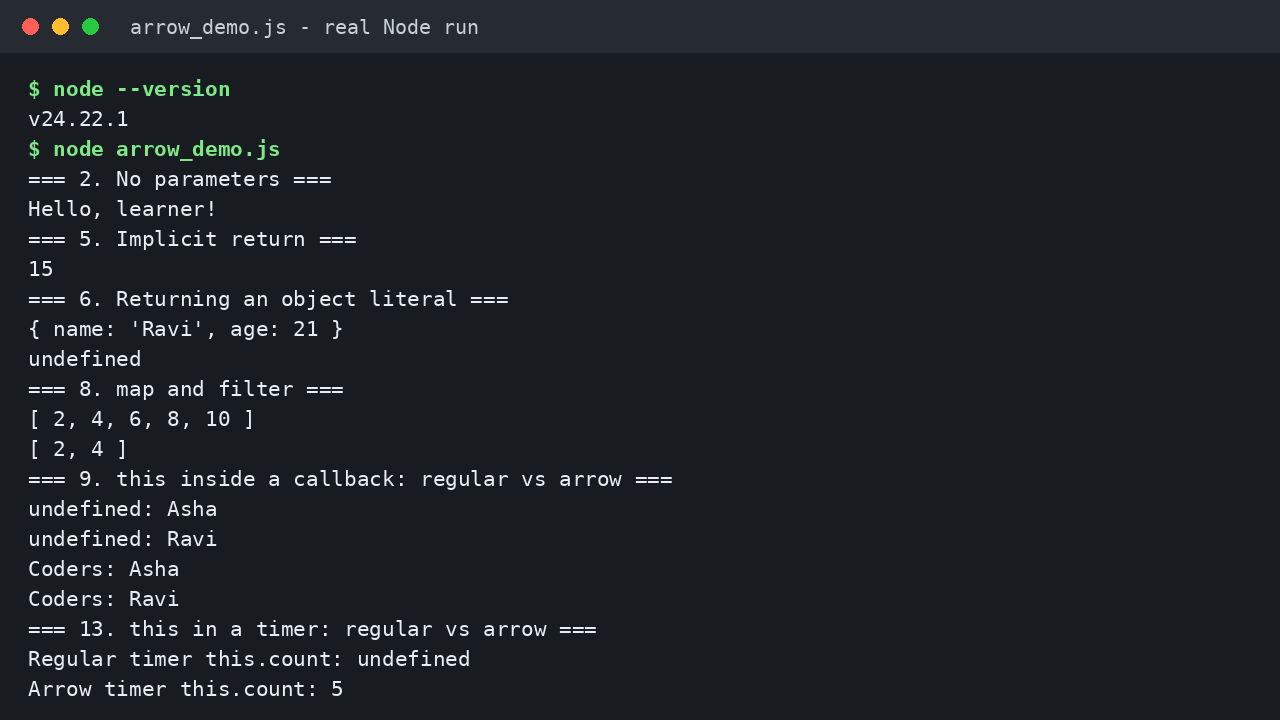
An arrow function is a shorter way to write a function in JavaScript. Instead of the function keyword, you put an arrow, =>, between the parameters and the code: const add = (a, b) => a + b;. In this guide you will learn every syntax form, use arrows with map and filter, meet the one big difference called this, and avoid the mistakes that confuse most beginners. Every output below matches a real test run in Node.
What Is an Arrow Function?
The same job, written both ways:
function addRegular(a, b) {
  return a + b;
}

const addArrow = (a, b) => a + b;

console.log(addRegular(3, 4));
console.log(addArrow(3, 4));
Expected output:
7
7
Both print 7. The arrow version drops the function keyword and the return word, and stores the function in a variable. It is mostly a shorter, calmer way to write the same thing, which is why modern code is full of arrows.
We store it in a const variable, because it will not be reassigned later. If const, let and var still blur together for you, our guide to the difference between var, let and const in JavaScript clears it up. For the bigger picture, the MDN guide to functions in JavaScript shows where arrows sit among all function types.
The Syntax, Form by Form
Arrow functions change shape depending on the parameter count and the body size. Six forms cover almost everything:
Form 1: no parameters. Use empty parentheses, then the arrow:
const sayHello = () => "Hello, learner!";

console.log(sayHello());
Expected output: Hello, learner! The empty () is required: with no parameters there is nothing to put inside, but the parentheses still have to be there.
Form 2: one parameter. The parentheses become optional:
const double = x => x * 2;

console.log(double(6));
Expected output: 12. Writing (x) => x * 2 gives the same result. Pick one style per project and stick to it.
Form 3: two or more parameters. Now the parentheses are required again:
const add = (a, b) => a + b;

console.log(add(10, 5));
Expected output: 15. A second test example, joining two names, printed Asha Sharma. The rule is easy: zero parameters need empty parentheses, one makes them optional, two or more make them compulsory.
Form 4: implicit return. When the body is one expression with no curly braces, its value comes back automatically. Programmers call this an implicit return, because return is implied:
const triple = n => n * 3;

console.log(triple(5));
Expected output: 15. This is the form you will type most often, especially inside short callbacks. The MDN page on arrow functions lists every variation in one place, worth bookmarking.
Form 5: returning an object literal. This form has one famous trap: curly braces after the arrow mean a function body, not an object. The fix: wrap the object in parentheses:
const makeUser = (name, age) => ({ name: name, age: age });

console.log(makeUser("Ravi", 21));
Expected output: { name: 'Ravi', age: 21 }. Without the parentheses, JavaScript reads the braces as a body and returns nothing: our test version printed undefined, the classic beginner surprise here.
Form 6: a multiline body. When a function needs more than one step, bring back the curly braces and write return yourself:
const grade = score => {
  if (score >= 90) {
    return "A";
  }
  if (score >= 60) {
    return "B";
  }
  return "Keep practising";
};

console.log(grade(95));
console.log(grade(72));
console.log(grade(40));
Expected output:
A
B
Keep practising
With braces, nothing returns automatically. Forget return in a braced body and the function quietly gives back undefined.
Using Arrow Functions with map and filter
Arrows shine as short callbacks, functions you hand to another function. Array methods are where beginners meet them first:
const numbers = [1, 2, 3, 4, 5];

const doubled = numbers.map(n => n * 2);
console.log(doubled);

const evens = numbers.filter(n => n % 2 === 0);
console.log(evens);
Expected output:
[ 2, 4, 6, 8, 10 ]
[ 2, 4 ]
Read map as: run this little function on every item and collect the results into a new array. Read filter as: keep only the items where it returns true. A third test example turned names into greetings: [ 'Hello, Asha!', 'Hello, Ravi!', 'Hello, Meera!' ]. Our guide to JavaScript array methods explained with examples covers the rest of the family, including forEach, find and reduce.
Arrow Functions vs Regular Functions: the this Difference
So far the arrow looks like pure shorthand. It is not. A regular function gets its own this, decided by how it is called. An arrow has no this of its own: it borrows this from the code around it:
const team = {
  name: "Coders",
  members: ["Asha", "Ravi"],
  showWithRegular: function () {
    this.members.forEach(function (member) {
      console.log(this.name + ": " + member);
    });
  },
  showWithArrow: function () {
    this.members.forEach(member => {
      console.log(this.name + ": " + member);
    });
  }
};

team.showWithRegular();
team.showWithArrow();
Expected output:
undefined: Asha
undefined: Ravi
Coders: Asha
Coders: Ravi
Inside the regular callback, this no longer points at the team object, so this.name is undefined. The arrow callback borrows this from showWithArrow, where this is the team, so the name prints correctly. Timers behave the same: a regular function inside setTimeout printed Regular timer this.count: undefined, while the arrow printed Arrow timer this.count: 5.
An arrow can borrow like this because it keeps access to the world where it was written, much like a function remembering variables from around it. That remembering has its own name, and our guide to JavaScript closures explained with simple examples explains it step by step.
| Question | Regular function | Arrow function |
|---|---|---|
| Where does this come from? | Its own this, set by the call | Borrowed from surrounding code |
| Has an arguments object? | Yes, its own | No, use rest parameters |
| Can it be used with new? | Yes, as a constructor | No, throws a TypeError |
| Best for | Object methods and constructors | Short callbacks, map and filter |
Two rows deserve proof. A regular function reads its call values through arguments: our test printed Count: 3 and First: 10 for a call with 10, 20 and 30. An arrow has none of its own; tested inside another function, it borrowed the outer arguments and printed from outer. The modern fix is rest parameters: (...nums) => nums.reduce((total, n) => total + n, 0) summed 1, 2 and 3 to print Rest sum: 6. And while new Person("Asha") printed Asha, new on an arrow threw TypeError: ArrowPerson is not a constructor.
Common Mistakes and Troubleshooting
Expecting an arrow to have its own this. The arrow always borrows. If a value prints as undefined where you expected an object property, check which kind of function you wrote: the timer test above shows undefined for the regular callback and 5 for the arrow.
Forgetting the parentheses when returning an object. () => { name: "Ravi" } returns undefined, because the braces are read as a body. Wrap the object: () => ({ name: "Ravi" }). If an object arrow keeps giving you undefined, check this first.
Using an arrow as an object method. Methods need this to be the object itself, and an arrow cannot provide that:
const user = {
  name: "Meera",
  greetRegular: function () {
    return "Hello, " + this.name;
  },
  greetArrow: () => "Hello, " + this.name
};

console.log(user.greetRegular());
console.log(user.greetArrow());
Expected output:
Hello, Meera
Hello, undefined
The arrow sits at the top level, so it borrowed a this with no name. Keep methods regular, save arrows for callbacks inside them, and most arrow confusion disappears.
Frequently Asked Questions
Can I replace every function with an arrow function?
No. Arrows suit short callbacks, but methods and constructors need a regular function with its own this.
Do I need parentheses for one parameter?
No, they are optional: x => x * 2 and (x) => x * 2 behave the same. Zero and two or more parameters always need them.
Why does my arrow function return undefined?
Usually one of two reasons: a braced body with no return, or an object literal not wrapped in parentheses. Both printed undefined in our test run.
What should I learn after arrow functions?
Practise callbacks next. Rewrite small map and filter tasks with arrows until the shapes feel boring, then study how functions remember variables.
Conclusion
An arrow function is a compact way to write a function: parameters, an arrow, then either one expression that returns itself or a braced body with an honest return. You have seen all six forms, real map and filter results, and the key idea: an arrow borrows this instead of owning one. Keep methods regular, and your arrows will behave.



Leave a Comment