

 Lavkush
 An abandoned cart in Shopify is a checkout that a shopper started but never finished: they added products, typed some details, and left without paying. Industry research commonly puts the average cart abandonment rate at around 70% — treat that as a rough estimate across all online stores, not a promise about yours — which means most shops lose more sales at the checkout door than they complete. The hopeful part is that abandonment is the most fixable leak in ecommerce. Shopify quietly saves every abandoned checkout for you, and a small set of automatic emails plus a few honest checkout fixes can win back a real share of those almost-customers.
Picture a shopper in a physical shop who filled a basket, walked to the till, suddenly remembered the bus leaves in two minutes, and sprinted out. They did not dislike your products. Life simply interrupted. Recovery marketing is just you politely calling after them: "Your basket is still here."
Where to See Abandoned Checkouts in Shopify
Shopify keeps these half-finished orders in a place many beginners never open. In your Shopify admin, go to Orders, then Abandoned checkouts. You will see a list of shoppers who reached checkout, what was in their cart, how much it was worth, and — if they typed it — their email address. Click any entry to see the full details and whether a recovery email has been sent. The official Shopify guide to abandoned checkouts walks through this screen and the recovery options step by step, and it is worth reading once with your own admin open beside it.
Do not panic at the size of the list. Every healthy store has one. In fact, if you are just starting your Shopify store, seeing your first abandoned checkouts is oddly good news: it means real visitors are reaching your checkout at all.
Why Shoppers Abandon Their Carts
People rarely leave for one dramatic reason. It is usually a small, boring friction at the worst moment. The most common causes are these:
Unexpected extra costs. The product page said one price, then shipping and taxes appeared at checkout like uninvited guests. Surprise fees are the single biggest abandonment trigger, because the shopper feels the deal changed at the last second.
Forced account creation. A first-time buyer who must invent a password, verify an email and fill a profile before paying will often give up. Guest checkout exists for a reason.
A slow or clumsy checkout. Long forms, pages that load slowly, and errors that wipe out typed details all test patience. On a phone, with one thumb, patience is short.
Just browsing or comparing. Some visitors use the cart as a wish list or a calculator to see the total with shipping. They were never going to buy today — and no email trick will change that, which is fine.
Too few payment options. If a shopper wants to pay with a wallet or a method you do not offer, the sale quietly dies at the final step.
What Shopify Already Does Automatically
Before you install anything, know what you already have. Shopify can send an automatic abandoned checkout email to shoppers who left their email at checkout. You control and customise it under Settings → Notifications and through Shopify's marketing automations, and Shopify's help centre explains exactly how abandoned checkout emails are triggered and timed. You can also build fuller flows with Shopify Flow and the built-in marketing automations in Marketing → Automations, mixing email with discount logic and follow-ups.
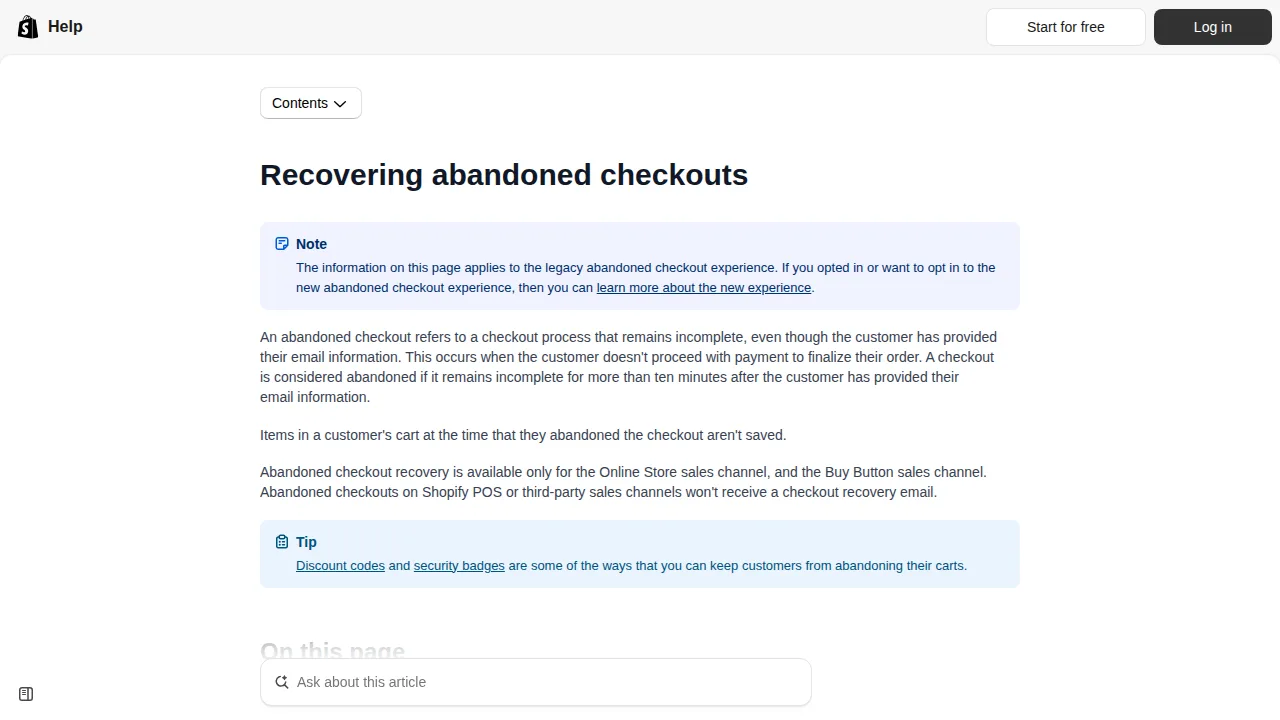
Two honest limits. First, Shopify can only email shoppers who actually entered an email address (or are recognised customers), so a checkout abandoned at the very first step may be unrecoverable. Second, one polite automatic email helps, but a short sequence usually recovers more, because people read email at different hours of their day.
A Simple 3-Email Recovery Sequence
You do not need a marketing degree here, just three friendly messages with different jobs. A proven simple pattern looks like this:
| Send after | Job of the email | What to include | |
|---|---|---|---|
| 1 — The reminder | About 1 hour | Catch people who got interrupted | Their items, a clear "complete your order" button, no discount yet |
| 2 — The helper | About 24 hours | Remove doubts and friction | Answers about shipping, returns and sizing; a small nudge of social proof |
| 3 — The last call | About 48–72 hours | Give a final reason to return | A modest discount code or free-shipping offer with a gentle deadline |
Keep the discount for the last email. If you train shoppers that abandoning a cart earns a coupon, they will happily abandon carts on purpose — customers are smart like that. Write every email like a helpful shopkeeper, not an alarm bell: show the exact product photo, keep one clear button, and make sure the link lands back on their saved checkout so they do not start again from zero.
Fixes That Stop Abandonment Before It Happens
Recovery emails rescue sales; good checkout design prevents the leak. Start with shipping: show delivery costs early on the product or cart page, and if you can, offer a free-shipping threshold such as "free shipping over ₹999" (or your local equivalent) — a visible target also raises order values. Next, turn on express checkout options like Shop Pay, Apple Pay and Google Pay in your payment settings; a shopper who pays with one tap never meets your long form at all. Allow guest checkout, keep the form as short as Shopify lets you, and test your own checkout on a phone every month — actually buy your cheapest product and feel every step.
Two more gentle tools. An exit-intent offer — a small pop-up with a modest discount shown when a visitor is about to leave the cart page — rescues a few sales, but use it sparingly so your store does not feel desperate. And basic retargeting, where ads on social platforms remind past visitors of the product they viewed, works because it targets warm interest rather than strangers; start with a tiny budget and only advertise products people already clicked. If you are still choosing a platform, our comparison of WordPress or Shopify for ecommerce explains why hosted checkout is one of Shopify's genuine strengths.
Frequently Asked Questions
What is a normal abandoned cart rate for a Shopify store?
Estimates across ecommerce commonly sit near 70%, but your real rate depends on your prices, shipping costs and traffic quality. Track your own trend month by month instead of chasing an internet average.
Where exactly do I find abandoned checkouts in Shopify?
In the admin, open Orders, then Abandoned checkouts. Each entry shows the cart contents, the value, the shopper's email if they gave one, and the recovery email status.
Does Shopify send recovery emails automatically?
It can. Abandoned checkout emails are managed in Settings → Notifications and through Shopify's marketing automations. Check they are switched on and customise the wording to sound like your brand.
Should my first recovery email include a discount?
Usually no. Send a plain reminder first — many people simply got interrupted. Save a small discount or free shipping for the final email in the sequence.
Can I recover a checkout if the shopper never typed an email?
Not by email. Shopify can only contact shoppers who entered an email or are known customers. That is one more reason to make express checkout buttons prominent — they carry the customer's details with them.
Conclusion
Abandoned carts are not a failure of your store; they are the normal behaviour of busy humans. Check your Abandoned checkouts list weekly, switch on a kind three-email sequence, and remove the little frictions — surprise shipping, forced accounts, slow forms — that push people away. Small fixes, applied once, keep rescuing sales while you sleep.


Leave a Comment