

 Anand Bajrangi
 If your business does not show on Google Maps when customers search for what you do nearby, the cause is almost always your Google Business Profile, not your website. The profile may be unverified, claimed twice (a duplicate), filed under the wrong category, or filled with a name, address and phone number that do not match what appears elsewhere on the internet. Google shows the businesses it can understand and trust. The fixes below take your profile from "confusing" to "confirmed" — most of them take under an hour, and none of them cost money.
Understand what is at stake: when someone searches "salon near me" or "dentist in Indore", the map results — the famous three-pack — appear above the normal website listings and collect most of the calls. Being absent from Maps means being absent from the highest-intent searches your business will ever get. Let us get you on the map.
Fix 1: Claim and Verify Your Google Business Profile
Nothing else matters until this is done. Search Google Maps for your business name. If a listing exists but says "Own this business?", claim it. If nothing exists, create the profile at Google Business Profile. Then complete verification — Google may use a video recording, a postcard, phone, or documents depending on your business type.
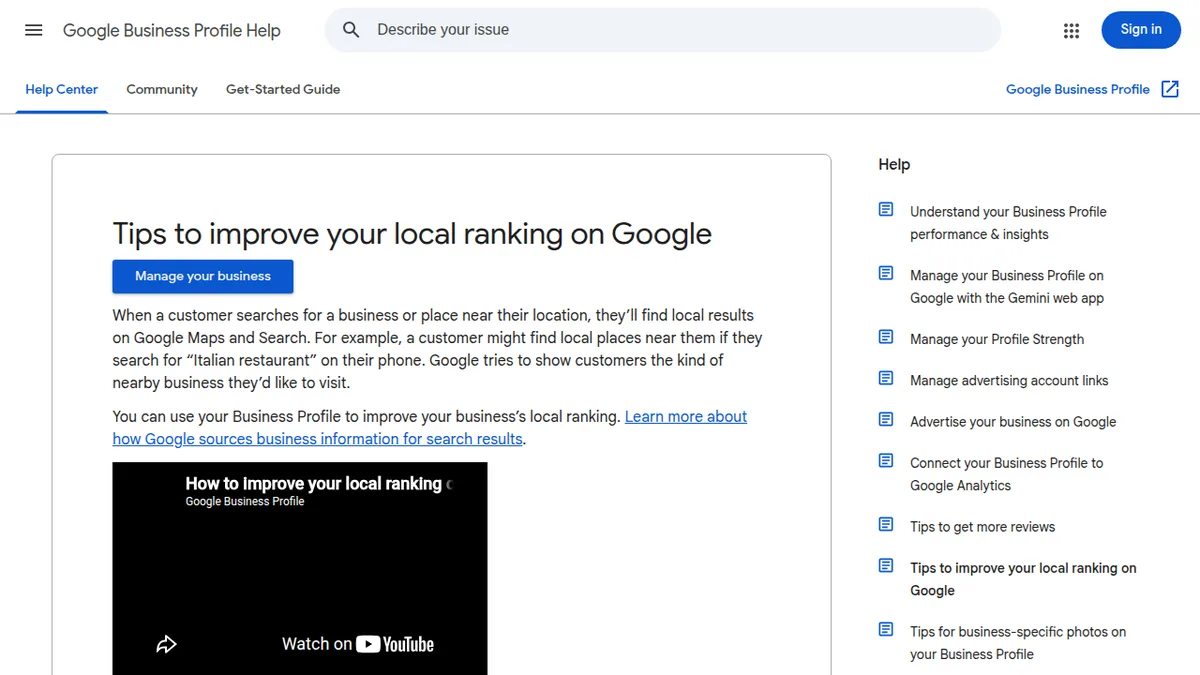
An unverified profile is treated as a rumour: it may appear weakly, be edited by strangers, or not appear at all. Verification is Google's way of knowing a real business stands behind the listing. Google's own Business Profile Help guide to improving your local ranking puts accurate, complete, verified information at the top of its advice for a reason.
Fix 2: Delete Duplicate Profiles
Duplicates are more common than owners realise: a staff member created one, an old agency created another, Google auto-created a third from some directory. Two profiles for one business split your reviews, confuse customers (one may show old hours or an old address), and weaken both listings.
Search Maps carefully for every variation of your name. Keep the verified profile with the most reviews, and request removal or merging of the duplicates through Google Business Profile support. Also remove a profile for any location that has permanently closed — a "ghost" location still collects confused customers and bad reviews meant for your open shop.
Fix 3: Choose the Right Primary Category
Your primary category is the single strongest signal telling Google what searches you belong in, and it is the field businesses most often get vaguely wrong. "Restaurant" is weaker than "North Indian restaurant"; "Store" is weaker than "Mobile phone repair shop". Choose the most specific primary category that honestly describes your main business, then add secondary categories for your other real services.
And a warning: do not stuff keywords into your business name to game this ("Best Cheap Tasty Sharma Restaurant And Catering Services"). Google can suspend profiles for keyword-stuffed names — its guidelines for representing your business on Google state that your name must be the one your business is known by in the real world, signage included. Put keywords in categories and services, where they belong.
Fix 4: Make Name, Address and Phone Identical Everywhere
Google cross-checks your business details against the rest of the web — your website, Facebook page, directories like JustDial and IndiaMART, and map data. If your address appears as "MG Road" in one place, "M.G. Road" in another, and with a different phone number in a third, Google's confidence drops, and confidence is the ranking currency here.
Pick one official format for your name, address and phone number, use it character-for-character everywhere including your website's contact page and footer, and update old listings you find. This consistency check is basic, boring, and one of the highest-value hours you can spend — the same discipline as the basics in our blog SEO step-by-step guide, applied to your business identity instead of a web page.
Fix 5: Put the Map Pin in the Right Place
Sometimes the profile is fine but the pin sits in the wrong street, the wrong block, or — memorably — the middle of a lake. Customers then navigate to the wrong spot, get annoyed, and Google quietly trusts your location data less. In your profile settings, zoom in and drag the pin to your actual entrance.
While you are there, confirm the address is exactly the one customers should navigate to, including the correct floor or shop number if you are inside a market or mall.
Fix 6: Get Reviews, and Reply to All of Them
A profile with three reviews loses the click to a competitor with 140 — and reviews influence ranking as well as trust. Ask every happy customer, at the moment they are happiest, with a direct review link or QR code at the counter. Make it a habit for staff, not a monthly campaign.
Reply to every review, good and bad, briefly and politely. Google lists review count and rating among the things that shape local prominence, and owner responses are a trust signal Google itself encourages for local profiles. Never buy reviews or ask only for five stars — filters catch the pattern, and a suspension costs far more than honesty.
Fix 7: Add Real Photos, Correct Hours and Full Details
Profiles with real photos of the shopfront, interior and team get more calls and direction requests than empty ones — Google says so itself, and it matches common sense: people choose the place they can picture. Add your logo, a cover photo, and fresh photos every month or two.
Then complete the fields people actually filter by: opening hours (including holiday hours), services or menu with prices where relevant, attributes like "women-owned" or "wheelchair accessible" when true, and a short honest description. Every empty field is a search you cannot appear in. Agencies that manage many locations treat this completeness audit as routine — it is a core part of the local work described in our piece on SEO for agency websites too.
Fix 8: Set Service Areas Correctly (Especially If You Have No Shopfront)
Plumbers, tutors, caterers and other businesses that visit customers should usually hide their home address and set service areas instead — the cities or neighbourhoods they cover. A home address shown publicly looks unprofessional and can get the profile suspended for not being a customer-facing location.
Set your service areas to the places you genuinely serve, no larger. Claiming an entire state when you serve one city dilutes the local signals that decide "near me" results.
Quick Diagnosis Table
| What you see | Likely cause | First fix |
|---|---|---|
| Business missing from Maps entirely | Unverified or never claimed | Claim the profile and complete verification |
| Two listings for your business | Duplicate profiles | Keep the reviewed one; merge or remove the rest |
| Competitors show, you don't, for your main service | Wrong or vague primary category | Set the most specific honest category |
| Customers navigate to the wrong place | Pin or address is wrong somewhere | Fix the pin; make details identical everywhere |
| Profile exists but nobody calls | Few reviews, no photos, wrong hours | Ask for reviews; add photos; fix hours |
Frequently Asked Questions
How long after verifying does a business appear on Google Maps?
Usually within a few days, sometimes up to two weeks while Google processes changes and gathers confidence. Edits to name, address or category can trigger a fresh review, so make changes carefully and once.
Why does my competitor rank above me on Maps?
Usually a combination of a more specific category, more and better reviews, a longer-verified profile, and details that match across the web. Work through this checklist and the gap narrows — Maps rankings reward completeness and trust more than tricks.
Can I show on Maps without a physical shop?
Yes, as a service-area business: hide the address, set the areas you serve, and you can still appear for searches in those areas. Many trades and home services rank very well this way.
Does my website affect my Maps ranking?
Partly. A website whose name, address and phone match the profile, with a page describing your local services, reinforces trust. But the profile itself is the main lever — fix it first.
Conclusion
Google Maps is not a lottery; it is a trust test with a checklist. Verify the profile, kill the duplicates, pick the right category, make your details identical everywhere, drop the pin on your real door, and earn reviews honestly. Do that this week and you give Google every reason to put you on the map — literally.


Leave a Comment